TechSpot’s 47-board B850 roundup published in early 2026 confirmed what builders suspected: the B850 chipset has matured into the sweet spot for Ryzen 9000 builds, with enough PCIe 5.0 bandwidth, strong VRMs, and WiFi 7 now standard across most mid-range options. The two boards that keep coming up in that conversation are the MSI MAG B850 Tomahawk MAX WiFi and the ASUS ROG STRIX B850-F Gaming WiFi — and the gap between them is more interesting than the $70 price difference suggests.
This comparison covers both boards in depth, plus three strong alternatives at $210–$250 if neither is the right fit for your build.
| Spec | MSI MAG B850 Tomahawk MAX WiFi 9.2/10 | ASUS ROG STRIX B850-F Gaming WiFi 8.7/10 | ASUS TUF Gaming B850-PLUS WiFi 8.4/10 | GIGABYTE B850 AORUS Elite WIFI7 8.3/10 | ASUS ROG STRIX B850-A Gaming WiFi 8.5/10 |
|---|---|---|---|---|---|
| Socket | AM5 | AM5 | AM5 | AM5 | AM5 |
| Chipset | AMD B850 | AMD B850 | AMD B850 | AMD B850 | AMD B850 |
| VRM | 14+2+1 phases, 80A SPS | 16+2+2 phases, AI power stages | 14+2+1 phases, 80A DrMOS | 14+2+2 phases | 14+2+2 phases |
| Memory | DDR5 up to 8400+ MT/s (OC), 4 slots, 256GB max | DDR5 AEMP up to 8000+ MT/s (OC), 4 slots, 256GB max | DDR5 up to 8000+ MT/s (OC), 4 slots, 256GB max | DDR5 up to 8000+ MT/s (OC), 4 slots, 256GB max | DDR5 AEMP up to 8000+ MT/s (OC), 4 slots, 256GB max |
| Storage | 3x M.2 (2x PCIe 5.0 Gen5), 4x SATA | 4x M.2 (2x PCIe 5.0, 2x PCIe 4.0), 2x SATA | 3x M.2 (1x PCIe 5.0 Gen5), 2x SATA | 3x M.2 (1x PCIe 5.0 x4), 4x SATA | 4x M.2 (PCIe 5.0), 2x SATA |
| Networking | WiFi 7, 5G LAN | WiFi 7, 2.5G LAN, AI Networking II | WiFi 7, 2.5G LAN | WiFi 7, 2.5G LAN | WiFi 7, 2.5G LAN, AI Networking II |
| Rating | 9.2/10 | 8.7/10 | 8.4/10 | 8.3/10 | 8.5/10 |
Prices change daily — tap Check Price for the current Amazon price.
Prices change daily — tap Check Price for the current Amazon price.
Quick Picks
- Best overall: MSI MAG B850 Tomahawk MAX WiFi — 5G LAN, dual PCIe 5.0 M.2, coolest VRM thermals in class at $229
- Best feature set: ASUS ROG STRIX B850-F Gaming WiFi — four M.2 slots, 19 USB ports, 16+2+2 VRM at $299
- Best budget B850: ASUS TUF Gaming B850-PLUS WiFi — BIOS FlashBack, 80A DrMOS, solid reliability at $210
- Best white build: ASUS ROG STRIX B850-A Gaming WiFi — cleanest white AM5 board under $300 with four M.2 slots
B850 vs X870 — Do You Need to Spend More?
Before getting into the board details: the B850 vs X870 question comes up in every AM5 thread right now. The short answer is that X870 adds PCIe 5.0 to the second GPU slot and more USB 4 bandwidth, but for gaming the practical difference is zero. X870 starts around $350–$450; B850 tops out around $300 for premium options like the ROG STRIX B850-F. Unless you’re running dual GPU workloads or need USB 4 Thunderbolt passthrough, the extra spend doesn’t land in gaming frame rates.
B850’s advantage over B650: native PCIe 5.0 x16 slot support, more USB bandwidth, and official DDR5 6400+ profiles across the board. If you’re building today, B850 is the right chipset tier.
VRM Reality Check
The VRM situation is where the two headline boards diverge in a meaningful way.
The MSI MAG B850 Tomahawk MAX WiFi uses 14+2+1 phases with 80A Smart Power Stages for a total current delivery of 1,120A to the CPU. According to owner reports and review testing data, VRM temperatures hit a maximum of 59°C under a 30-minute Cinebench 2026 multi-thread run on a Ryzen 9 9950X — that’s genuinely impressive for a sub-$230 board. You can run any current Ryzen 9000 chip without worrying about thermal throttle.
The ASUS ROG STRIX B850-F Gaming WiFi steps up to 16+2+2 phases with ASUS’s AI power control. The extra phases give it more parallel current paths, which translates to lower per-phase temperatures and more headroom for sustained workloads. Based on published review data, the STRIX B850-F handles the 9950X with more thermal margin than the Tomahawk MAX, but both boards pass the 9950X stress test without throttling. For a Ryzen 7 9700X or 9800X3D build, both VRMs are overkill.
Bottom line: both VRMs are capable. The Tomahawk MAX runs cooler than its 14-phase spec suggests; the ROG STRIX B850-F has more headroom for future chips.
M.2 and Storage Slots
| Board | M.2 Slots | PCIe 5.0 Gen5 Slots | SATA Ports |
|---|---|---|---|
| MSI MAG B850 Tomahawk MAX WiFi | 3 | 2 | 4 |
| ASUS ROG STRIX B850-F Gaming WiFi | 4 | 2 | 2 |
| ASUS TUF Gaming B850-PLUS WiFi | 3 | 1 | 2 |
| GIGABYTE B850 AORUS Elite WIFI7 | 3 | 1 | 4 |
| ASUS ROG STRIX B850-A Gaming WiFi | 4 | 2 | 2 |
The ROG STRIX B850-F and B850-A lead the group with four M.2 slots each. For content creators, video editors, or anyone running a secondary NVMe cache drive, the extra slot matters. The Tomahawk MAX’s dual PCIe 5.0 Gen5 slots match the ROG STRIX boards for primary and secondary NVMe, and the four SATA ports give it an edge for large-capacity HDD or older SSD setups.
Networking: 5G LAN at $229 Is the Tomahawk’s Killer Feature
This is the clearest differentiator in the comparison. The MSI MAG B850 Tomahawk MAX WiFi ships with 5G Ethernet as standard. Every other board in this roundup caps at 2.5G LAN, including the ROG STRIX B850-F at $299. If you have a 2.5G router or switch, this doesn’t matter. If your network infrastructure supports 5G — or you’re planning to upgrade — the Tomahawk MAX is the only B850 board at this price that keeps pace.
WiFi 7 (802.11be) is standard across all five boards. The practical difference between implementations is antenna design: ASUS uses their Q-Antenna system on the ROG STRIX boards for easier antenna positioning, while MSI includes a standard dual-antenna setup.
Connectivity and Rear I/O
The ASUS ROG STRIX B850-F Gaming WiFi has the strongest rear I/O in this group — 19 USB ports total, including a 20Gbps USB Type-C. For a build with multiple peripherals, external drives, and capture cards, that matters. The Tomahawk MAX is more conservative in USB count but covers the essentials without gaps.
For the build guide crowd: both boards have USB BIOS FlashBack equivalents (MSI’s Flash BIOS Button, ASUS’s BIOS FlashBack on the TUF) that let you update firmware without installing a CPU. The ROG STRIX boards require a CPU to be installed for initial BIOS update — worth knowing if you’re pairing with a day-one Ryzen 9000 launch chip.
The Two Main Boards — Detailed Reviews
MSI MAG B850 Tomahawk MAX WiFi
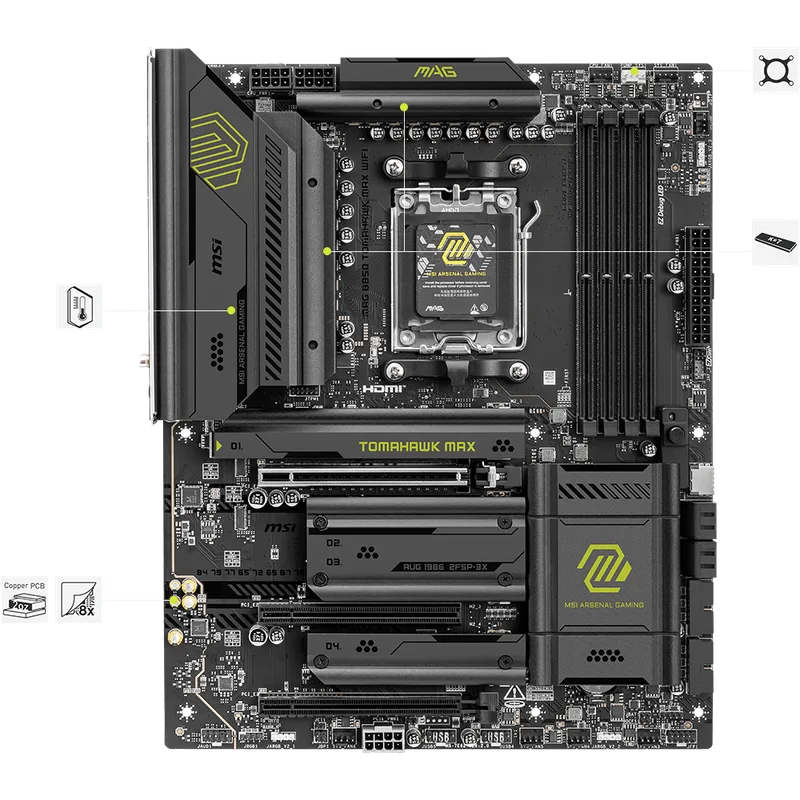
The Tomahawk MAX has been the B850 recommendation across Tom’s Hardware, TechSpot’s 47-board roundup, and PC Guide’s best B850 list. The reasoning is straightforward: 5G LAN and dual PCIe 5.0 M.2 slots at $229 is a combination no other board in this price bracket offers.
The VRM design is built on an 8-layer server-grade PCB with 2oz thickened copper traces. That construction is part of why VRM temperatures stay as low as they do — the board dissipates heat into the PCB layer stack, not just the heatsink. According to published review data, sustained Cinebench 2026 loads on a 9950X kept VRM temps at 59°C maximum, which outperforms several boards priced $50–$100 higher.
The aesthetic is clean and functional — matte black with minimal RGB. For builders who want a no-nonsense platform with headroom to spare, this is the board. The main concession vs the ROG STRIX B850-F is the M.2 slot count (3 vs 4) and the absence of Aura Sync RGB.
Best for: Any Ryzen 9000 build under $1,200, NAS/HTPC builds that need 5G LAN, builders who want maximum VRM capability without paying ROG premium.
ASUS ROG STRIX B850-F Gaming WiFi
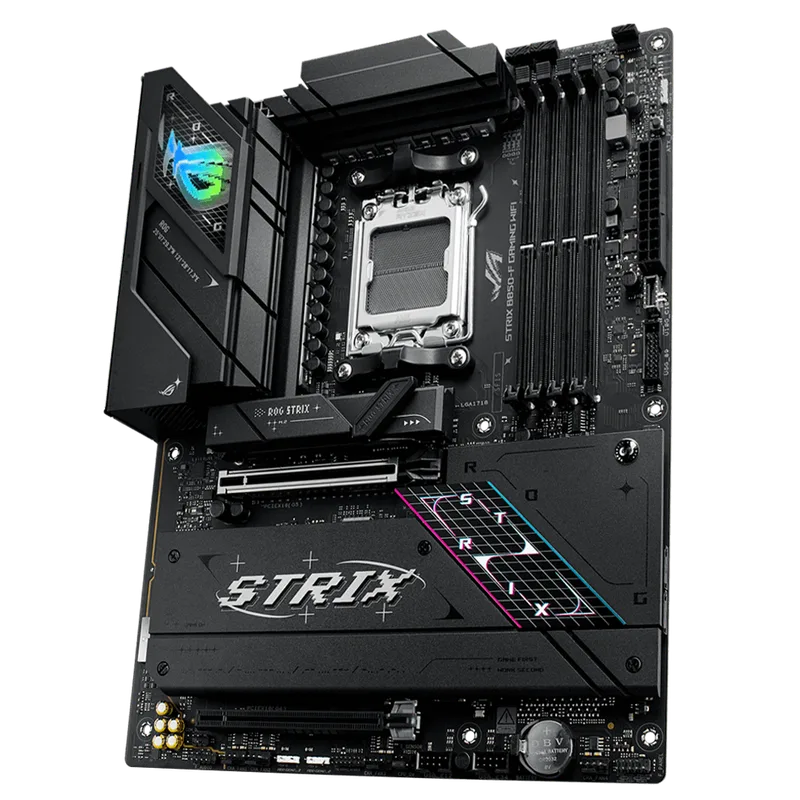
XDA-Developers called the ROG STRIX B850-F “a tough pill to swallow at $300” — and that’s a fair characterization. The board is well-designed, with a genuinely excellent UEFI BIOS (ASUS’s BIOS is consistently the best in the industry), four M.2 slots with two running at PCIe 5.0 Gen5 speeds, and 19 USB ports across the rear panel.
The issue is the 2.5G LAN. At $299, you’d expect at least an option for 5G Ethernet — the Tomahawk MAX includes it at $229. ASUS positions the AI Networking II feature as compensation, which does provide network diagnostics and optimization tools, but it doesn’t change the physical 2.5G ceiling.
Where the B850-F justifies its price: USB count, M.2 slot count, and the 16+2+2 VRM for anyone running a 9950X in an all-core workload long-term. According to TechPowerUp’s review, the board delivered solid thermal performance with very good power efficiency in CPU workloads. If you’re building a workstation-adjacent rig where four M.2 slots and 19 USB ports get used, the $70 premium over the Tomahawk MAX has a clearer case.
Best for: Workstation-lite builds needing four M.2 slots, content creators with lots of USB peripherals, builders who want the ASUS BIOS experience.
ASUS TUF Gaming B850-PLUS WiFi
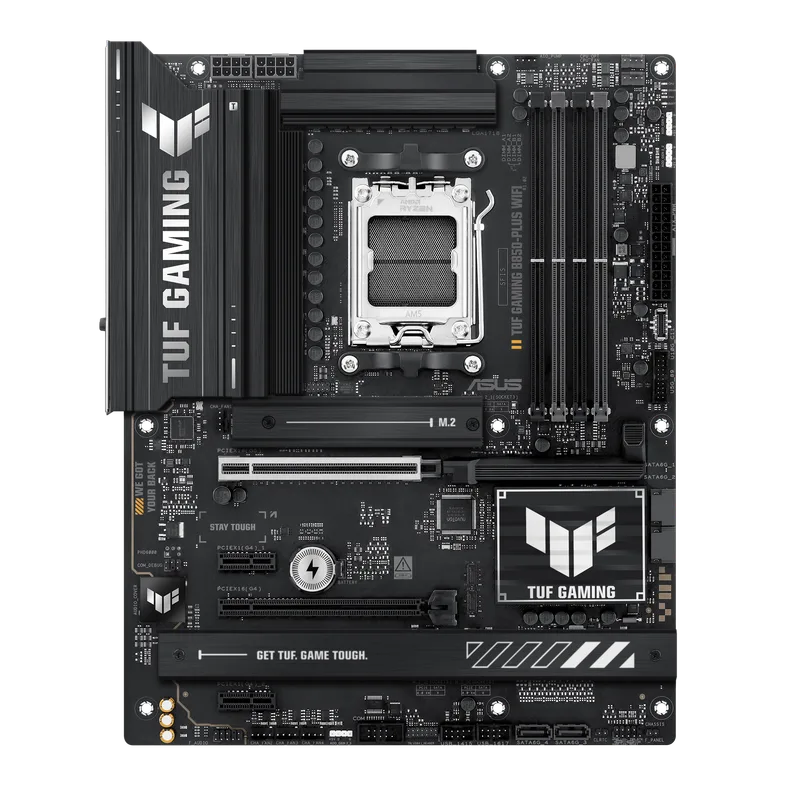
The TUF B850-PLUS WiFi is the board to recommend to first-time AM5 builders. BIOS FlashBack is the critical differentiator here — you can update the motherboard firmware by inserting a USB drive with the BIOS file without having a CPU or RAM installed. That removes one of the main failure modes for new builds where the BIOS version might not support your Ryzen 9000 chip out of the box.
The 14+2+1 80A DrMOS VRM matches the Tomahawk MAX’s power delivery architecture. Based on published review data and owner reports, it handles the Ryzen 7 9700X and 9800X3D without thermal concerns. For a Ryzen 9 9950X under sustained all-core load, there’s less headroom than the Tomahawk MAX, but gaming and typical desktop workloads don’t push that limit.
The one M.2 Gen5 slot is the main trade-off vs the Tomahawk MAX. If you’re planning to run a PCIe 5.0 NVMe as your boot drive and a PCIe 4.0 secondary, this covers both. Running two Gen5 drives requires the Tomahawk MAX or a ROG STRIX model.
Best for: First AM5 build, budget-conscious Ryzen 7 9700X/9800X3D builds, anyone prioritizing build simplicity and BIOS FlashBack.
GIGABYTE B850 AORUS Elite WIFI7
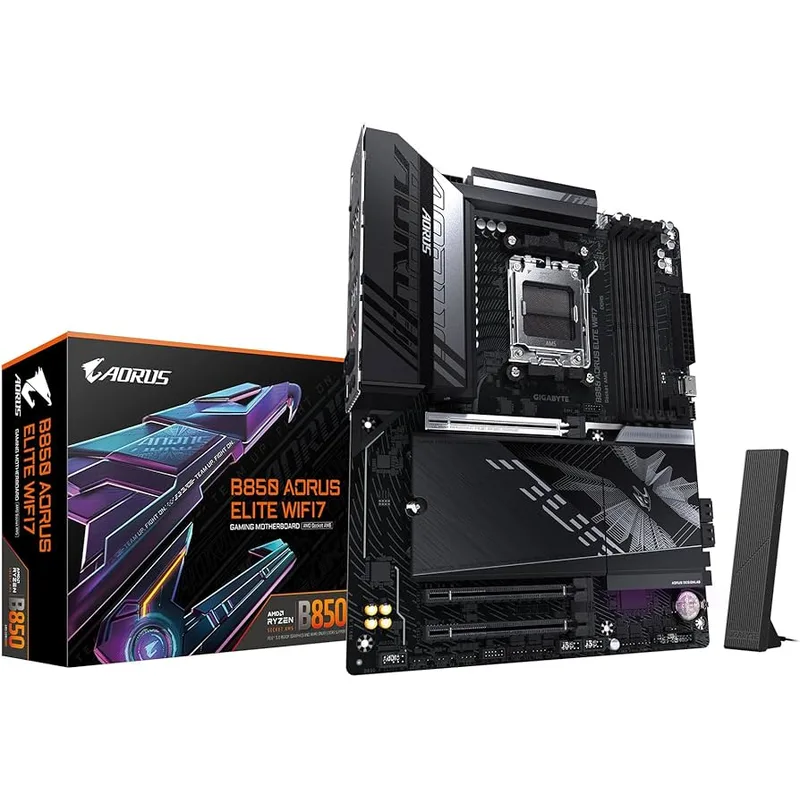
The AORUS Elite WIFI7 matches the TUF B850-PLUS WiFi on price at $210 and adds GIGABYTE’s EZ-Latch system — a tool-less M.2 and GPU slot mechanism that genuinely speeds up assembly and component swaps. Tom’s Hardware noted it “led benchmark segments vs pricier competition” in several test runs, which reflects the board’s clean power delivery despite the 14+2+2 phase count.
The distinguishing feature for a value board is the 5-year warranty — longest standard coverage in this B850 tier. Most rivals ship with 3 years. If you’re building a machine that needs to run reliably for half a decade without a warranty concern, that’s a material advantage.
Networking is 2.5G LAN with WiFi 7, standard for the $210 price point. Storage is three M.2 slots with one at PCIe 5.0 x4 Gen5. The 14+2+2 VRM handles Ryzen 7 9700X and 9800X3D with no thermal concerns; it’s more conservative than the Tomahawk MAX for 9950X extended loads.
Best for: Budget AM5 builds, system integrators who want the longest warranty, builders who value GIGABYTE’s EZ-Latch tool-free assembly.
ASUS ROG STRIX B850-A Gaming WiFi
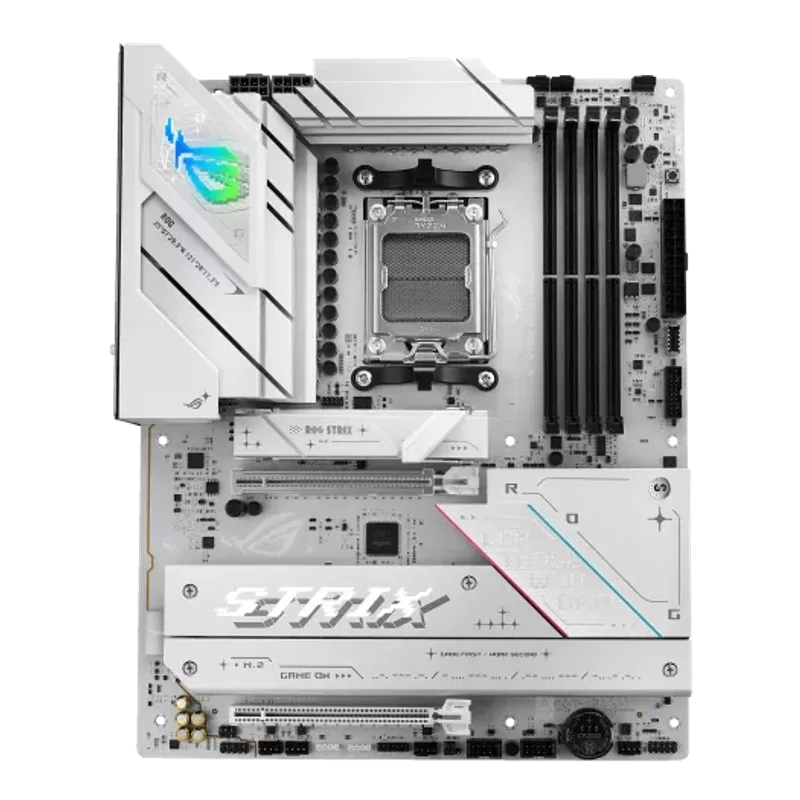
If you’re building a white PC, the ROG STRIX B850-A Gaming WiFi is the cleanest option under $300 on the AM5 platform. The white PCB and matching heatsink covers look purpose-built, not like an afterthought recolor. It pairs naturally with white cases like the Fractal North Chalk White or Lian Li LANCOOL 216 RGB White.
Specs are essentially a 14+2+2 version of the ROG STRIX B850-F with slightly less VRM capacity but the same four M.2 slots (two at PCIe 5.0), WiFi 7 with Q-Antenna, and AI Networking II. The AEMP DDR5 memory profiles support kits up to 8000+ MT/s. For a Ryzen 7 9700X or 9800X3D gaming build, the 14+2+2 VRM is entirely sufficient.
The B850-A sits at $249 — $50 less than the B850-F, $20 more than the Tomahawk MAX. The main loss vs the B850-F is the lower VRM tier and 2.5G vs 5G LAN (though both lack 5G LAN). Vs the Tomahawk MAX, you get four M.2 slots and white aesthetics at a $20 premium, but lose 5G LAN.
Best for: White PC builds, aesthetic-forward Ryzen 9000 gaming rigs, builders who want four M.2 slots without paying ROG STRIX B850-F pricing.
Build Compatibility Notes
CPU compatibility: All five boards support AMD Ryzen 7000, 8000, and 9000 series on socket AM5. Check for BIOS updates before pairing with day-one 9000 series launch chips — the Tomahawk MAX ships with AMD AGESA updates that support all current Ryzen 9000 chips out of the box per owner reports, but a BIOS flash may still be needed depending on production batch.
RAM compatibility: All boards support DDR5 only — no DDR4 support on any AM5 board. Target DDR5-6000 CL30 kits for Ryzen 9000 (the sweet spot for memory performance vs price). The Tomahawk MAX officially supports DDR5 8400+ MT/s (OC); the ROG STRIX boards use AEMP profiles which include both AMD EXPO and Intel XMP-compatible timings.
PSU requirements: Motherboard power draw for B850 boards is 15–25W under load. Budget for CPU TDP on top: Ryzen 7 9700X is 65W base (up to 88W boost), Ryzen 9 9950X is 170W. Use an 850W PSU for 9950X builds with a mid-range GPU; 650W covers most Ryzen 7 9700X/9800X3D configurations.
GPU slot: All five boards have a PCIe 5.0 x16 primary GPU slot. Current-gen GPUs (RTX 5070, RX 9070 XT) are PCIe 4.0 x16 compatible and will run at full performance in the x16 slot.
Case compatibility: All are ATX form factor (305mm x 244mm) — compatible with any ATX or E-ATX case.
FAQ
Is B850 better than X870 for gaming? For gaming specifically, B850 and X870 deliver identical performance — the chipset doesn’t affect gaming frame rates. X870 adds PCIe 5.0 to the secondary slots and more USB 4 bandwidth, but those features don’t translate into FPS. X870 boards start around $350; save that $150 for a better GPU unless you have a specific use case that needs X870’s extra connectivity.
Does the MSI MAG B850 Tomahawk MAX support PCIe 5.0 SSDs? Yes — two M.2 slots run at PCIe 5.0 Gen5 x4 speeds (up to ~14 GB/s sequential), making it compatible with drives like the Kingston Fury Renegade Gen5 or Samsung 9100 Pro. The primary GPU slot is also PCIe 5.0 x16.
Can I run a Ryzen 9 9950X on these boards? All five boards support the Ryzen 9 9950X. The MSI MAG B850 Tomahawk MAX and ASUS ROG STRIX B850-F are the strongest choices for 9950X sustained all-core workloads based on VRM thermal data. The TUF B850-PLUS and AORUS Elite WIFI7 handle gaming and typical desktop 9950X use fine; sustained Cinebench loops or Blender renders are where their VRMs work harder.
Does the ASUS ROG STRIX B850-F have BIOS FlashBack? No — the ROG STRIX B850-F requires a CPU to be installed for the initial BIOS flash. If you need USB BIOS FlashBack without a CPU, the ASUS TUF Gaming B850-PLUS WiFi has it.
Which board is best for DDR5-6000 CL30 memory kits? All five boards support DDR5-6000 CL30 with EXPO or XMP profiles. The MSI MAG B850 Tomahawk MAX and ROG STRIX boards have published compatibility with Kingston FURY Beast DDR5-6000, G.Skill Trident Z5 Neo, and Corsair Vengeance DDR5-6000 kits. Enable XMP/EXPO in BIOS on first boot — it doesn’t apply automatically.
The Bottom Line
The MSI MAG B850 Tomahawk MAX WiFi wins this comparison on value: 5G LAN, dual PCIe 5.0 Gen5 M.2 slots, and the best VRM thermals in the B850 class at $229. It’s the board TechSpot, Tom’s Hardware, and PC Guide all land on as the B850 recommendation for most Ryzen 9000 builds.
The ASUS ROG STRIX B850-F Gaming WiFi at $299 makes sense specifically for workstation-adjacent builds that need four M.2 slots and 19 USB ports — and builders who prefer ASUS’s BIOS experience. The 2.5G LAN ceiling is a real omission at this price, but the feature depth elsewhere justifies the premium for the right use case.
For first-time builders on a budget, the ASUS TUF Gaming B850-PLUS WiFi at $210 with BIOS FlashBack is the lowest-friction path to an AM5 build. For white builds, the ROG STRIX B850-A at $249 is the clear pick.