Hall Effect switches went from niche enthusiast hardware to the default recommendation for competitive gaming in 2026. Keyboards like the Wooting 80HE and NuPhy Field75 HE now ship with 8000Hz polling and per-key Rapid Trigger as standard features — specs that would have required a $300+ purchase two years ago. If you’re playing Valorant, CS2, or any FPS where counter-strafing speed matters, the HE category is where to look first.
| Spec | NuPhy Field75 HE Unavailable 9.2/10 | Wooting 80HE Unavailable 9.4/10 | SteelSeries Apex Pro TKL Gen 3 9/10 | Logitech G Pro X TKL Lightspeed 8.5/10 | Razer BlackWidow V4 75% 8.3/10 |
|---|---|---|---|---|---|
| layout | 75%, 83 keys | 80%, 87 keys | TKL, 87 keys | TKL, 87 keys | 75%, 83 keys |
| switches | Magnetic HE (Jade or White) | Lekker V2 Magnetic HE | OmniPoint 3.0 HyperMagnetic | GX Red Linear (non-swappable) | Razer Orange Tactile Gen 3 (50g, 2mm actuation) |
| polling_rate | 8000Hz | 8000Hz | 8000Hz | 1000Hz (Lightspeed) | 8000Hz |
| rapid_trigger | Yes, 0.1mm resolution | Yes, 0.1mm + Rappy Snappy | Yes, 40 levels (0.1–4.0mm) | No | No (Snap Tap only) |
| connectivity | Wired USB-C | Wired USB-C | Wired USB-C | Lightspeed 2.4GHz + Bluetooth + Wired | Wired USB-C |
| hot_swap | Yes | Yes | Yes | — | Yes (3-pin and 5-pin) |
| Rating | 9.2/10 | 9.4/10 | 9/10 | 8.5/10 | 8.3/10 |
Prices change daily — tap Check Price for the current Amazon price.
Prices change daily — tap Check Price for the current Amazon price.
Quick Picks
- Best Overall: NuPhy Field75 HE — 8000Hz HE at $149.95 undercuts most of the competition while matching their core feature set
- Best Competitive: Wooting 80HE — Rappy Snappy and the most polished HE software make this the top choice for serious FPS players
- Best Wireless: Logitech G Pro X TKL Lightspeed — the only wireless TKL on this list you’d take to a tournament without hesitation
Buying Guide
Hall Effect vs. Traditional Mechanical
Hall Effect switches use magnetic sensors instead of physical contact to register a keypress. This means:
- Adjustable actuation: You can set each key to trigger at 0.1mm of travel instead of the fixed 2mm on most mechanical switches
- Rapid Trigger: The key resets as soon as you lift your finger by the configured amount — critical for counter-strafing in CS2 and Valorant
- No contact wear: Magnetic switches outlast traditional mechanical switches because nothing physically touches during actuation
If you’re gaming competitively, the actuation flexibility alone justifies the switch. If you primarily type or play slower-paced games, a well-built mechanical keyboard like the Razer BlackWidow V4 75% still makes sense.
Polling Rate: 1000Hz vs. 8000Hz
A 1000Hz polling rate sends input data to your PC every 1ms. An 8000Hz keyboard does it every 0.125ms — eight times more frequently. For most users, the difference is imperceptible. For competitive FPS where frame times run at 0.5–2ms with high-refresh monitors, it’s a meaningful reduction in input stack latency.
The Logitech G Pro X TKL Lightspeed runs at 1000Hz via Lightspeed wireless. Every Hall Effect keyboard on this list runs at 8000Hz wired. This is the main tradeoff when choosing between wireless and wired.
Form Factor Considerations
- TKL (87 keys): Removes numpad, keeps function row and arrow cluster. Best balance of compactness and usability.
- 75% (83 keys): Removes numpad and condenses right-side navigation cluster. Saves roughly 2–3cm of desk width vs. TKL.
- 80% (87 keys): Similar to TKL but with a more compact housing. The Wooting 80HE fits TKL keys into a smaller frame.
All keyboards on this list are TKL or 75% — full-size gaming keyboards have largely been displaced by these smaller layouts.
Detailed Reviews
1. NuPhy Field75 HE — Best Overall
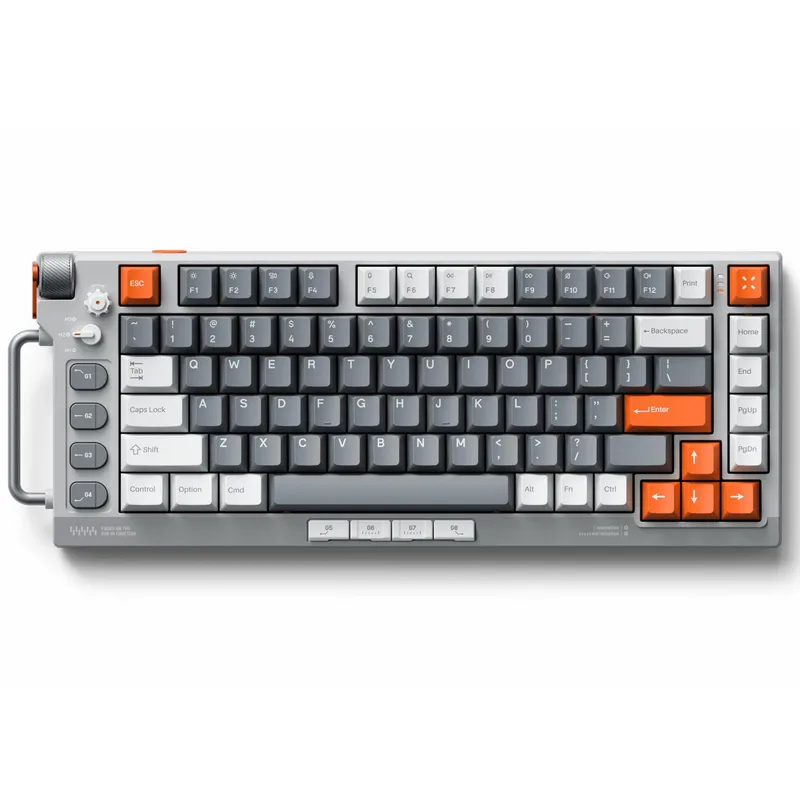
NuPhy Field75 HE
The NuPhy Field75 HE is the most competitive-priced Hall Effect keyboard currently available. At $149.95, it delivers 8000Hz polling and 0.1mm Rapid Trigger resolution — the same core specs as keyboards at $199. The only meaningful difference is build: the housing is plastic rather than aluminum, and the software requires installation with no on-board profile storage.
For setup, you get a choice between Magnetic Jade switches (0.1–3.3mm range, lighter travel) or Magnetic White (0.1–4.0mm, slightly firmer). Both support per-key actuation adjustment. The included volume knob works without software and is a welcome addition at this price.
The 75% layout keeps the function row intact while trimming the numpad and compressing the navigation cluster. At 83 keys, it’s slightly more keys than a 65% layout while staying compact enough for low-sensitivity mouse users who need extra pad space.
One real limitation: if you want to bring this to a LAN tournament, there’s no on-board profile storage. Rapid Trigger settings live in the software on your home PC. For anyone who games primarily at one desk, this is a non-issue.
2. Wooting 80HE — Best for Competitive Gaming
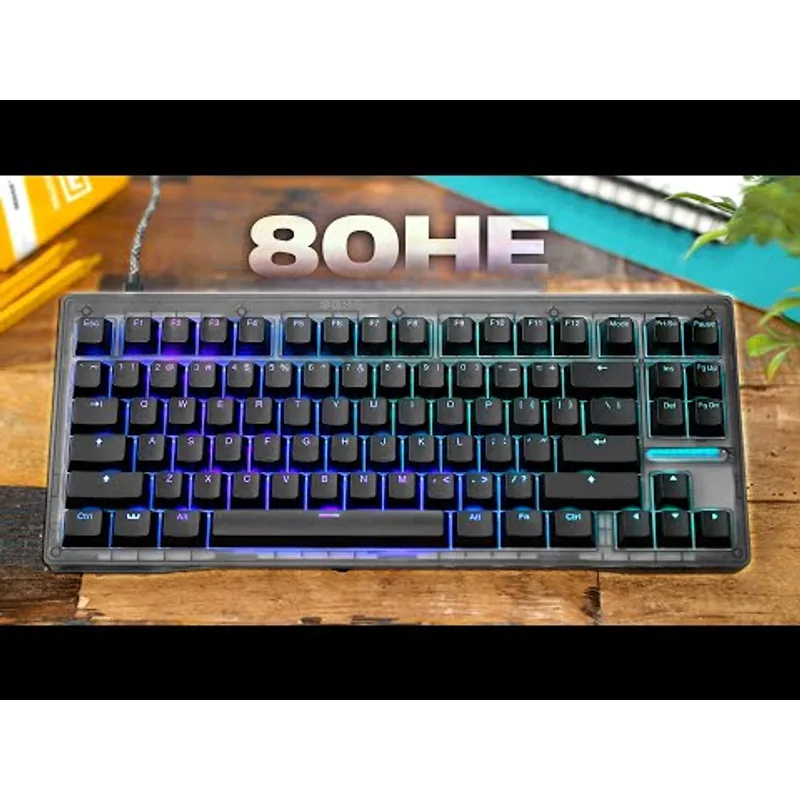
Wooting 80HE
The Wooting 80HE is the keyboard professional CS2 and Valorant players refer to when HE comes up. Wooting’s software platform is the most feature-complete in the segment: per-key Rapid Trigger, adjustable actuation, and their proprietary Rappy Snappy function.
Rappy Snappy is a SOCD (simultaneous opposite cardinal direction) handler that lets you configure how the keyboard responds when you hold A and then press D without releasing A. Options include “last input wins,” “first input wins,” or “neutral.” This is the cleanest implementation of SOCD handling in the consumer keyboard market.
Build quality matches the price premium. The gasket mount design isolates the typing plate from the outer case, absorbing keystroke force and producing a softer, less metallic sound. Screw-in stabilizers for the larger keys eliminate the rattle common in cheaper builds.
The Lekker V2 switches choose between 45g and 60g spring weights depending on preference. Both support the full 0.1mm Rapid Trigger resolution. The PCB is hot-swappable, so you can replace switches without soldering if you want to experiment.
At $199 the Wooting 80HE is $50 more than the NuPhy Field75 HE. The extra cost buys better build, better software, and Rappy Snappy. If you compete regularly, it’s worth it.
3. SteelSeries Apex Pro TKL Gen 3 — Best Ecosystem
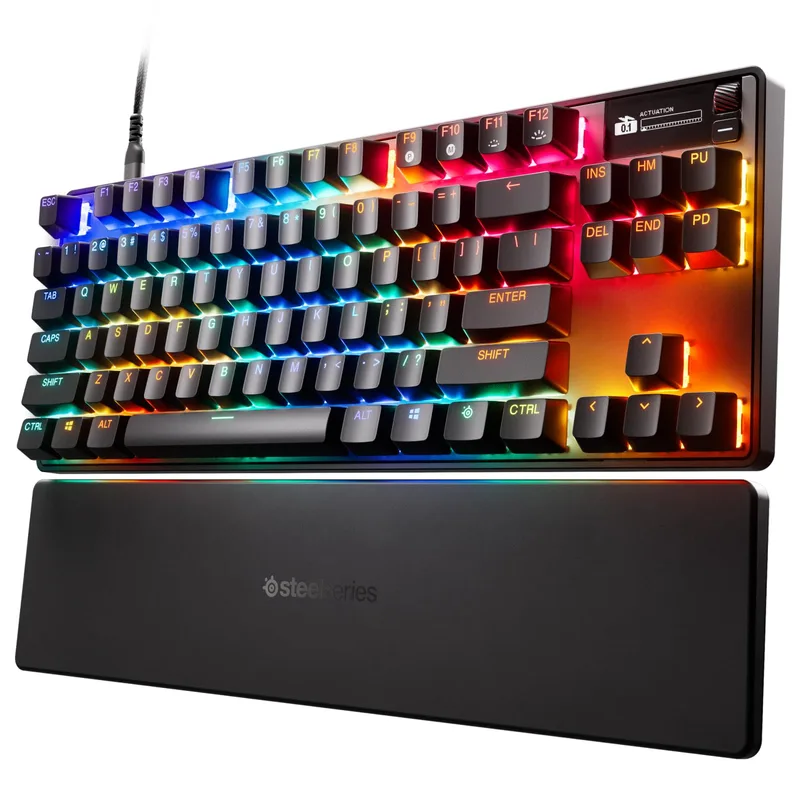
The SteelSeries Apex Pro TKL Gen 3 is the most feature-dense keyboard on this list. OmniPoint 3.0 switches support 40 levels of adjustable actuation per key — more granular than the Wooting or NuPhy’s 0.1mm increment systems — and each key can be tuned individually through SteelSeries GG software.
The OLED smart screen is the standout physical differentiator. It shows your current actuation profile, active macro layers, media track information, and game-specific readouts. No other keyboard on this list gives you real-time hardware feedback without alt-tabbing.
Protection Mode is SteelSeries-exclusive. It automatically lowers the sensitivity of keys physically adjacent to your current keypress, reducing accidental simultaneous inputs during fast movement sequences. In CS2 and Apex Legends this translates to cleaner counter-strafes — particularly useful when transitioning from keyboard-typing habits.
Triple-layer sound dampening foam and per-key switch lubrication from the factory make the Gen 3 one of the quieter Hall Effect keyboards stock. If office noise is a concern, this is the HE keyboard to buy.
The main weakness is the SteelSeries GG software. It’s resource-heavy and less intuitive than Wooting’s browser-based configurator. For tournament use, the lack of on-board profile storage is less of an issue than with the NuPhy since SteelSeries GG can export settings.
4. Logitech G Pro X TKL Lightspeed — Best Wireless
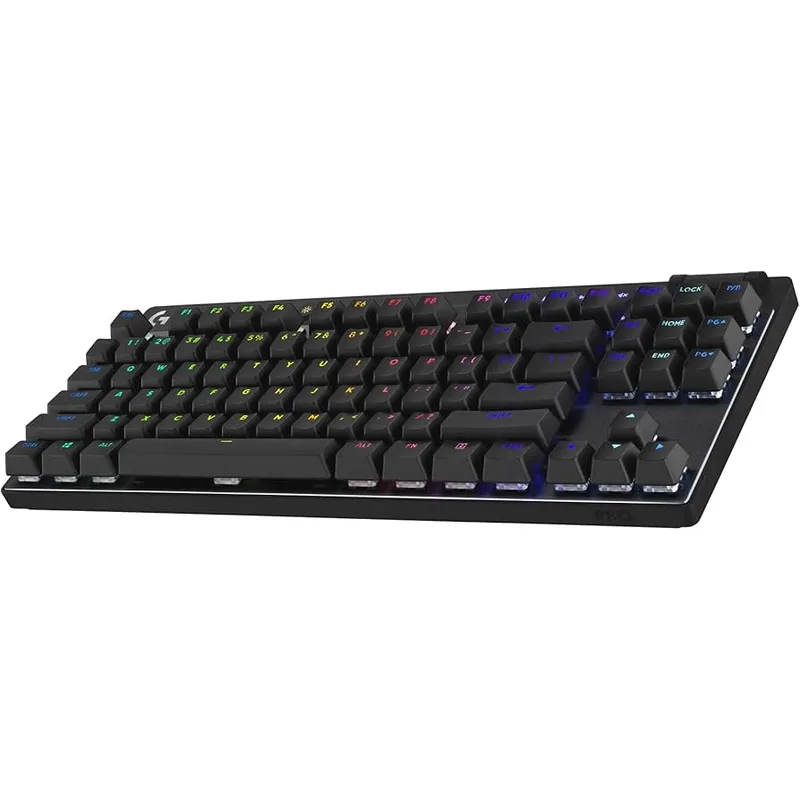
The Logitech G Pro X TKL Lightspeed is the only wireless gaming keyboard on this list, and it earns its place. Lightspeed 2.4GHz wireless has a measured latency of 1ms end-to-end — the same as a wired connection in practice. With ~50 hours of battery at 100% RGB brightness and around 37 hours with lighting off, it handles weeks of daily gaming between charges.
The G PRO X TKL was validated at major LAN events. Logitech’s G PRO hardware line is what you’ll find on tournament tables at events like IEM and ESL Pro League, which reflects the engineering priority: absolutely zero wireless reliability issues under competitive conditions.
Triple connectivity covers PC (Lightspeed dongle), console and mobile (Bluetooth 5.1), and backup wired via USB-C. The keyboard automatically switches modes when it detects which connection is active.
The core limitation vs. HE competitors is polling rate. Lightspeed runs at 1000Hz — functional for competitive play but 8x slower than HE keyboards at 8000Hz. There’s also no Rapid Trigger and no hot-swap. GX switches must be selected at purchase (Red linear, Brown tactile, or Blue clicky), and the one you buy is permanent.
If wireless freedom matters more than maximum input precision, the G Pro X TKL is the best option here. If you’re fixed to one desk and want the most competitive wired setup, put the $164.99 toward a Hall Effect keyboard instead.
5. Razer BlackWidow V4 75% — Best Hot-Swap Mechanical
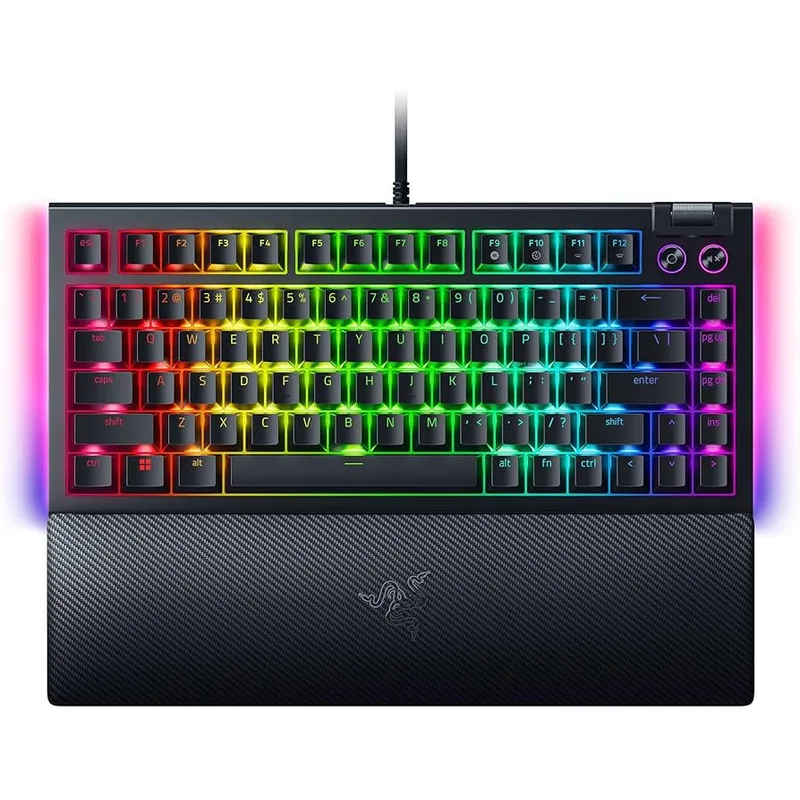
The Razer BlackWidow V4 75% is for the builder who wants to swap switches. The hot-swappable PCB accepts 3-pin and 5-pin switches, which covers virtually every third-party switch on the market. Razer Orange Gen 3 tactile switches are installed by default — rated for 100 million keystrokes, with a 50g actuation force and 2mm actuation point — but you can pull them with a switch puller and install any linear or clicky you prefer without soldering.
Build quality is the other reason to buy. Gasket mounting and dual-layer foam dampening give the BlackWidow V4 75% a typing feel that’s noticeably less clicky and hollow than budget keyboards. The aluminum top plate adds rigidity and keeps flex at a minimum. At $129.99, it punches above its price on construction.
8000Hz polling is included, and Snap Tap handles SOCD inputs. These are real competitive additions for a mechanical keyboard — they put the V4 75% closer to HE competitors than any previous BlackWidow generation.
The hard limit is actuation. Traditional mechanical switches can’t do Rapid Trigger. The Orange Gen 3 resets at the full 2mm travel distance, full stop. HE keyboards reset at 0.1mm. For fast FPS counter-strafing, this is the single clearest reason to pick the NuPhy Field75 HE at $149.95 over this keyboard at $169.
If your priority is tactile feel, switch swapping, and a premium mechanical build, the BlackWidow V4 75% is the right call. If reaction-time optimization is the goal, HE is the right category.
FAQ
Is Hall Effect better than mechanical for gaming? For competitive FPS — yes. HE switches support Rapid Trigger (sub-0.2mm reset distance) and 8000Hz polling, both of which reduce the time between physical key movement and in-game action. For casual gaming, RPGs, or typing-heavy use, a high-quality mechanical keyboard like the BlackWidow V4 75% is just as effective and often more satisfying to type on.
What is Rapid Trigger and do I need it? Rapid Trigger resets the key registration as soon as you lift your finger by a configured amount (typically 0.1–0.4mm). On traditional switches, the key only resets after it physically returns past its actuation point — usually 2mm. For counter-strafing in CS2 or Valorant, Rapid Trigger means your movement key deregisters faster, letting you stand still and fire more accurately sooner. If you play competitive FPS, you need it.
Does wireless affect gaming performance? Modern 2.4GHz wireless like Logitech Lightspeed has sub-1ms latency — effectively the same as wired in practice. The real gap is polling rate: the G Pro X TKL Lightspeed caps at 1000Hz wirelessly, while wired HE keyboards run at 8000Hz. For most players this doesn’t matter. For top-level competitive play, wired HE at 8000Hz is the theoretical optimum.
Can I use Hall Effect keyboards for typing? Yes. HE keyboards are often more comfortable for long typing sessions than stiff mechanical switches because you can lower the actuation point to 0.5–1mm, reducing the force needed to register a keypress. The adjustability that makes HE good for gaming also makes it adaptable for typing comfort.
Which keyboard is best for Valorant and CS2? The Wooting 80HE is the top recommendation for Valorant and CS2. Its Rappy Snappy SOCD implementation, 8000Hz polling, and 0.1mm Rapid Trigger resolution are all directly applicable to fast FPS movement. The NuPhy Field75 HE delivers the same core input specs at $50 less if budget is the constraint.
The Bottom Line
The NuPhy Field75 HE delivers the best value in gaming keyboards right now — Hall Effect precision, 8000Hz polling, and 0.1mm Rapid Trigger at $149.95 undercuts most of the competition. The Wooting 80HE is the top pick for serious FPS players who want the best-in-class software and Rappy Snappy SOCD handling. If you need wireless without compromise, the Logitech G Pro X TKL Lightspeed remains the most reliable option, though you’ll trade Hall Effect features for cable-free convenience. For tighter budgets, our best gaming keyboards under $100 covers the top picks below this list’s price floor. If you prefer premium typing feel with traditional mechanical switches, our best mechanical keyboards under $150 has dedicated picks at that price point.