Hall Effect switches went from enthusiast curiosity to mainstream standard in 2025. The Wooting 80HE helped kick off the movement, and by early 2026 every major peripheral brand has at least one Hall Effect board on the market. Rapid Trigger — which re-activates a key the instant you move your finger, not at a fixed reset point — is now table stakes for competitive play. If you’re buying a gaming keyboard today and ignoring Rapid Trigger, you’re leaving speed on the floor.
| Spec | Wooting 80HE Unavailable 9.6/10 | SteelSeries Apex Pro TKL Gen 3 9.2/10 | Razer BlackWidow V4 Pro 75% Wireless 8.8/10 | Logitech G Pro X TKL Rapid 8.5/10 | Corsair K70 RGB Pro Unavailable 8/10 |
|---|---|---|---|---|---|
| layout | 75% (80 keys) | TKL (87 keys) | 75% (84 keys) | TKL (87 keys) | Full-size (104 keys) |
| switches | Lekker L60 V2 Hall Effect | OmniPoint 3.0 HyperMagnetic | Razer Orange Tactile (hot-swap) | Magnetic Analog Hall Effect | Cherry MX Red (linear) |
| pollingRate | 8,000Hz (Tachyon mode) | 8,000Hz | 4,000Hz wireless / 8,000Hz wired | 1,000Hz | 8,000Hz Hyper-Polling |
| actuation | 0.1–4.0mm adjustable | 0.1–4.0mm (40 levels) | 1.9mm (fixed) | 0.1–4.0mm adjustable | 2.0mm (fixed) |
| rapidTrigger | Yes (0.1mm sensitivity) | Yes | Yes (Snap Tap) | Yes | No (SOCD/Snap Tap only) |
| connectivity | Wired USB-C | Wired USB-C | HyperSpeed 4K Hz wireless, Bluetooth, USB-C | Wired USB-C (detachable) | Wired USB-C (detachable) |
| Rating | 9.6/10 | 9.2/10 | 8.8/10 | 8.5/10 | 8/10 |
Prices change daily — tap Check Price for the current Amazon price.
Prices change daily — tap Check Price for the current Amazon price.
Quick Picks
- Best overall: Wooting 80HE — 8,000Hz polling, 0.1mm Rapid Trigger, the gold standard for competitive play at $199
- Best wireless: Razer BlackWidow V4 Pro 75% — True 4,000Hz wireless polling with hot-swap switches at $299
- Best value Hall Effect: Logitech G Pro X TKL Rapid — Hall Effect + Rapid Trigger from a major brand at $150
Buying Guide: What Actually Matters in 2026
Hall Effect vs. Traditional Mechanical
Traditional mechanical switches use a physical contact point that closes a circuit. Hall Effect switches use a magnet and sensor — no contact, no wear, no debounce delay. In practice, Hall Effect gives you two advantages: adjustable actuation anywhere between 0.1mm and 4.0mm, and true Rapid Trigger.
If you’re playing shooters, MOBAs, or any game where reaction speed matters, Hall Effect is worth it. If you mainly type and play strategy games, Cherry MX or equivalent switches are still excellent and cost less.
Rapid Trigger: What It Does and Why It Matters
Standard mechanical switches have a fixed actuation point and a fixed reset point above it. If you press a key and partially release it, the key stays registered until you fully release past the reset point. Rapid Trigger eliminates that hysteresis — the key resets as soon as you move upward even 0.1mm.
In counter-strafing (CS2, Valorant), Rapid Trigger means your movement stops registering the instant you release — no “sticky” movement delay. The competitive community has measured this as a 1-3 frame advantage at high framerates. Every CS2 pro who has adopted Rapid Trigger has kept it.
Polling Rate
- 1,000Hz (1ms intervals) — standard for nearly all keyboards until recently
- 4,000Hz (0.25ms intervals) — Razer HyperSpeed wireless standard
- 8,000Hz (0.125ms intervals) — Wooting and SteelSeries Apex Pro Gen 3
The difference between 1,000Hz and 8,000Hz is ~0.875ms per keypress. Framed differently: at 360FPS, 0.875ms is roughly 0.3 frames. Whether that’s perceptible to you depends on your competitive level. At casual and mid-level play, it’s immeasurable. At the top 1%, it’s a real number.
Form Factor
- Full-size (104 keys): Dedicated numpad, more desk space used, harder to position mouse close in. Best for productivity + gaming hybrid setups.
- TKL (87 keys): No numpad, mouse sits closer, still has F-row and arrow keys. Most popular competitive layout.
- 75% (80-84 keys): Compressed TKL with all keys present but tighter spacing. Smallest footprint that keeps arrows and F-row.
- 65% and smaller: Arrow keys present, F-row removed. Requires Fn combos for everything.
Detailed Reviews
1. Wooting 80HE
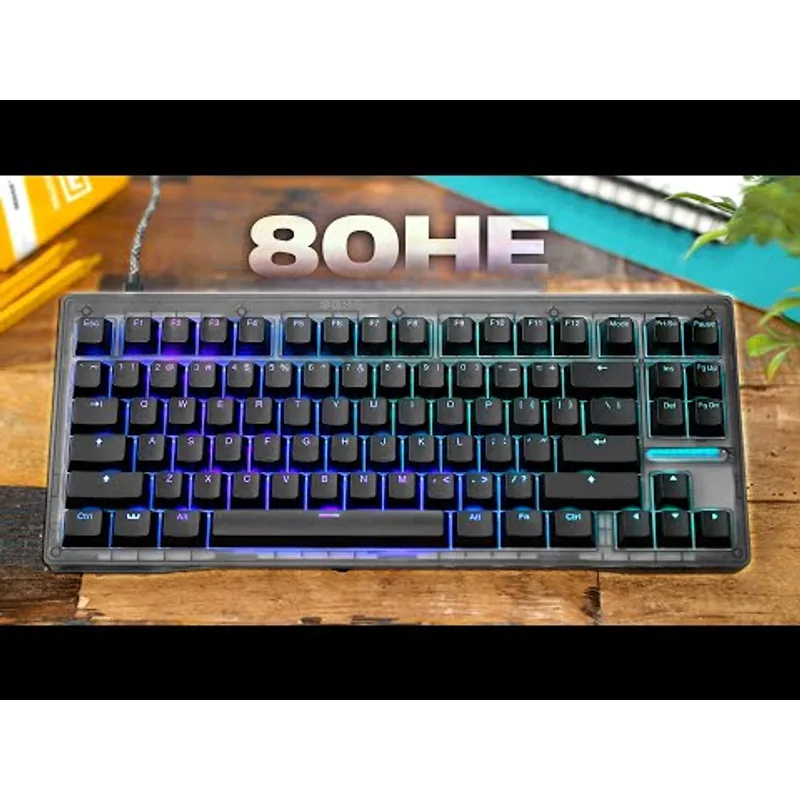
Wooting 80HE
The Wooting 80HE is the keyboard the pro community migrated to when Rapid Trigger went mainstream. Its Lekker L60 V2 switches use a Hall Effect sensor with 0.1mm minimum sensitivity — press down 0.1mm, key registers. Lift 0.1mm, key resets. There’s no contact wear because there’s no physical contact.
Tachyon mode pushes the polling rate to 8,000Hz with a synchronized 8,000Hz PCB scan rate. Wooting publishes an end-to-end input latency of ~0.4ms with Tachyon enabled. By comparison, a 1,000Hz keyboard with a traditional switch has ~1ms polling latency on top of whatever debounce delay the firmware adds.
The 75% layout is compact enough for FPS setups — your mouse stays closer to center — while keeping the F-row and arrow keys accessible. The gasket mount absorbs keystroke vibration without making the board feel mushy.
The one trade-off: it’s wired only. No battery, no wireless. For LAN tournament players that’s irrelevant. For couch gamers or people who hate cable management, it’s a real omission.
Who it’s for: Competitive FPS players (CS2, Valorant, Apex) who want the fastest possible input chain and don’t need wireless.
2. SteelSeries Apex Pro TKL Gen 3
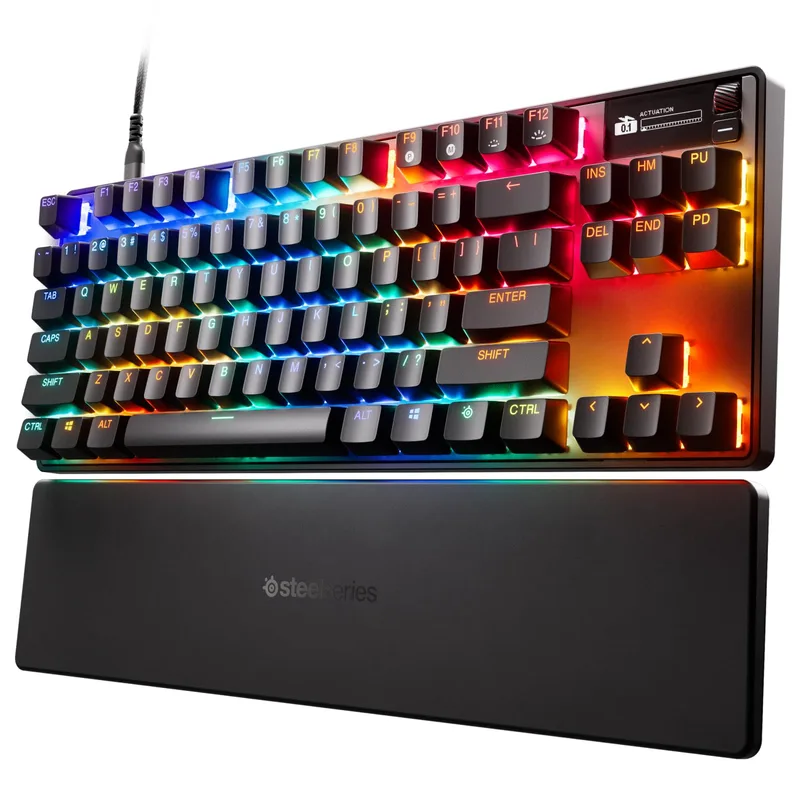
The Gen 3 update brought OmniPoint 3.0 HyperMagnetic switches, which support 40 distinct actuation levels (versus the previous version’s 10), and added 8,000Hz polling. Rapid Trigger sensitivity is 0.1mm — matching the Wooting.
The OLED display is a meaningful differentiator. You can view your active actuation depth, switch between profiles, and check system stats (CPU/GPU temps via SteelSeries GG) without alt-tabbing. It’s not something you’ll use every minute, but during setup and mid-session adjustments it saves time.
One caveat: only the 64 alphanumeric keys use OmniPoint 3.0. The modifier keys — Shift, Ctrl, Alt, Tab — use standard linear red switches. This means those keys don’t have adjustable actuation. For most gaming use cases this is fine; you’re not Rapid Triggering your Shift key. But it’s a real spec to know.
Protection Mode disables all Hall Effect actuation on demand, switching the keyboard to a standard fixed-actuation mode that passes anti-cheat checks in games that block Hall Effect input. As competitive game anti-cheat evolves, this matters.
Who it’s for: Players who want the Wooting’s HE performance plus an OLED interface and TKL form factor. At $190, it now undercuts the Wooting by $10.
3. Razer BlackWidow V4 Pro 75% Wireless
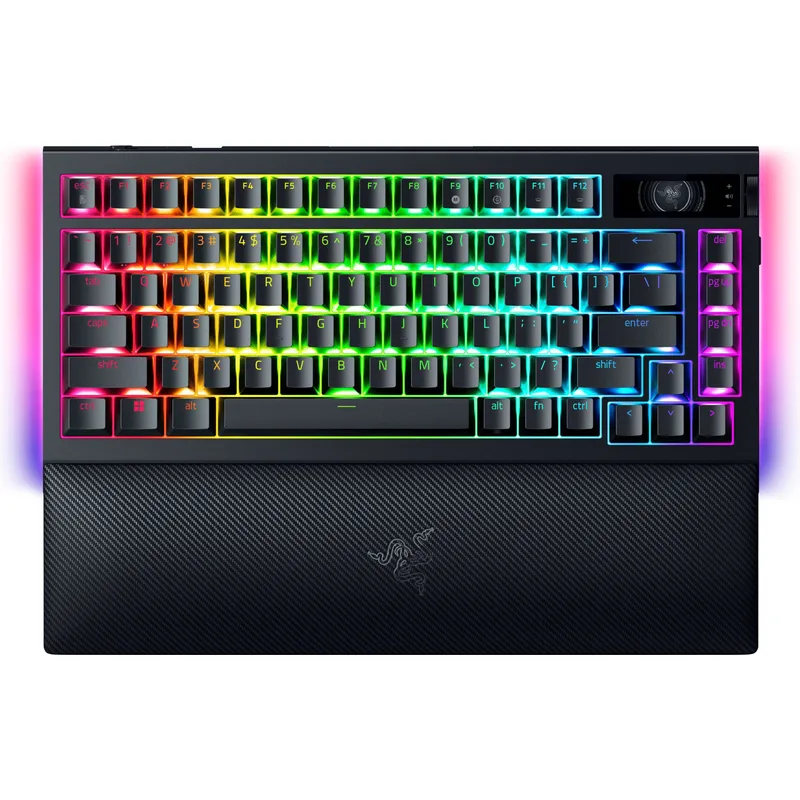
The BlackWidow V4 Pro 75% Wireless is the first keyboard where the wireless spec actually competes with wired boards on polling rate. Razer’s HyperSpeed wireless paired with HyperPolling technology delivers a sustained 4,000Hz over 2.4GHz — no caveats, no “up to” language. That’s 4x faster than a standard 1,000Hz wired keyboard.
The switches are hot-swappable 5-pin, which matters if you want to change feel later. The board ships with Razer Orange (45g tactile) but takes any MX-compatible 5-pin switch. Swap in Gateron Yellow linears, Durock POM linears, or whatever community favorites are current.
Snap Tap (Razer’s version of SOCD resolution) is built in. The Command Dial — a multi-function rotary encoder — controls volume, brightness, or custom macros depending on the mode ring you select. It feels like a premium addition rather than a gimmick.
The fixed 1.9mm actuation point is the honest limitation. You can’t set it to 0.5mm for hair-trigger inputs or 3.5mm for accidental-press prevention. For a $299 board in 2026, the absence of adjustable actuation is notable. Razer’s Orange switches are not Hall Effect — they’re traditional membrane-based tactile switches.
Who it’s for: Players who need wireless (no cables at their desk, living room gaming) and want the fastest wireless polling available with the ability to swap switches.
4. Logitech G Pro X TKL Rapid
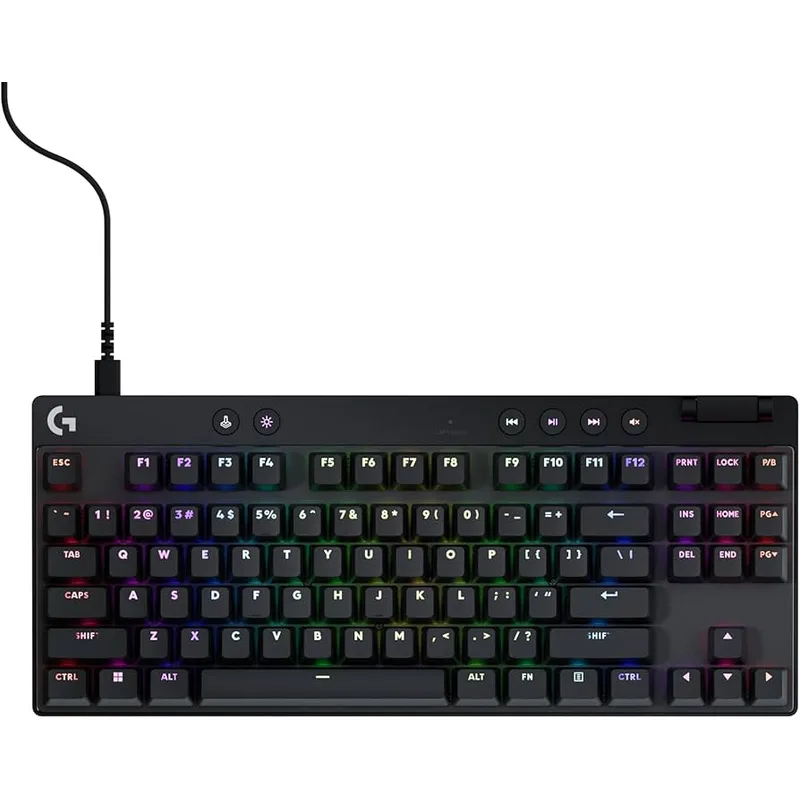
Logitech entered the Hall Effect market with the G Pro X TKL Rapid and priced it at $150 — $50 less than the Wooting, from a brand with wider retail availability. The magnetic analog switches support 0.1mm Rapid Trigger sensitivity and the full 0.1mm–4.0mm actuation range.
Where it falls short of the Wooting is polling rate. The G Pro X TKL Rapid runs at 1,000Hz, not 8,000Hz. For most players at most framerates, that 0.875ms difference is not perceptible. But if you’re running at 360FPS and optimizing every variable, you’ll want the Wooting.
The TKL layout with dedicated media controls and a physical volume roller is a genuine differentiator in this price range. Most budget and mid-range TKL boards skip the roller. The dual-shot PBT keycaps are standard (not an upgrade), which is the right call for a $150 board.
G HUB is required for per-key actuation customization. If you set a global actuation depth and leave it, you can do that entirely on-board. If you want different actuation depths per key — popular in FPS where WASD might be 0.5mm but spacebar is 2.0mm — you need the software installed.
Who it’s for: Players stepping up from traditional mechanical switches to Hall Effect for the first time who want Rapid Trigger at $150 — well below every other Hall Effect board on this list.
5. Corsair K70 RGB Pro
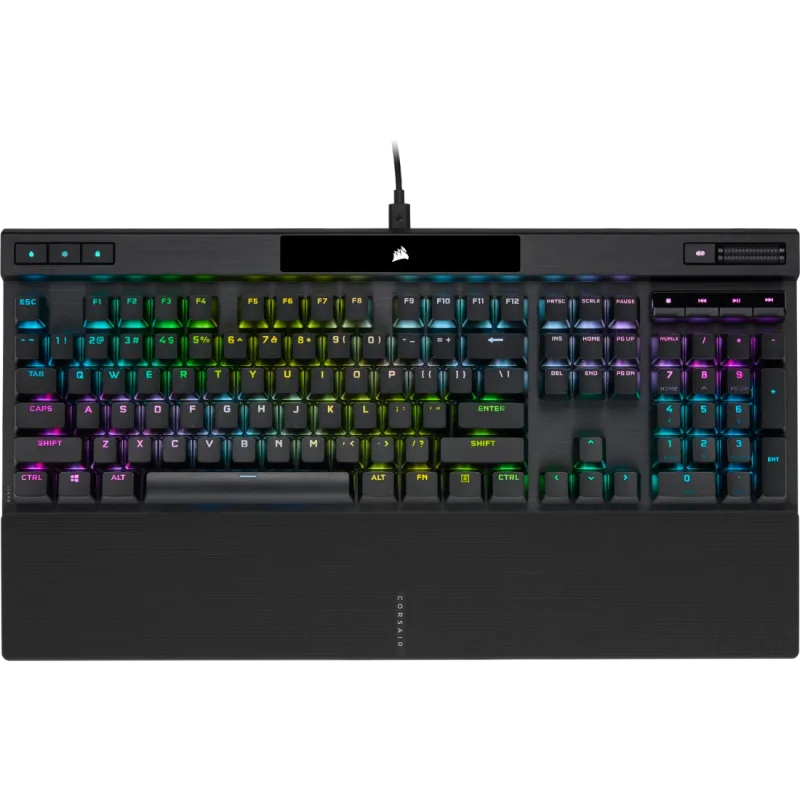
Corsair K70 RGB Pro
The K70 RGB Pro is the best full-size board if you need a numpad and want the fastest possible polling from traditional Cherry MX switches. Its 8,000Hz Hyper-Polling is the headline spec — Cherry MX Red actuation at 1,000Hz input latency would be standard, but at 8,000Hz the polling overhead drops to 0.125ms. The switch itself still has a 2.0mm actuation point and standard debounce, so this isn’t competitive with Hall Effect, but it’s meaningfully faster than any other Cherry MX board.
The aluminum frame and full-size layout make this a desk anchor. The rear-mounted tournament switch is a practical feature for organized play — flip it and macros disable, RGB defaults to a solid color, and the board presents as a clean, compliant device. PBT double-shot keycaps handle extended typing sessions without developing that ABS shine.
No Rapid Trigger, no adjustable actuation. Cherry MX switches are physical contact switches with a fixed 2.0mm actuation and ~1.8mm reset. That’s the trade-off for getting traditional switch feel with high polling.
Who it’s for: Users who need a numpad for productivity, want 8,000Hz polling, and prefer the known feel of Cherry MX Red over Hall Effect.
FAQ
Do I need Hall Effect switches for gaming?
For casual and most competitive gaming, no. Traditional mechanical switches like Cherry MX Red deliver fast, consistent inputs. Hall Effect with Rapid Trigger offers a measurable edge in counter-strafing precision for FPS titles — if you’re playing CS2 or Valorant seriously, it’s worth it. For RPGs, strategy, or general gaming, stick with whatever switch feel you prefer.
What polling rate do I actually need?
1,000Hz is sufficient for most players below 240FPS. At 360FPS+, 8,000Hz reduces per-input polling overhead from 1ms to 0.125ms. The real-world gameplay impact is small but measurable in competitive FPS. If you’re not sure, 1,000Hz is fine — you can upgrade later when you’re certain you feel the difference.
Can I use a Hall Effect keyboard in all games?
Yes, with one caveat. Some anti-cheat systems (notably Faceit) have flagged certain Hall Effect keyboards in the past. SteelSeries built Protection Mode into the Apex Pro Gen 3 specifically to address this — it disables Hall Effect actuation and mimics fixed-actuation behavior. The Wooting’s Wootility software has similar options. Check your game’s anti-cheat documentation before competing.
What’s the difference between Rapid Trigger and SOCD?
Rapid Trigger addresses key reset speed — it resets the instant you start releasing, not at a fixed point. SOCD (Simultaneous Opposing Cardinal Directions) handling resolves what happens when you press opposing keys (left + right) simultaneously. Most Hall Effect boards implement SOCD cancellation or Last Input Priority, which cancels the conflicting input or prioritizes the most recent press. These are separate features that often appear together on modern gaming keyboards.
Are 75% keyboards missing important keys?
The 75% layout keeps all keys present from a standard keyboard — arrows, F-row, Home/End/Delete, Insert — but compresses the spacing between clusters. The main adjustment is the right-side layout. After a few days of use, most people adapt. The keys aren’t removed, just repositioned.
The Bottom Line
The Wooting 80HE is the clearest recommendation for competitive play — 8,000Hz polling, 0.1mm Rapid Trigger across all 80 Hall Effect keys, in a compact 75% layout for $199. The SteelSeries Apex Pro TKL Gen 3 matches it on polling and adds an OLED display at $190 — now actually $10 cheaper than the Wooting — making it a strong pick if you prefer TKL and want the screen. If wireless is non-negotiable, the Razer BlackWidow V4 Pro 75% delivers 4,000Hz wireless polling with hot-swap support at $299.