RGB lighting in PC cases has shifted from novelty to expectation — but the gap between a case that glows and one that actually moves air well has narrowed considerably in 2026. The Lian Li LANCOOL 217 INF launched in December 2025 with an infinity mirror front panel that immediately became a Reddit favorite, while NZXT overhauled the H9 Flow RGB line with better fan mounting angles. Whether you want every cable hidden or just three strong intake fans and a clean build, there’s a case here that fits the job.
| Spec | Lian Li O11D EVO RGB 9.2/10 | NZXT H9 Flow RGB+ (2025) 8.9/10 | Corsair iCUE 5000D RGB Airflow Unavailable 8.7/10 | Phanteks Eclipse P500A DRGB Unavailable 8.5/10 | Lian Li LANCOOL 217 INF 8.8/10 |
|---|---|---|---|---|---|
| form_factor | ATX / E-ATX Mid-Tower | ATX Mid-Tower (Dual-Chamber) | ATX Mid-Tower | ATX Mid-Tower | ATX Mid-Tower |
| dimensions | 478 x 290 x 471mm | 506 x 315 x 481mm | 520 x 245 x 520mm | 231 x 518 x 490mm | 482 x 238 x 503mm |
| included_fans | 0 (supports up to 10) | 7 (6x 140mm + 1x 120mm RGB) | 3x AF120 RGB Elite PWM | 3x 140mm D-RGB PWM | 3 (2x 170mm ARGB + 1x 140mm) |
| radiator_support | Up to 420mm (top) | Up to 420mm (top or front-right) | 360mm front, 360mm top | Up to 420mm (front and top) | Up to 360mm (front) |
| gpu_clearance | 446mm | 435mm | 420mm | 503mm | 380mm |
| front_io | USB 3.2 Gen1 Type-A, USB 3.2 Gen2 Type-C | USB 3.2 Gen1 Type-A x2, USB-C | USB 3.1 Gen1 Type-A x2, USB-C | USB 3.0 x2, USB-C, HD Audio | USB 3.0 x3, 3.5mm Audio |
| Rating | 9.2/10 | 8.9/10 | 8.7/10 | 8.5/10 | 8.8/10 |
Prices change daily — tap Check Price for the current Amazon price.
Prices change daily — tap Check Price for the current Amazon price.
Quick Picks
- Best overall: Lian Li O11D EVO RGB — reversible chassis, built-in ARGB strips, and true E-ATX support for $159
- Best if you want everything included: NZXT H9 Flow RGB+ (2025) — seven fans and a Control Hub, back-connect ready at $289
- Best under $130: Lian Li LANCOOL 217 INF — infinity mirror front, strong thermals, dual 170mm fans
Buying Guide: What to Look For in an RGB Case
RGB ecosystem vs. universal headers
Most cases ship with either proprietary RGB connectors or standard 5V ARGB (3-pin) headers. Corsair’s AF120 fans use the iCUE ecosystem — they sync perfectly with Corsair RAM, AIOs, and peripherals, but you’ll need a second app if you mix in non-Corsair components. Phanteks’ D-RGB headers are 5V standard and work with ASUS Aura, MSI Mystic Light, and ASRock Polychrome without any adapter. If your build isn’t staying all-Corsair, universal headers save headaches.
Fan count vs. fan quality
A case that ships with six 120mm fans sounds better than one with three 140mm fans — until you check CFM ratings. Three Corsair AF120 RGB Elite fans at 65.57 CFM each (196 CFM total) outmove six generic 120mm fans at 35 CFM each (210 CFM total) with much less noise at similar pressure. Lian Li’s dual 170mm fans on the LANCOOL 217 INF move comparable air at a lower RPM than 120mm fans, which translates directly to less noise at idle.
Airflow configuration
Single-chamber cases (5000D, P500A, Lancool 217 INF) mount the PSU behind a shroud in the main chamber. Dual-chamber cases (O11D EVO RGB, H9 Flow RGB+) put the PSU and storage in a separate rear compartment, keeping cables away from airflow paths and making the build look cleaner through glass panels. Dual-chamber designs require slightly more desk space but are notably easier to photograph and the lighting looks better for the same reason.
Radiator support and cooling goals
If you’re running a 360mm or 420mm AIO, verify the mounting position. The O11D EVO RGB supports a 420mm at the top. The H9 Flow RGB+ supports 420mm on the top and front-right panel. The P500A handles 420mm front and top. The Lancool 217 INF caps out at 360mm front only. For air-cooled builds with large tower coolers like the Noctua NH-D15 (165mm tall), all five cases clear it comfortably except — double-check the Lancool 217 INF’s 180mm limit versus your specific cooler.
Cable management
Look for PSU shroud cutouts, Velcro straps or cable channels, and at least 25mm of space behind the motherboard tray. The Corsair 5000D’s RapidRoute channel is the most thoughtfully designed on this list — it guides all power cables behind the shroud in a single pass. The O11D EVO RGB has a similarly clean system designed for the dual-chamber layout.
Detailed Reviews
Lian Li O11D EVO RGB — Best Overall RGB Case
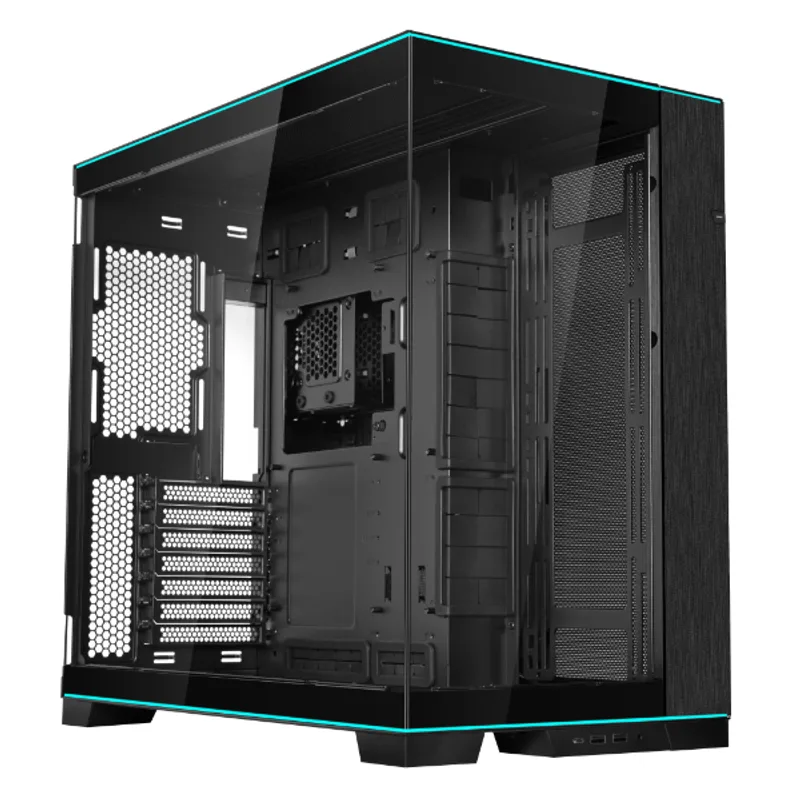
The O11D EVO RGB is the current revision of Lian Li’s most popular case family, adding ARGB lighting strips along the top and bottom rails of the chassis to the proven O11D EVO platform. The base chassis supports ATX, Micro-ATX, Mini-ITX, and E-ATX motherboards — up to full E-ATX without modification — which no other case on this list matches.
The reversible chassis is the standout feature. Out of the box it’s configured right-side entry, but flipping the interior orients the motherboard to face left, moving the PSU and storage chamber to the opposite side. This changes the airflow path and lets you choose which side of the desk the tempered glass faces. It’s a feature normally reserved for enthusiast cases costing $200+.
Fan support reaches 10 total positions: three at the top (supporting a 420mm radiator), three at the front, three at the bottom, and one rear 120mm. The ARGB lighting strips are powered independently of any fans, so the case glows even with zero fans installed. Add three 120mm intake fans at the front and you have a solid foundation for a high-end build.
At $159, the O11D EVO RGB leaves budget for fans and costs $130 less than NZXT’s premium dual-chamber alternative.
NZXT H9 Flow RGB+ (2025) — Best Premium RGB Case
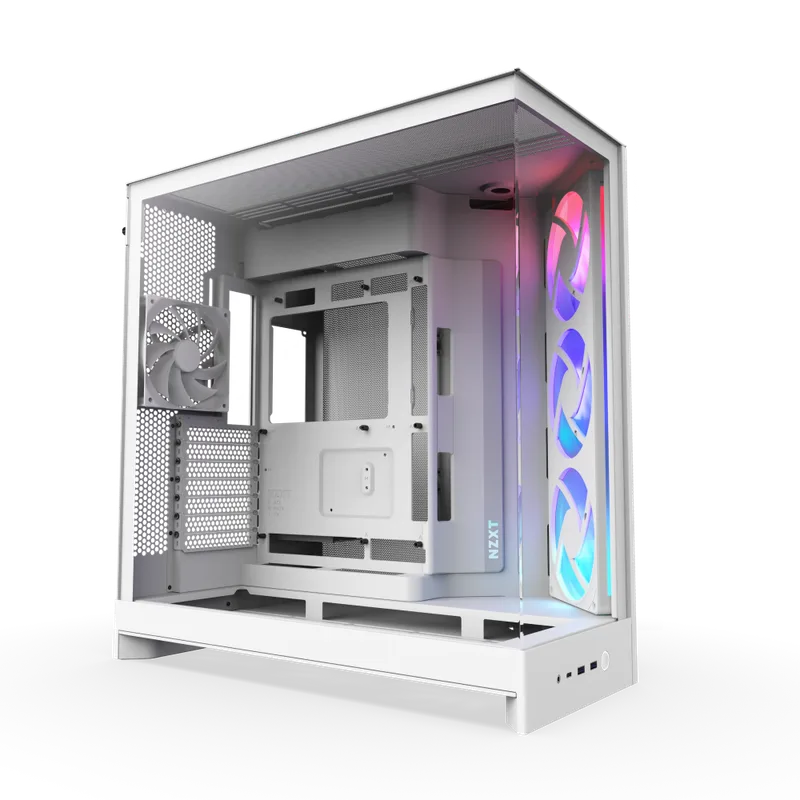
NZXT redesigned the H9 Flow for 2025 with two specific complaints from the original in mind: the bottom of the front-right panel only had two 140mm positions, and GPU temperatures were higher than expected with the original fan angle. The 2025 revision adds a third bottom position and angles the front-right fans inward, directing air more aggressively at the GPU. Independent testing from WindowsCentral showed measurable improvements in GPU thermal headroom with the new layout.
The RGB+ variant includes seven fans: six F Series 140mm RGB and one F120 RGB Core at the rear, plus an NZXT Control Hub that handles LED syncing and fan speed curves without requiring headers on the motherboard. The wraparound tempered glass (front, side, and partial top) creates panoramic views of the RGB fans and lighting. No other mid-tower case on this list comes close to this aesthetic impact.
The back-connect motherboard support is notable — ASUS BTF and MSI Project Zero boards route all power connectors through the back of the PCB, eliminating every cable visible through the front glass. Paired with the H9 Flow RGB+, the result is a build with nothing but RGB fans and a GPU visible.
The $289.99 price is steep, but the fan bundle alone would cost ~$105 purchased separately, and the Control Hub adds another $30. The effective premium over a bare case is closer to $50.
Corsair iCUE 5000D RGB Airflow — Best Value RGB Case
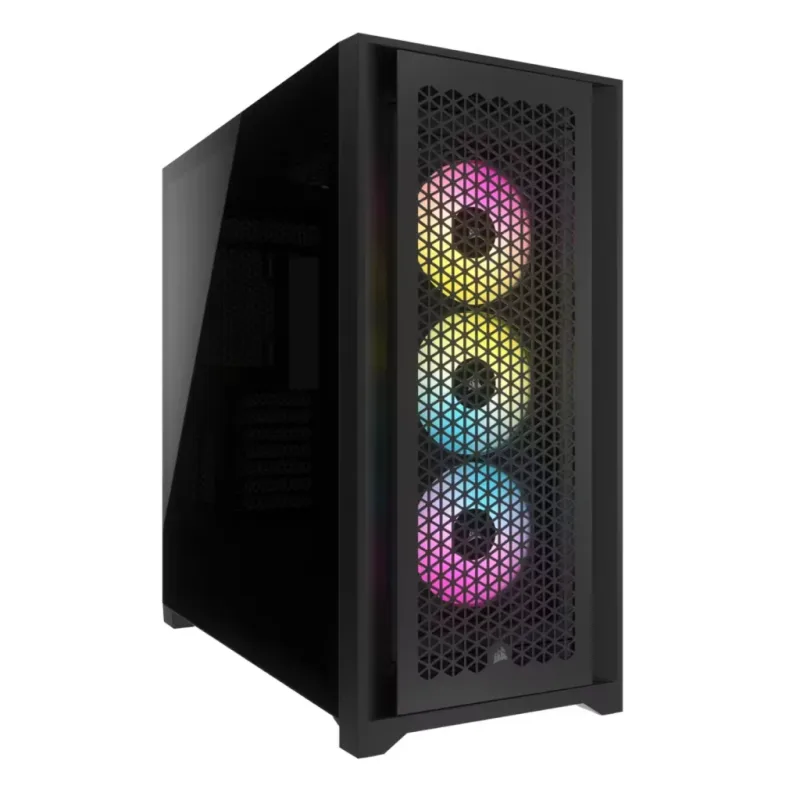
Corsair iCUE 5000D RGB Airflow
The iCUE 5000D RGB Airflow has been Corsair’s most consistent mid-tower recommendation since it launched, and the reason is straightforward: it ships with three high-quality fans, a lighting controller, and one of the cleanest cable management systems available at this price point.
The three included AF120 RGB Elite fans run at up to 2,100 RPM and push 65.57 CFM at their rated static pressure. They’re magnetic-bearing fans — the same line used in Corsair’s Hydro X and AIO coolers — not budget pack-ins. The iCUE Lighting Node PRO controller manages up to six additional fans and two LED strips, giving you room to expand without replacing the controller.
The RapidRoute cable management system uses a vertical channel on the right side of the motherboard tray. Every PSU cable routes through a single entry point and exits behind the tray, which eliminates the cable bundling and tucking required in cases without dedicated channels. For new builders, this alone reduces build time and improves the final appearance significantly.
At $149.99, the 5000D RGB Airflow comes in slightly under the O11D EVO RGB.
It ships with the AF120 fans and a controller that would run $60+ separately, making it the most complete out-of-box package on this list for a first build.
Phanteks Eclipse P500A DRGB — Best Budget RGB
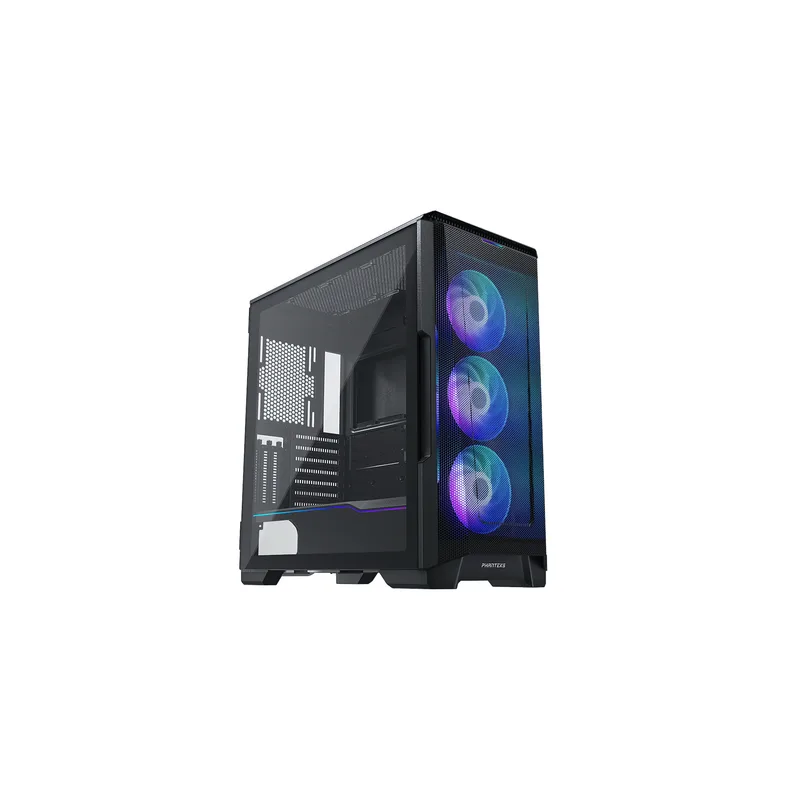
Phanteks Eclipse P500A DRGB
The P500A DRGB arrived in 2020 and GamersNexus ranked it best in class for noise-normalized thermals at launch — a ranking it earned from its 1mm ultra-fine performance mesh front panel rather than any airflow gimmick. Six years later, cheaper alternatives still struggle to match its thermal-to-noise ratio, which is why it remains a recommendation in 2026.
The D-RGB designation means standard 5V ARGB 3-pin headers. The three included 140mm fans connect directly to motherboard headers without any intermediate controller — plug in, set lighting in your motherboard’s RGB app, done. If you already use ASUS Aura Sync, MSI Mystic Light, or Gigabyte RGB Fusion, the P500A’s fans follow those settings automatically.
At 503mm of GPU clearance, it accommodates the longest current-generation cards without modification. Compare this to the Lancool 217 INF’s 380mm limit or the H9 Flow’s 435mm, and the P500A is the safe choice for a build featuring a triple-slot RTX 5080 FE (336mm) or a beefy third-party cooler variant.
The case is genuinely budget-priced at $129.99, but the compromise is an incomplete fan setup — front intake only. A rear exhaust fan ($15–$20) and top exhaust fan (optional) are needed for full positive pressure.
Lian Li LANCOOL 217 INF — Best Unique Look
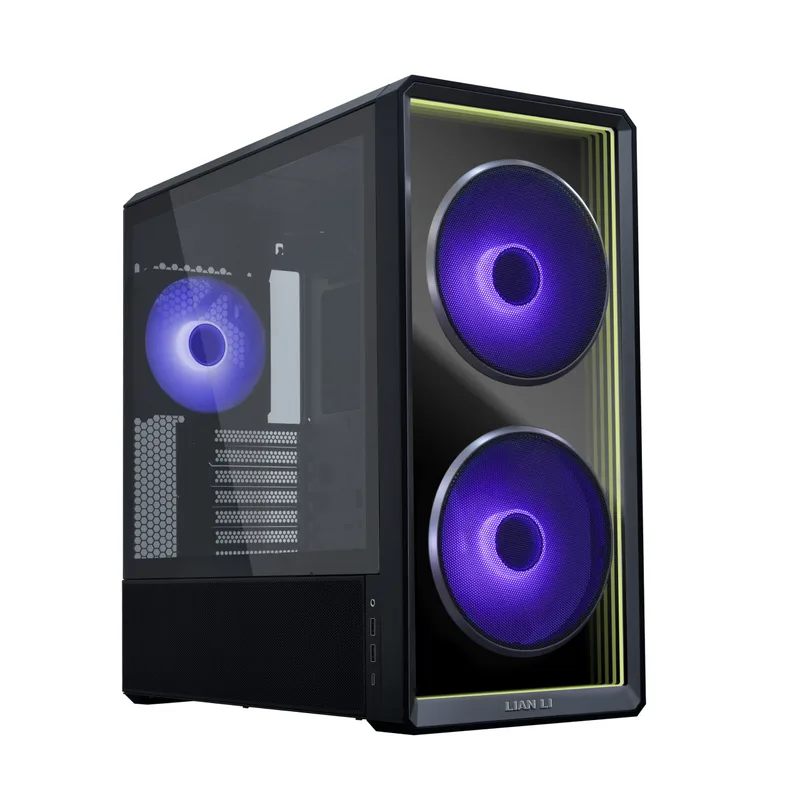
The LANCOOL 217 INF launched in December 2025 as a visual departure from the original wood-paneled Lancool 217. The tempered glass front panel houses an infinity mirror array that creates a receding tunnel of light — a visual effect normally seen in premium LED art installations, not budget mid-towers. The effect uses the case’s front ARGB lighting strip reflected between the glass layers, and it activates automatically once the system powers on.
Beyond aesthetics, the thermal fundamentals are solid. KitGuru measured the CPU at 53°C over ambient and GPU at 49°C over ambient under sustained load — competitive with mesh-front cases at this price. Lian Li reduced noise by 1 dBA compared to the standard Lancool 217 while maintaining the same airflow output, which is achieved by running the dual 170mm front fans at lower RPMs.
The 170mm fan size is the key differentiator. At the same 700 RPM used in a typical 120mm fan sleep profile, a 170mm fan moves significantly more air. The result is a case that’s perceptibly quieter than a three-120mm-fan setup at the same airflow rate — measurable on a dB meter and noticeable in a quiet room.
The 380mm GPU clearance is the main caveat. Most current flagship GPUs fit — the RTX 5070 Ti reference card is 336mm, the RX 9070 XT reference is 315mm — but high-end third-party triple-fan models can exceed 350mm. Measure your GPU before ordering.
FAQ
Do I need a case with RGB fans included, or can I add fans later?
Both approaches work. Cases like the NZXT H9 Flow RGB+ and Corsair 5000D include quality fans matched to their airflow design from the start. Cases like the O11D EVO RGB ship fan-free, giving you complete flexibility to choose fan brands, sizes, and RGB ecosystems. If you already have a Corsair or NZXT fan preference, starting fan-free is often cheaper overall.
Will my RTX 5080 fit in these cases?
The NVIDIA RTX 5080 Founders Edition is 336mm long. All five cases here clear it comfortably. Triple-fan third-party RTX 5080 variants can reach 360mm+; verify the spec sheet before ordering if you’re getting a large AIB card. The Phanteks P500A’s 503mm clearance gives the most headroom.
Does RGB lighting affect thermals?
The LEDs themselves generate negligible heat. The bigger thermal factor is whether fans are included and how many. A case with six RGB fans and a mesh front will always run cooler than one with two case fans and a glass front, regardless of lighting.
What’s the difference between RGB and ARGB (5V D-RGB)?
Standard RGB uses a 4-pin 12V header — all LEDs change to the same color simultaneously. ARGB (also called D-RGB or 5V 3-pin) uses a 3-pin 5V header and allows individual LED control, enabling patterns, gradients, and animations. All five cases on this list use ARGB except the Corsair 5000D, which uses Corsair’s proprietary iCUE connector (fully controllable per-LED through iCUE software).
Can I run a 360mm AIO in all five cases?
Yes for all five. Front 360mm radiator support is available on the O11D EVO RGB (top), H9 Flow RGB+ (front-right), P500A, Corsair 5000D, and Lancool 217 INF (front only). The Lancool 217 INF is the one case that does not support a 420mm AIO — maximum front radiator size is 360mm, and top support is 120mm only.
The Bottom Line
For most builders, the Lian Li O11D EVO RGB hits the right balance — E-ATX compatibility, built-in ARGB strips, and a reversible chassis at $159 before fans.
If you want the full RGB package without buying anything else, the NZXT H9 Flow RGB+ (2025) ships with seven fans and a hub for near-zero additional cost, and it’s ready for back-connect motherboards.
On a tighter budget, the Lian Li LANCOOL 217 INF at under $130 delivers the most visually distinctive case on this list with genuinely competitive thermal performance.