Bad thermal paste application is the most common self-inflicted cooling problem in PC builds. A blob that’s too large, a bubble trapped under the cooler, or old paste that dried out two years ago — any of these can add 10–20°C to your CPU temps under load. This guide covers the correct application method for 2026 hardware, including Intel Core Ultra (LGA1851) and AMD Ryzen 9000 series (AM5), along with the four pastes worth using.
| Spec | ARCTIC MX-6 (4g) 9.2/10 | Noctua NT-H2 (3.5g) 9/10 | Thermal Grizzly Kryonaut (1g) 9/10 | Thermal Grizzly Conductonaut Extreme (1g) Unavailable 8.5/10 |
|---|---|---|---|---|
| conductivity | 12.5 W/mK | >8.5 W/mK | 12.5 W/mK | 73 W/mK |
| amount | 4g | 3.5g | 1g | 1g |
| electrically_conductive | No | No | No | YES — liquid metal |
| longevity | Up to 8 years | Up to 5 years | 3–5 years | 3–5 years |
| max_temp | -50°C to +150°C | -50°C to +150°C | -250°C to +350°C | -30°C to +180°C |
| includes | Syringe | 3 cleaning wipes | Spatula | Applicator brush |
| Rating | 9.2/10 | 9/10 | 9/10 | 8.5/10 |
Prices change daily — tap Check Price for the current Amazon price.
Prices change daily — tap Check Price for the current Amazon price.
Supplies at a Glance
| Item | Purpose | Where to Get |
|---|---|---|
| Thermal paste | Heat transfer between IHS and cooler | See picks below |
| 99% isopropyl alcohol | Cleaning old paste off surfaces | Pharmacy or hardware store |
| Lint-free cloth or coffee filter | Cleaning applicator | Any dollar store |
| CPU cooler | Obviously | Your existing cooler or new one |
| Nitrile gloves | Keep finger oils off the IHS | Optional but recommended |
Replace thermal paste every 2–3 years on high-load builds (gaming, content creation) and every 3–5 years on light-use systems. On a Ryzen 9 9950X or Core Ultra 9 285K running near TDP daily, you’ll notice the temps creep up before the 3-year mark.
Which Paste to Choose
ARCTIC MX-6 is the right pick for 95% of builds. It’s non-conductive, applies cleanly, costs about $9 for 4g, and performance-tests within 0.3°C of Kryonaut and NT-H2 in Tom’s Hardware’s 90-paste shootout. There’s no meaningful reason to pay more for a stock AMD or Intel build.
Noctua NT-H2 makes sense if you’re on AM5 and want the dedicated AM5 Edition with its thermal paste guard — it ships with a pre-cut IHS guard that prevents paste from migrating during mounting. Also the better choice if you don’t have isopropyl alcohol on hand, since the included wipes handle cleanup.
Thermal Grizzly Kryonaut is the overclocker’s standard. If you’re pushing a Ryzen 9 9800X3D past its rated clocks or running an AIO at 360mm, Kryonaut’s 12.5 W/mK compound and extreme-temp rating (-250°C) make it the safe choice. The 1g tube only covers one or two applications, so buy the 5.55g size if you’re doing multiple systems.
Thermal Grizzly Conductonaut Extreme is liquid metal — 73 W/mK vs. 12.5 W/mK for standard pastes. The performance gain on a de-lidded Intel i9 or high-TDP AMD chip is real, but it’s electrically conductive and will destroy your board if it contacts exposed capacitors or solder pads. Only use it if you’ve done this before, have a copper or nickel-plated cooler contact plate, and have time to tape-mask the surrounding IHS area.
Thermal Paste Deep Dives
ARCTIC MX-6 (4g) — Best Overall
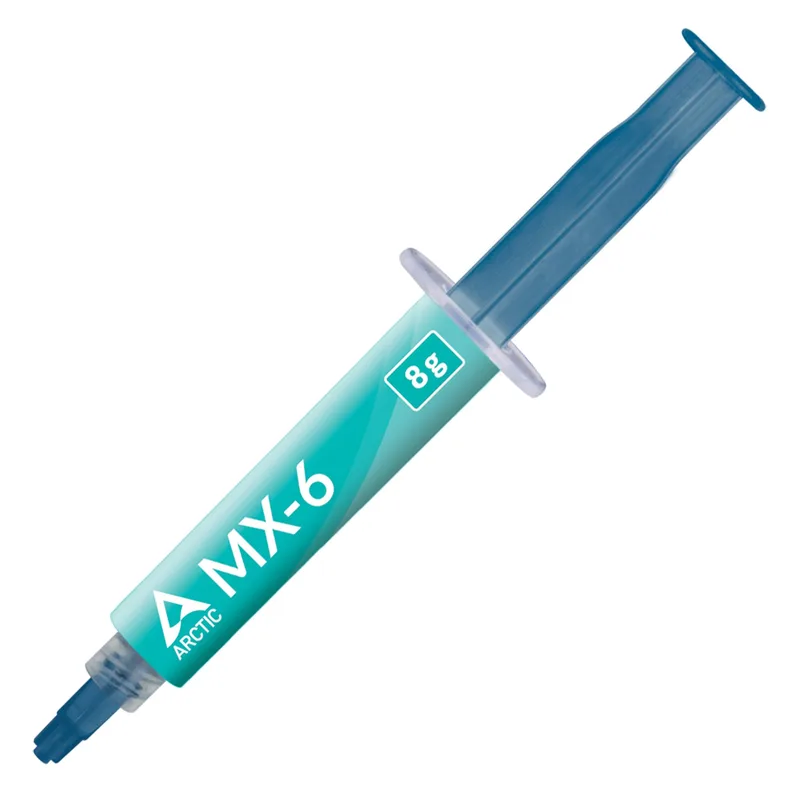
The MX-6 replaced MX-4 as ARCTIC’s flagship in late 2022 and has held its position as the top value-to-performance paste since. At 12.5 W/mK thermal conductivity it matches Kryonaut, but the 4g syringe gives you 8–12 applications for $9 — roughly $0.75–1.10 per application. It’s carbon-based, non-conductive, and shows no significant degradation in long-term aging tests at temperatures up to 150°C. Viscosity is on the thicker side, which means the pea-dot method works best; don’t try to pre-spread it, just let the cooler pressure do the work.
Noctua NT-H2 (3.5g) — Best for AM5

Noctua’s NT-H2 is the paste that ships with nearly every high-end Noctua cooler for good reason. Zero burn-in time — peak thermal performance starts from the first boot, not after a heat-cycle break-in period. The 3.5g standard version comes with three cleaning wipes, eliminating the need to source isopropyl alcohol separately. If you’re building on AM5, the NT-H2 AM5 Edition adds an IHS-shaped paste guard that prevents paste migration under the high clamping pressure of AM5 mounting mechanisms — a genuinely useful addition for the $2 premium over the standard version.
Thermal Grizzly Kryonaut (1g) — Best for Overclocking
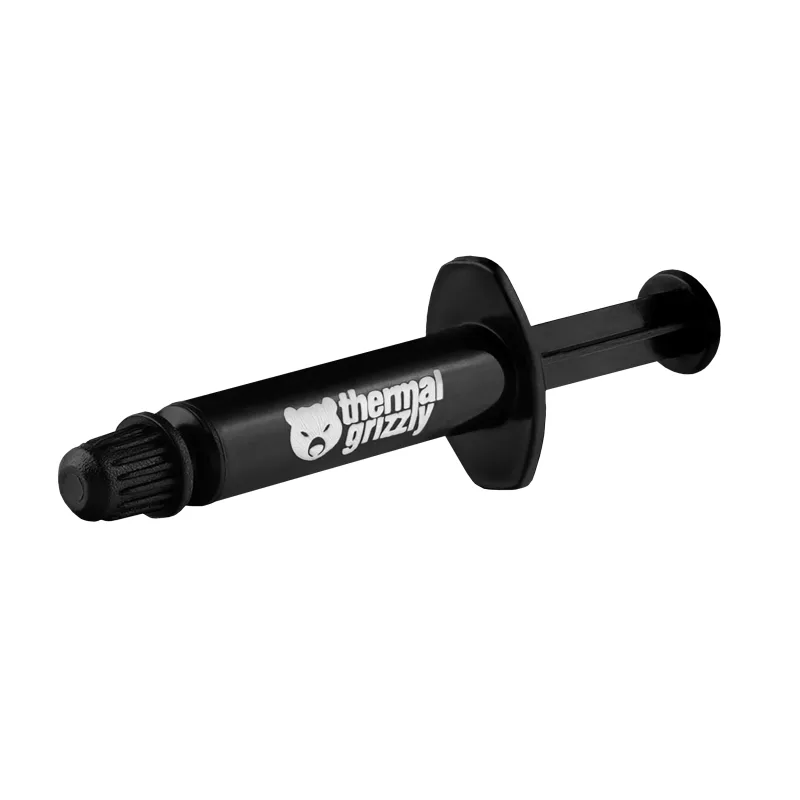
Kryonaut has been the enthusiast standard since 2015, and its 12.5 W/mK conductivity still stands up in 2026 testing. The ultra-fine particle structure spreads thinly under cooler pressure, minimizing the effective gap between the IHS and cold plate. Where it loses ground is longevity — thermal cycling at sustained high loads can cause the compound to stiffen and crack after 18–24 months on systems running at or above TDP daily. For a gaming PC that’s on 4–6 hours a day, expect 3+ years without issues. For a 24/7 rendering workstation near TDP, consider reapplication at 18 months. The included spatula is useful on large, flat IHS chips (i9-14900K, Ryzen 9 9950X) where pre-spreading helps ensure coverage to the edges.
Thermal Grizzly Conductonaut Extreme (1g) — Extreme Use Only

Thermal Grizzly Conductonaut Extreme (1g)
This is the only liquid metal compound in this guide, and it demands respect. At 73 W/mK, the Conductonaut Extreme delivers 10–15°C lower temps than any standard paste on a de-lidded CPU — that’s not marketing copy, it’s consistent across reviewer benchmarks. But the requirement list is strict: copper or nickel-plated cooler contact plate only (aluminum corrodes on contact with the gallium-indium alloy), IHS area fully taped off before application, gloves mandatory, and absolutely no spillage onto the motherboard socket area. On a de-lidded i9-14900K or a 9950X with a custom loop, this is a legitimate choice. On a standard retail CPU with a stock cooler, it’s needlessly dangerous.
Step-by-Step Application Guide
Step 1: Clean Both Surfaces
Remove any old paste from the CPU IHS and the cooler contact plate before applying new compound. Use 99% isopropyl alcohol on a lint-free cloth or coffee filter — paper towels leave fibers. If the old paste is hardened, apply IPA and let it sit for 30 seconds before wiping. One pass in a single direction, not circular. Repeat until the surface is visibly clean and dry.
Do not touch the IHS or cold plate with bare fingers after cleaning. Skin oils reduce thermal contact.
Step 2: Apply the Paste — Pea Dot Method
Place a pea-sized dot (about 3–4mm diameter, roughly the size of a BB pellet) in the center of the CPU IHS. This amount — approximately 0.3–0.4ml — is correct for standard desktop CPUs up to 170W TDP, including the Core Ultra 9 285K and Ryzen 9 9950X.
Do not pre-spread. The cooler mounting pressure distributes the paste evenly. Pre-spreading introduces air pockets and uneven layer thickness.
Exception: Large rectangular IHS chips like the i9-13900K or Ryzen Threadripper benefit from a short line (instead of a dot) running along the long axis of the IHS. This accounts for the elongated die layout and improves edge-to-edge coverage.
Step 3: Mount the Cooler
Lower the cooler straight down onto the CPU without sliding or twisting. Twisting shears the paste and creates voids. Once the cooler is seated, hand-tighten the mounting screws in a diagonal cross pattern — top-left, bottom-right, top-right, bottom-left — to distribute clamping pressure evenly. Tighten each screw a quarter-turn at a time per pass. Never fully torque one screw before moving to the next.
For AM5, the AMD mounting mechanism uses a retention frame with four screws. Same diagonal pattern applies. Torque spec is 0.6 N·m if you have a torque screwdriver; finger-tight plus a quarter turn is a reasonable approximation.
Step 4: Verify Spread (Optional)
If you’re the kind of person who needs to see it, remove the cooler after a brief initial boot (15 seconds — just enough to seat the paste) and check the spread pattern. Correct application leaves a uniform thin film covering 80–100% of the IHS with no voids or bare spots. If you see a large uncovered area, add a slightly larger dot next time. If paste is squeezing out the sides, you used too much.
Step 5: First Boot
Boot to the BIOS and let the system idle for 5–10 minutes. Check CPU temperature via HWMonitor or BIOS hardware monitoring. Idle temps on a 65W TDP chip with a quality air cooler should be 30–45°C. If idle temps are above 60°C immediately after application, the cooler contact is poor — reseat.
Temperature Impact
Thermal paste choice alone — between the top three non-metal compounds — makes roughly a 1–3°C difference under full load. What matters far more is the application quality:
| Scenario | Temp delta vs. correct application |
|---|---|
| Too much paste (large blob) | +3–8°C (insulating layer too thick) |
| Too little paste (no edge coverage) | +5–12°C (air gaps at die edges) |
| Pre-spread incorrectly (bubbles) | +4–10°C |
| Dried-out old paste (>4 years) | +8–20°C |
| Correct pea-dot, new paste | Baseline |
| Liquid metal (de-lidded only) | −10–15°C vs. standard paste |
The temperature swing between a properly applied MX-6 and a properly applied Kryonaut is about 1°C in controlled testing. The swing between correctly applied paste and dried-out paste from 2021 is potentially 20°C. Reapplication matters more than brand selection.
When to Reapply
The standard guidance of “every 5 years” is conservative and was written before 200W+ TDP CPUs became commonplace. More practical reapplication schedule:
- Gaming or workstation PC near rated TDP daily: Every 2–3 years
- Light-use desktop at 30–50% TDP: Every 4–5 years
- Kryonaut specifically: Check at 18–24 months under sustained high-load use; it dries faster than MX-6 or NT-H2
- Any paste: Reapply immediately if idle temps suddenly increase 5–10°C without a change in ambient temperature or system workload
Liquid metal (Conductonaut) does not dry out but can migrate under pump-out effect from repeated thermal cycling — check it annually on daily-driver systems.
FAQ
How much thermal paste should I use? A pea-sized dot, approximately 3–4mm in diameter. This is about 0.3–0.4ml. The most common mistake is using too much — a large blob creates a thick insulating layer instead of a thin conductive one.
Can I use too little thermal paste? Yes. Too little paste leaves air gaps at the edges of the IHS where heat spreads. If the spread pattern doesn’t cover 80%+ of the IHS after mounting, you used too little. Add a slightly larger dot next time.
Do I need to remove old paste before reapplying? Always. Old paste — especially if it’s dried or cracked — actively insulates rather than conducts. Apply 99% isopropyl alcohol, let it sit 30 seconds, wipe clean, and dry completely before applying new paste.
Is thermal paste electrically conductive? Standard pastes (MX-6, NT-H2, Kryonaut) are not electrically conductive. Liquid metal compounds (Conductonaut, Conductonaut Extreme) are electrically conductive and can short circuit exposed pads if they contact them. Never use liquid metal on a standard (non-de-lidded) CPU without masking the area around the IHS.
How long does thermal paste last? MX-6 and NT-H2 are rated for 5–8 years under normal operation. Kryonaut can begin to dry at 2 years under sustained high-load use. Liquid metal doesn’t dry but may migrate under thermal cycling — annual inspection is reasonable.
The Bottom Line
ARCTIC MX-6 is the correct answer for almost every build: $9 for 4g of 12.5 W/mK compound that performs within 1°C of anything else in its class. Noctua NT-H2 earns its place for AM5 builds, especially the AM5 Edition with the IHS guard. Thermal Grizzly Kryonaut is the overclocker’s choice and the benchmark reference paste. Conductonaut Extreme is for experienced builders doing de-lidded builds who want maximum thermal headroom.
Regardless of which paste you choose, application technique accounts for far more temperature variance than brand. Clean surfaces, pea-sized dot, straight-down cooler mount, diagonal cross-pattern tightening. Get those four steps right and any of these pastes will perform at spec.