The B850 chipset launched alongside AMD’s Ryzen 9000 series as the mainstream AM5 option — below X870/X870E in connectivity and overclocking headroom, but significantly cheaper. At the top of MSI’s B850 MAG lineup sits the Tomahawk MAX WiFi, a board that the hardware community flagged almost immediately as carrying specifications that punch well above its price tier: dual PCIe 5.0 x4 M.2 slots, 5 GbE networking, Wi-Fi 7, and a 14-phase VRM that handles AMD’s most power-hungry desktop CPUs without thermal complaints. In early 2026, it’s sitting at $229 — less than the starting price of most X870 boards — and the question worth answering is whether those specs actually deliver, or whether something had to give.
| Spec | MSI MAG B850 Tomahawk MAX WiFi 9.2/10 | MSI MAG B850 Tomahawk WiFi 8.7/10 | ASUS TUF Gaming B850-Plus WiFi 8.4/10 |
|---|---|---|---|
| socket | AM5 | AM5 | AM5 |
| chipset | AMD B850 | AMD B850 | AMD B850 |
| form_factor | ATX | ATX | ATX |
| vrm | 14+2+1 phases, 80A SPS MOSFETs | 14+2+1 phases, 80A SPS MOSFETs | 14+2+1 phases, 80A DrMOS |
| m2_slots | 4× M.2 (2× PCIe 5.0 x4, 1× PCIe 4.0 x4, 1× PCIe 4.0 x2) | 3× M.2 (1× PCIe 5.0 x4, 2× PCIe 4.0) | 3× M.2 (1× PCIe 5.0 x4, 2× PCIe 4.0) |
| lan | 5 GbE (Realtek RTL8126VB) | 5 GbE | 2.5 GbE |
| wifi | Wi-Fi 7 (Qualcomm FastConnect 7800) | Wi-Fi 7 | Wi-Fi 7 |
| ddr5_oc | 8400+ MT/s | 8200+ MT/s | 8000+ MT/s |
| Rating | 9.2/10 | 8.7/10 | 8.4/10 |
Prices change daily — tap Check Price for the current Amazon price.
Prices change daily — tap Check Price for the current Amazon price.
Which Tomahawk Should You Buy?
MSI sells the Tomahawk in two AM5 configurations. The base Tomahawk WiFi (see on Amazon) runs $189 and offers one PCIe 5.0 x4 M.2 slot, DDR5-8200+ OC support, and the same 5 GbE/Wi-Fi 7 networking as the MAX. The Tomahawk MAX WiFi (see on Amazon) runs $229 and adds a second CPU-attached Gen5 M.2 slot, DDR5-8400+ OC headroom, a larger rear IO set, and two 8-pin EPS connectors for the heaviest CPU overclocking scenarios.
For most Ryzen 7000/9000 gaming builds, the base Tomahawk WiFi at $189 is sufficient — one Gen5 M.2 slot covers current fast NVMe drives and the VRM is identical in capability. Step up to the MAX WiFi if you plan to run two Gen5 SSDs simultaneously, want the larger rear USB set, or anticipate pushing DDR5 memory clocks past 8200 MT/s.
What B850 Actually Means
AMD’s chipset hierarchy matters before committing to any B850 board. B850 supports EXPO and XMP memory profiles but does not allow manual CPU multiplier overclocking on most Ryzen chips — that’s X870/X870E territory. The practical impact is narrow: most Ryzen 9000-series users leave clocks at stock and enable PBO (Precision Boost Overdrive), which works on B850 and raises real-world all-core performance significantly over base frequencies. The VRM on the Tomahawk handles this without issue.
B850 also provides more USB 3.2 and PCIe lanes from the chipset than its predecessor B650, which is why boards like the Tomahawk MAX WiFi can offer four M.2 slots without compromising PCIe slot assignments. The trade-off vs. X870 comes down to USB4 (X870 requires it; B850 does not) and guaranteed PCIe 5.0 from the CPU for both the primary graphics and M.2 slots. The Tomahawk MAX WiFi delivers PCIe 5.0 x16 for graphics and two Gen5 M.2 slots from the CPU — which matches what most builders actually use on X870.
X870 boards start at $299. The Tomahawk MAX WiFi lands at $229 with the same Gen5 storage capability. The delta goes to memory kit or CPU budget.
MSI MAG B850 Tomahawk MAX WiFi Deep Dive
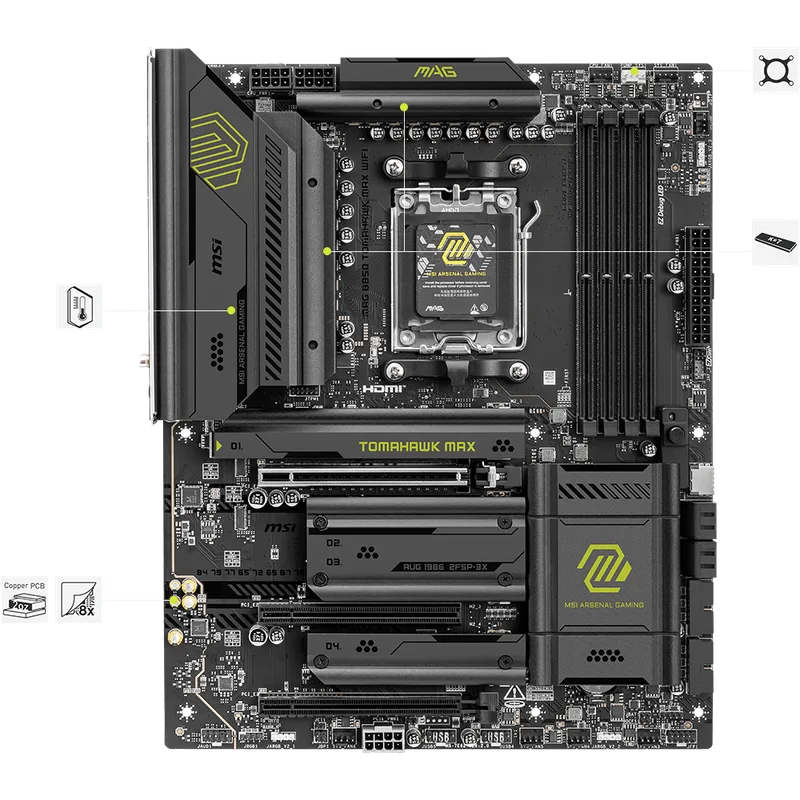
The MAX WiFi uses a 14+2+1 VRM configuration: 14 power stages dedicated to Vcore, 2 for the SoC rail, and 1 for miscellaneous — each rated at 80A using Monolithic Power Systems SPS MOSFETs. Under a 30-minute sustained Cinebench 2026 run with a Ryzen 9 9950X at PBO, Babel Tech Reviews recorded a VRM peak temperature of 59°C — well within safe operating range for these components, which typically throttle above 110-115°C. Dual 8-pin EPS connectors are present; the board uses only one under typical loads but the second is there if you run extreme overclocking scenarios with a direct voltage mod.
The four M.2 slots divide as follows: M.2_1 and M.2_2 connect directly to the CPU and run PCIe 5.0 x4 each — both verified at full Gen5 throughput (~13-14 GB/s sequential reads) in testing. M.2_3 is chipset-connected at PCIe 4.0 x2 (capped around 3.5 GB/s) and shares bandwidth with the secondary PCIe x4 slot. M.2_4 is chipset-connected at PCIe 4.0 x4 but shares lanes with the Wi-Fi 7 module. The practical advice: load your primary and secondary SSDs into M.2_1 and M.2_2, and leave M.2_3 for cold storage drives where the bandwidth ceiling doesn’t matter.
The rear IO provides ten USB ports: 3× USB-C at 10 Gbps, 2× USB-A at 10 Gbps, 1× USB-A at 5 Gbps, and 4× USB-A 2.0. One notable omission: there’s no rear-facing 20 Gbps (USB 3.2 Gen2x2) or USB4 port. The 20 Gbps connection exists as a front-panel header, not a rear port — relevant if you want to run a Thunderbolt dock or 20 Gbps external SSD directly into the back of the machine.
Networking is the Tomahawk MAX WiFi’s clearest advantage over competing B850 boards at this price: Realtek RTL8126VB 5 GbE LAN handles real-world file transfers to a NAS or server at rates up to ~550 MB/s sustained over the wire, compared to ~275 MB/s max on a 2.5G port. The wireless module is a Qualcomm FastConnect 7800, which supports Wi-Fi 7 Multi-Link Operation (MLO) — this is the full-spec Wi-Fi 7 implementation, not a budget Wi-Fi 6E chip rebadged.
Board assembly aids include MSI’s EZ PCIe Release button (removes the GPU without reaching behind the card), EZ M.2 Clip II (tool-free M.2 installation), a clear CMOS jumper accessible from the rear IO, and a Flash BIOS button on the rear panel. Debug LEDs for CPU, VGA, DRAM, and Boot status are present; a two-digit hex POST display is absent, which is the norm at this chipset tier.
The audio codec is a Realtek ALC4080 on an isolated PCB section — the best audio chip in the Realtek lineup, and the same component used on several boards $50-100 more expensive.
MSI MAG B850 Tomahawk WiFi: The Budget Pick
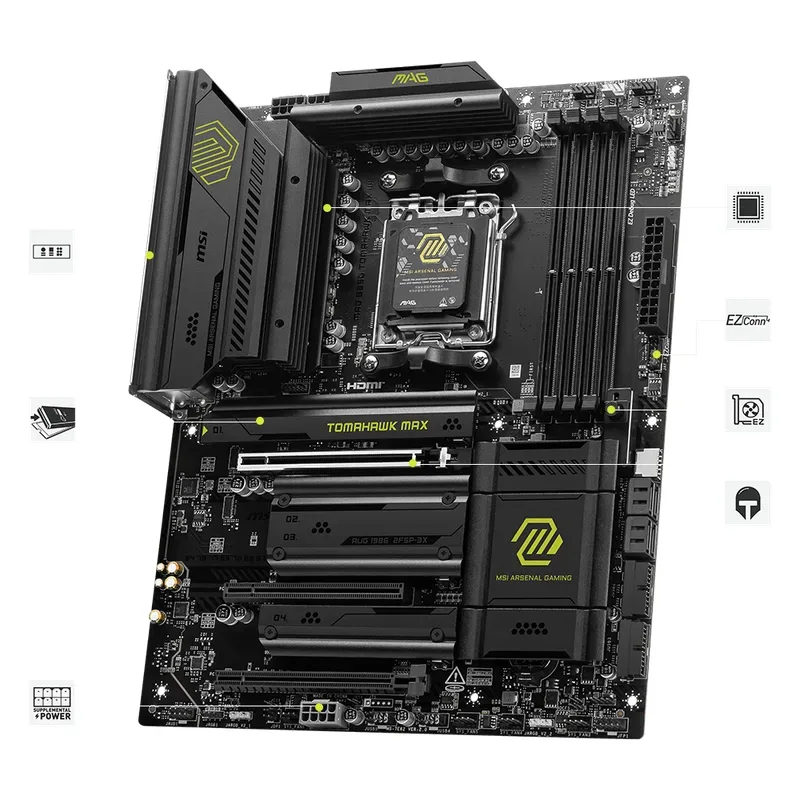
The base Tomahawk WiFi at $189 carries more of the MAX WiFi’s specification than the $40 gap would suggest. The 5 GbE LAN and Wi-Fi 7 networking are present on both models — MSI didn’t cut these to differentiate the tiers. The VRM configuration is the same 14+2+1 80A design. The primary PCIe 5.0 x16 slot and the first M.2 slot’s Gen5 connection from the CPU are both intact.
What the base model gives up vs. the MAX WiFi is the second CPU-attached Gen5 M.2 slot, a slightly lower DDR5 OC ceiling (8200+ vs. 8400+ MT/s), and a narrower rear IO set. For a gaming build anchored on a Ryzen 7 9800X3D or Ryzen 5 9600X with a single NVMe drive and a gaming GPU, none of those omissions change the user experience. The base Tomahawk WiFi is the right choice when the $40 delta matters and the workload doesn’t include dual Gen5 SSD configurations.
Builders planning a content creation workstation where a second Gen5 SSD would hold a fast scratch drive or active project library should step up to the MAX WiFi. The per-slot Gen5 bandwidth (128 GB/s) matters for sustained sequential write workloads — video editing timelines, 3D render caches, or software build directories benefit from it.
vs. ASUS TUF Gaming B850-Plus WiFi
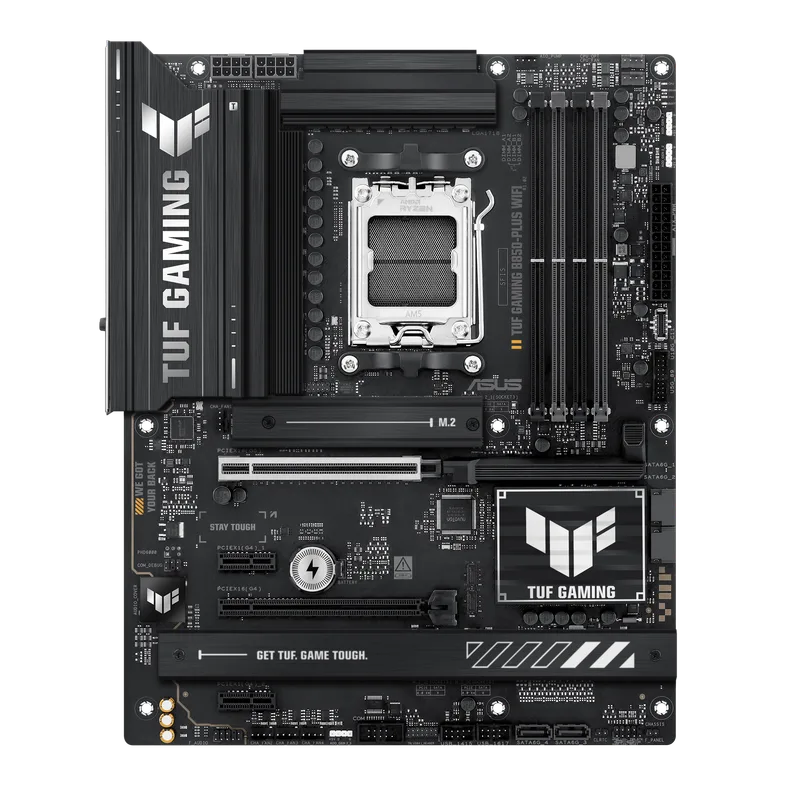
The ASUS TUF Gaming B850-Plus WiFi sits at $190 — $1 more than the base Tomahawk WiFi — and represents the most direct price-comparable alternative. The VRM is competitive: 14+2+1 80A DrMOS with a design that handles the 9950X with PBO enabled per Tweaktown’s review. BIOS FlashBack is present, which allows a BIOS update via USB without a CPU installed — a useful capability when a new Ryzen generation launches and the board ships with firmware that doesn’t support the latest processors yet.
The TUF B850-Plus WiFi also includes DisplayPort and HDMI outputs on the rear IO, making it suitable for Ryzen 8000G APU builds where you want iGPU display output on first boot without a discrete GPU installed. Neither Tomahawk variant offers this.
Where the TUF falls short of the Tomahawk lineup is networking. 2.5 GbE LAN at $190 vs. 5 GbE on both Tomahawk variants is a meaningful step down — the practical throughput difference when transferring large files to a NAS or server is roughly 2× in favor of the Tomahawk. If your home network runs multi-gig infrastructure, the Tomahawk WiFi at the same $189-190 price is the stronger choice. If you’re on a 1 Gbps network or don’t use NAS transfers, the LAN difference is irrelevant and the TUF’s BIOS FlashBack and DisplayPort output may tip the decision.
The TUF B850-Plus WiFi’s rear IO includes a USB 3.2 Gen2x2 Type-C at 20 Gbps — a rear-facing 20 Gbps port the Tomahawk MAX WiFi lacks on the back panel. For a direct Thunderbolt dock or a fast 20 Gbps external drive connected to the rear, the TUF has the Tomahawk beat on this one spec.
ASUS TUF Gaming B850-Plus WiFi
Compatibility Notes
- CPU support: Both Tomahawk variants support Ryzen 7000, 8000, and 9000 series on AM5. The Ryzen 9 9950X (170W TDP) runs within thermal limits on the Tomahawk’s VRM — confirmed at 59°C peak under sustained load. The Ryzen 7 9800X3D (120W TDP) and Ryzen 5 9600X (65W TDP) leave substantial VRM headroom.
- DDR5 memory: Both boards use a 2-DIMM layout (one channel per slot). Maximum capacity is 256 GB (2× 128 GB, if such sticks become available). Standard EXPO DDR5-6000 kits are the practical sweet spot for Ryzen 9000 gaming — the performance plateau above DDR5-6400 is minimal in most gaming benchmarks.
- GPU clearance: The Tomahawk MAX WiFi’s EZ PCIe Release button removes the GPU without the usual bent-finger maneuver behind the card. The PCIe 5.0 x16 slot is the only electrically-full slot; the secondary slot runs at PCIe 4.0 x4 and is appropriate for a capture card or NVMe expansion card, not a second gaming GPU.
- PSU requirements: B850 doesn’t impose unusual PSU requirements. A quality 750W 80+ Gold unit covers any single-GPU Ryzen 9000 build with headroom to spare. The 9950X paired with an RTX 5080 operates safely within 750W under sustained combined load.
- AM5 cooler mounting: The AM5 socket uses a standardized bracket that all current AM5 coolers support. No AM4 cooler will physically mount without an adapter. If you’re reusing a cooler from an older build, verify AM5 compatibility before ordering.
FAQ
Is the MSI MAG B850 Tomahawk MAX WiFi worth $40 more than the base Tomahawk WiFi? Yes, if your build includes two Gen5 NVMe drives or you’re pushing DDR5 past 8200 MT/s. No, if you’re running a single SSD and standard EXPO memory — the base model’s VRM, networking, and primary Gen5 M.2 slot are identical, and the $40 difference applies better to a faster CPU or more RAM.
Does B850 support overclocking the CPU clock multiplier? No. B850 allows AMD’s PBO (Precision Boost Overdrive), which raises power limits and boosts real-world performance meaningfully, but manual multiplier overclocking is restricted to X870/X870E chipsets. For gaming, PBO on B850 captures the majority of performance available from Ryzen 9000 CPUs.
How does the MSI MAG B850 Tomahawk MAX WiFi compare to X870 boards at $299? The Tomahawk MAX WiFi matches X870 on the specs that matter for gaming: dual Gen5 M.2 slots, PCIe 5.0 x16 for graphics, Wi-Fi 7, and a VRM capable of the full Ryzen 9000 lineup. X870 adds USB4 support and slightly broader overclocking headroom. For non-overclockers who don’t need USB4, the Tomahawk MAX WiFi closes the gap enough that the $70 price delta is better spent on a CPU or GPU upgrade.
Can the MSI MAG B850 Tomahawk MAX WiFi run the Ryzen 9 9950X? Yes. The 14-phase 80A VRM peaked at 59°C under a sustained 30-minute Cinebench 2026 run with the 9950X — well within component operating limits. PBO enabled on the 9950X is supported without VRM throttling on this board.
What’s the difference between Wi-Fi 6E and the Wi-Fi 7 on the Tomahawk? The Tomahawk MAX WiFi uses a Qualcomm FastConnect 7800 supporting Wi-Fi 7 with Multi-Link Operation (MLO), which allows simultaneous connections across 2.4 GHz, 5 GHz, and 6 GHz bands for reduced latency and improved bandwidth. Wi-Fi 6E supports the 6 GHz band but not MLO. In practical use with a Wi-Fi 7 router, MLO provides lower and more consistent ping — relevant for competitive online gaming.
The Bottom Line
The MSI MAG B850 Tomahawk MAX WiFi is the B850 board to buy if your budget reaches $229. Dual PCIe 5.0 x4 M.2 slots from the CPU, 5 GbE networking, Wi-Fi 7, a 14-phase VRM that handles the entire Ryzen 9000 lineup, and a 15-second cold boot post time — at this price, you’re getting a specification sheet that matches most X870 boards for $70 less. The rear IO omission of a 20 Gbps USB port and the PCIe 4.0 x2 limitation on M.2_3 are real trade-offs, but neither affects the core use case for a gaming or workstation build.
The base Tomahawk WiFi at $189 is the right call when a single Gen5 M.2 slot covers your storage needs — it retains the full 5 GbE/Wi-Fi 7 network stack and the same VRM, and the $40 saving is real.
The ASUS TUF Gaming B850-Plus WiFi is the alternative pick if BIOS FlashBack or a rear-facing 20 Gbps USB port matter more than 5 GbE LAN. At $190, it’s a capable board that loses the networking race to the Tomahawk but wins on the rear USB spec for external high-speed drives.