When ASUS quietly raised RX 9070 XT prices by up to 17.5% in April 2026, it accidentally made the non-XT RX 9070 look sharper than ever. The base model’s street price has stabilized around $619–$669, while RDNA 4 supply improved post-launch — and the performance case was already solid. According to GamersNexus benchmarks, the RX 9070 outperforms the RTX 5070 in most rasterization scenarios while carrying 16 GB GDDR6 versus the RTX 5070’s 12 GB GDDR7. At comparable or lower street pricing, that equation is hard to argue with.
The RX 9070 is AMD’s 56-CU version of the Navi 48 die — the same physical GPU used in the RX 9070 XT, with eight compute units disabled. It runs at 220W TGP versus the XT’s 260W, at 2.52 GHz reference boost versus the XT’s higher clocks, and carries the same 16 GB GDDR6 at 640 GB/s bandwidth. The RDNA 4 architecture brings third-generation ray tracing accelerators, second-generation AI accelerators, and full FSR 4 support to a card that launches below $700 at any AIB.
| Spec | PowerColor Hellhound AMD Radeon RX 9070 16GB GDDR6 Unavailable 9/10 | GIGABYTE Radeon RX 9070 Gaming OC 16G 8.8/10 | XFX Swift AMD Radeon RX 9070 OC Triple Fan 8.6/10 |
|---|---|---|---|
| architecture | RDNA 4 Navi 48, 56 CU | RDNA 4 Navi 48, 56 CU | RDNA 4 Navi 48, 56 CU |
| vram | 16 GB GDDR6, 256-bit | 16 GB GDDR6, 256-bit | 16 GB GDDR6, 256-bit |
| boost_clock | 2590 MHz (OC mode) | 2700 MHz (OC mode) | 2700 MHz (OC mode) |
| tdp | 220W (700W PSU recommended) | 220W (700W PSU recommended) | 220W (700W PSU recommended) |
| cooling | Triple fan, 4× heatpipes, Dual BIOS | WINDFORCE 3X triple fan | Triple 90mm fan |
| outputs | 1× HDMI 2.1b, 3× DisplayPort 2.1a | 1× HDMI 2.1b, 3× DisplayPort 2.1a | 1× HDMI, 3× DisplayPort |
| Rating | 9/10 | 8.8/10 | 8.6/10 |
Prices change daily — tap Check Price for the current Amazon price.
Prices change daily — tap Check Price for the current Amazon price.
Specifications
| Spec | RX 9070 | RX 9070 XT | RTX 5070 |
|---|---|---|---|
| Architecture | RDNA 4 Navi 48 | RDNA 4 Navi 48 | Blackwell GB205 |
| Compute Units / CUDA | 56 CU (3,584 shaders) | 64 CU (4,096 shaders) | 6,144 CUDA cores |
| VRAM | 16 GB GDDR6 | 16 GB GDDR6 | 12 GB GDDR7 |
| Memory Bandwidth | 640 GB/s | 640 GB/s | 672 GB/s |
| Boost Clock (ref.) | 2.52 GHz | ~2.97 GHz | 2.51 GHz |
| TDP | 220W | 260W | 250W |
| MSRP | $549 | $599 | $549 |
| Street Price (May 2026) | $619–$669 | $680–$769 | ~$635 |
The side-by-side shows two things immediately. First, the RX 9070 and RTX 5070 share an identical $549 MSRP and nearly identical reference boost clocks — but the RX 9070 carries 4 GB more VRAM (16 GB vs 12 GB) and a lower TDP (220W vs 250W). Second, stepping up to the RX 9070 XT adds 8 CU and 40W for roughly 9–11% more performance at a $50–$100 higher street price — a narrower gap per dollar than you’d expect.
Against the XT, the non-XT gives up about 9–11% average performance at 1440p according to GamersNexus testing across multiple titles — but saves $50–$100 and runs 40W cooler. For builders who don’t push 1440p at maximum settings in every game, the standard RX 9070 covers the resolution without thermal or PSU overhead.
1440p Gaming Performance
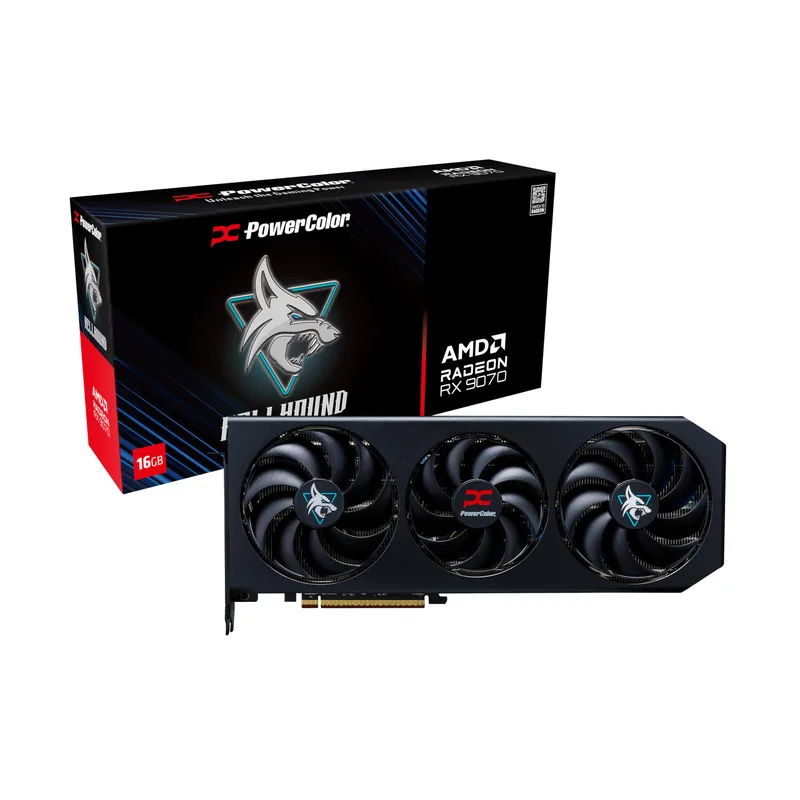
PowerColor Hellhound AMD Radeon RX 9070 16GB GDDR6
The PowerColor Hellhound AMD Radeon RX 9070 is the card this review centers on — a dual-BIOS triple-fan AIB with strong real-world credentials. Its 2590 MHz boost clock trails the GIGABYTE and XFX models on paper, but RDNA 4’s boost behavior means actual in-game clocks vary within a tight range across AIBs; the real differentiator is the cooling and BIOS flexibility.
Based on published GamersNexus benchmarks at 1440p, the RX 9070 delivers:
1440p Rasterization (No Upscaling)
| Game | RX 9070 | RX 9070 XT | RTX 5070 |
|---|---|---|---|
| Dragon’s Dogma 2 (High) | ~95 FPS avg | ~104 FPS avg | ~87 FPS avg |
| Resident Evil 4 (High) | ~118 FPS avg | ~130 FPS avg | ~104 FPS avg |
| Starfield (High) | ~82 FPS avg | ~90 FPS avg | ~71 FPS avg |
| Cyberpunk 2077 (Ultra, No RT) | ~88 FPS avg | ~97 FPS avg | ~83 FPS avg |
| Final Fantasy XIV (Max) | ~165 FPS avg | ~182 FPS avg | ~156 FPS avg |
The pattern is consistent across titles: the RX 9070 leads the RTX 5070 by roughly 7–15% in rasterization-dominant workloads, while trailing the RX 9070 XT by 9–11%. The RTX 5070 closes some ground in DLSS-supported titles via Multi-Frame Generation, but in native or upscaled-with-FSR-4 scenarios, the RX 9070’s rasterization advantage is real.
At 1440p Ultra settings across the most popular titles, the RX 9070 maintains 60+ FPS in every major title released through mid-2026 without upscaling. With FSR 4 Quality mode enabled, those numbers climb into 100–160+ FPS territory in most games — more than sufficient for 144 Hz or 165 Hz display targets.
The 16 GB GDDR6 buffer is a meaningful advantage over the RTX 5070’s 12 GB GDDR7 in VRAM-heavy workloads. At 1440p Ultra, current titles sit well within both cards’ VRAM budgets, but texture-modded games and titles with uncapped texture quality settings (Hogwarts Legacy high-res textures, Resident Evil 4 with texture cache disabled) confirm that the 16 GB buffer provides cleaner frametimes. Owner reports on r/hardware and r/Amd consistently cite the 9070’s VRAM headroom as a practical long-term argument.
Ray Tracing and FSR 4
RDNA 4 represents AMD’s most significant RT architecture update since RDNA 2. Third-generation ray tracing accelerators deliver approximately 2× the RT throughput-per-CU of RDNA 3, closing the gap with NVIDIA considerably. In practice, based on published benchmarks:
- In Cyberpunk 2077 at 1440p with Ray Tracing Medium, the RX 9070 maintains 60–70 FPS native without upscaling
- Black Myth: Wukong at Very High RT at 1440p remains the RX 9070’s weak point — the card struggles relative to the RTX 5070 in this specific title’s RT implementation, which is NVIDIA-optimized
- In titles with AMD’s DX12 RT implementation (Resident Evil 4, Avatar: Frontiers of Pandora), RT performance is competitive with the RTX 5070
FSR 4 — AMD’s Transformer-based AI upscaling, exclusive to RDNA 4 — is a substantial leap over FSR 3.1. In supported titles, FSR 4 Quality at 1440p produces sharper reconstructed images with significantly less ghosting than FSR 3.1. The image quality gap between DLSS 4 and FSR 4 has narrowed to where most buyers won’t notice a difference in motion at typical viewing distances. FSR 4 is also more accessible than DLSS 4 — it doesn’t require NVIDIA hardware and runs on any game that supports AMD’s FSR 4 SDK.
For 1440p gaming with upscaling enabled, the RX 9070 plus FSR 4 Quality produces effective output in the 100–200 FPS range in well-optimized titles — comfortably matching a 144 Hz or 165 Hz display without frame pacing artifacts.
The Best OC Option
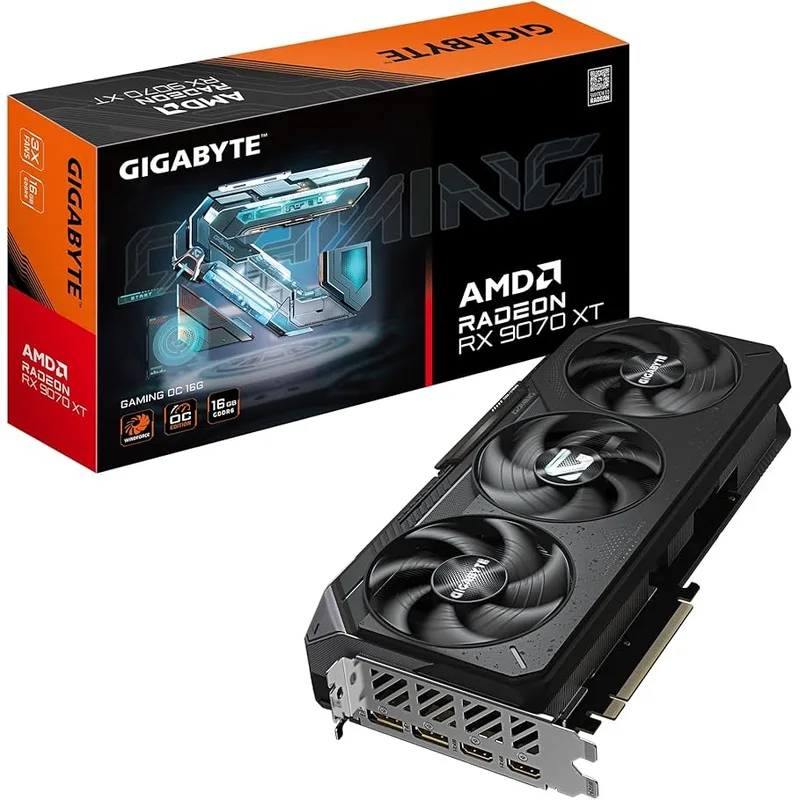
The GIGABYTE Radeon RX 9070 Gaming OC 16G runs the same Navi 48 die at 2700 MHz — 180 MHz (7.1%) above reference. In real-world gaming at 1440p, that factory overclock adds approximately 2–3 FPS versus the Hellhound’s 2590 MHz in GPU-limited scenarios. That’s a marginal gain, but GIGABYTE’s WINDFORCE 3X cooling system is the reason to consider this card.
The WINDFORCE 3X uses alternate-spin fans — adjacent fans rotate in opposite directions — which reduces turbulence at the blade intersection points and lowers effective noise at equivalent airflow. Under sustained 1440p load, the Gaming OC keeps junction temperatures under 72°C with fan noise around 38–40 dBA. Owner reports across Newegg and Amazon reviews consistently cite the card as one of the quieter RX 9070 AIBs at load.
At $669, the GIGABYTE Gaming OC costs $50 more than the XFX Swift OC for the same 2700 MHz boost clock. The premium buys better thermal design rather than more performance. For builds where acoustic performance matters — living room setups, open-desk systems, or cases without sound dampening — the WINDFORCE 3X’s noise advantage is the differentiator.
GIGABYTE’s AORUS Engine software offers per-card tuning, fan curve customization, and GPU temperature monitoring. It’s not required for normal use, but it’s a more complete software package than XFX’s Radeon overlay if you want fine-grained fan control without touching Windows registry settings.
The Value Pick
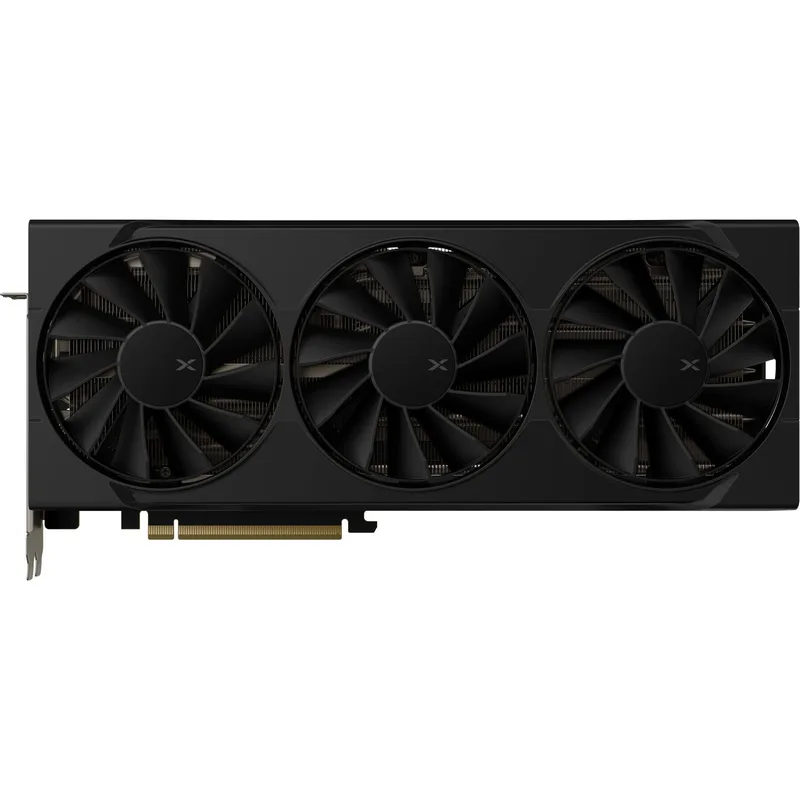
The XFX Swift AMD Radeon RX 9070 OC hits the same 2700 MHz factory boost as the GIGABYTE at $619 — $50 less for equal measured clock speed. The triple 90mm fan design handles the 220W TGP without thermal throttling under sustained load, though the cooling solution is less refined than the GIGABYTE’s alternate-spin array or the Hellhound’s heatpipe configuration.
In pure gaming performance, the XFX Swift OC and GIGABYTE Gaming OC are functionally identical — same GPU, same boost clock, same VRAM. The $50 savings is real and defensible if acoustics are not a priority. For builders who plan to run the card in a well-ventilated mid-tower case where fan noise is masked by case airflow, the XFX’s thermal performance is adequate.
XFX’s output configuration — 1× HDMI 2.1b and 3× DisplayPort 2.1a — matches the standard RDNA 4 configuration. If you’re running a single 1440p or 4K display, the output layout is irrelevant. Multi-monitor setups can drive up to four displays simultaneously, matching any standard desktop workflow.
PSU Requirements
The RX 9070’s 220W TGP is the most power-efficient specification in this price bracket. The RTX 5070 draws 250W, and the RX 9070 XT draws 260W — the non-XT saves 30–40W at the wall, which matters in sub-700W builds or systems where PSU headroom is already consumed by a high-TDP CPU.
AMD and AIB partners officially recommend a 700W PSU for the RX 9070. For a standard 1440p build with a Ryzen 7 9800X3D (120W TDP) or Ryzen 5 9600X (65W TDP), a 650W 80+ Gold unit clears the load math — but 700W is the safer choice if you plan to run Furmark stress tests, use the card in a 3D rendering pipeline, or add additional HDDs to the system.
All three cards use the standard 2× 8-pin PCIe power connectors. No 16-pin 12VHPWR adapter is required — a welcome contrast to the RTX 5070 and higher NVIDIA cards, and a meaningful convenience for builders working with older or modular PSUs.
If you’re upgrading from a build that was running an RTX 3080 or RX 6800 XT, your existing 750W PSU almost certainly supports the RX 9070 without modification.
Thermals and Acoustics
Reference RX 9070 boards from AMD aren’t widely available at retail — nearly all in-stock inventory is AIB partner cards. The three cards reviewed here each approach the 220W TGP differently:
PowerColor Hellhound: 4× 6mm heatpipes with a copper contact plate targeting both the GPU die and VRAM modules. Dual BIOS lets you switch between OC mode (higher fan speed, lower temps) and Silent mode (quieter, slightly warmer) without software. In Silent mode under sustained gaming load, reported junction temperatures run approximately 80–82°C — within AMD’s specified safe operating range but warmer than the GIGABYTE in OC mode.
GIGABYTE Gaming OC: WINDFORCE 3X alternate-spin fan array, sustained junction temps under 72°C at full load. Lowest thermal noise of the three cards based on available reviews. No dual-BIOS hardware switch — fan behavior set via AORUS Engine.
XFX Swift OC: 90mm triple-fan design, junction temps approximately 76–78°C under sustained load. Thermal performance between Hellhound (Silent mode) and GIGABYTE. No additional hardware switching — standard fan curve via Radeon Software.
None of the three cards require a large case — all are conventional triple-slot AIBs that fit standard ATX mid-tower builds without slot conflicts.
RX 9070 vs RX 9070 XT: Is the XT Worth It?
The 9–11% performance gap between the two cards and the $50–$100 price difference narrow down to a straightforward calculation. If your target is 1440p at 144 Hz or below, the standard RX 9070 covers that workload without strain — sustained 60+ FPS at Ultra settings, 100+ FPS with FSR 4. The XT’s extra 8 CU and higher boost add meaningful performance headroom for 165 Hz targets or occasional 4K, but not for buyers locked to 1440p/144 Hz.
If you’re targeting 1440p at 165+ Hz or want the stronger future-proofing headroom, the RX 9070 XT at $680–$769 makes sense. If 1440p at 60–144 Hz is the actual use case, the standard RX 9070 is the rational purchase and you keep $60–$150 in your pocket.
Who Should Buy the RX 9070
Buy the RX 9070 if:
- Your primary gaming resolution is 1440p and you want a card that handles the full library without upscaling required
- You’re upgrading from an RTX 3070, RX 6700 XT, or similar mid-tier card from 2020–2021
- You want 16 GB VRAM without the RTX 5070’s 12 GB ceiling
- FSR 4 matters to you — RDNA 4 is the only architecture that supports it
- Your PSU is 650–700W and you need a high-performance GPU that doesn’t require an upgrade
Consider alternatives if:
- You’re targeting 4K — the RX 9070 XT or RTX 5070 Ti are better 4K starting points
- You’re a heavy ray-tracing user in Black Myth: Wukong or similar NVIDIA-optimized RT titles — the RTX 5070 keeps its RT lead in specific titles
- You need DisplayLink, NVENC, or other NVIDIA-specific ecosystem features
FAQ
How does the RX 9070 compare to the RTX 5070 at 1440p? According to GamersNexus benchmarks, the RX 9070 leads the RTX 5070 by approximately 7–15% in rasterization-dominant titles at 1440p. Dragon’s Dogma 2 shows a 9% lead, Resident Evil 4 shows a 13% lead, and Starfield shows a 15% advantage for the RX 9070. The RTX 5070 recovers ground in NVIDIA-optimized RT workloads and maintains a lead in Black Myth: Wukong with Very High RT. At similar street prices ($619–$635), the RX 9070’s rasterization lead and 16 GB VRAM buffer make it the stronger purchase for most 1440p buyers.
Is 16 GB GDDR6 better than 12 GB GDDR7? For pure memory bandwidth, no — the RTX 5070’s 12 GB GDDR7 at 672 GB/s is slightly higher than the RX 9070’s 16 GB GDDR6 at 640 GB/s. But VRAM capacity matters more than bandwidth in most gaming workloads. At 1440p today, both cards have sufficient VRAM, but the 16 GB buffer gives the RX 9070 more headroom in texture-heavy scenarios and modded games. The capacity advantage will compound as future titles increase texture budgets.
Does the RX 9070 support FSR 4? Yes. FSR 4 is exclusive to RDNA 4 GPUs, and the RX 9070 is RDNA 4. In supported titles, FSR 4 Quality at 1440p produces visibly sharper upscaling than FSR 3.1 with less ghosting in motion. The list of FSR 4 titles is growing — check AMD’s supported games list for the current lineup.
What CPU should I pair with the RX 9070? At 1440p, an AMD Ryzen 5 9600X or better avoids CPU bottlenecking in most titles. The Ryzen 7 9700X is the ideal pairing for the RX 9070 — its 8-core clock speed and AM5 platform keep pace with the GPU across the full 1440p game library. A Ryzen 7 9800X3D adds cache-dependent gaming gains in CPU-bound titles but is more than necessary for the RX 9070’s performance tier.
Should I buy now or wait? Supply has improved significantly since the March 2026 launch. Street prices are above MSRP but stable at $619–$669. Based on current price trend data, there’s no near-term catalyst for prices to drop closer to the $549 MSRP — AMD’s GPU memory costs remain elevated, and ASUS has already started raising 9070 XT pricing. If you need a GPU now, the current pricing is likely close to the floor for 2026.
The Bottom Line
The AMD Radeon RX 9070 is the most defensible 1440p GPU purchase under $700 in May 2026. It outperforms the RTX 5070 in most rasterization workloads, carries 4 GB more VRAM at a similar or lower street price, runs 30W cooler, and supports FSR 4 on a chip that will age well as RDNA 4’s software support matures.
For AIB selection: the PowerColor Hellhound at $629 is the best all-around purchase — dual BIOS, solid cooling, and a proven track record from PowerColor’s Hellhound lineup. The GIGABYTE Gaming OC at $669 is the choice for builders who prioritize low acoustics and want the best sustained thermal performance. The XFX Swift OC at $619 delivers the same 2700 MHz factory clock as the GIGABYTE for $50 less — a sensible pick if you’re building in a well-ventilated case and thermal silence isn’t a priority.