The budget gaming keyboard market has genuinely improved in 2026. Hotswap sockets, QMK firmware, and PBT keycaps — features that cost $150+ just a few years ago — now show up regularly under $60. Keychron’s C3 Pro update added an 8,000 Hz polling mode late 2025, and Corsair’s K70 Core has settled into the $70 range as a full-feature alternative to pricier flagship boards. If you’re spending more than $100 on a gaming keyboard without wireless or hall-effect switches, you’re overpaying. For picks across all price tiers, see our best gaming keyboards roundup.
| Spec | Corsair K70 Core RGB 8.8/10 | Keychron C3 Pro 8.6/10 | HyperX Alloy Origins Core 8.3/10 | Logitech G413 TKL SE 7.9/10 | SteelSeries Apex 3 TKL 7.5/10 |
|---|---|---|---|---|---|
| switches | MLX Red Linear (pre-lubed) | Gateron Brown (hot-swappable) | HyperX Red Linear | Logitech GX Brown Tactile | SteelSeries QX2 Whisper Quiet (membrane) |
| layout | Full-size (104 keys) | TKL 87-key | TKL 87-key | TKL 87-key | TKL 87-key |
| polling_rate | 1000 Hz | 1000 Hz | 1000 Hz | 1000 Hz | 1000 Hz |
| lighting | Per-key RGB | RGB backlit | Per-key RGB | White LED backlight | 8-zone RGB |
| keycaps | ABS Double-Shot | Double-shot PBT | Double-shot PBT | PBT | ABS |
| features | SOCD, media dial, sound dampening | QMK/VIA, gasket mount, USB-C | Aluminum frame, USB-C, 3-angle tilt | Brushed aluminum top, 6KRO anti-ghosting | IP32 water resistance, anti-ghosting |
| Rating | 8.8/10 | 8.6/10 | 8.3/10 | 7.9/10 | 7.5/10 |
Prices change daily — tap Check Price for the current Amazon price.
Prices change daily — tap Check Price for the current Amazon price.
Quick Picks
- Best overall under $100: Corsair K70 Core RGB — pre-lubed linears, SOCD, and a media dial at $70
- Best value: Keychron C3 Pro — hotswap + QMK/VIA + gasket mount at $37
- Quietest: SteelSeries Apex 3 TKL — IP32-rated membrane at $40
Buying Guide
Mechanical vs. Membrane
Mechanical switches give individual physical feedback per key, with actuation forces typically between 35–60g depending on type. Membrane keyboards use a rubber dome sheet that actuates all keys uniformly — quieter, cheaper, but less consistent feel across the board. For competitive gaming, mechanical switches give you more reliable tactile confirmation of keypresses. If you share a living space or office, membrane is a legitimate pick.
Switch Types: Linear, Tactile, Clicky
- Linear (Corsair MLX Red, HyperX Red, Logitech GX Red): Smooth press with no bump. Preferred by most FPS players for rapid WASD movement and faster re-actuation.
- Tactile (Keychron Brown, Logitech GX Brown): Physical bump mid-travel. Good for mixed gaming and typing without the loud click.
- Clicky (Cherry MX Blue, Razer Green equivalents): Audible click plus tactile bump. Not ideal for competitive gaming — longer reset travel.
For FPS gaming specifically — linear is the standard choice. The K70 Core’s pre-lubed MLX Red and HyperX Alloy’s Red both actuate at 45g with a 2mm actuation point.
Form Factor: Full-Size vs. TKL
Full-size keyboards include a numpad, extending the total width by roughly 4–5 inches. TKL (tenkeyless) removes the numpad, shortening the board to 87 keys and freeing mouse space on smaller desks. If you don’t regularly use the numpad for data entry, TKL is the better gaming choice. The K70 Core is the only full-size board in this roundup; the other four are TKL. For an even more compact layout, 65% keyboards drop the function row while keeping arrow keys — see our best 65% keyboards guide. If you want to keep the function row while trimming the numpad, see our best 75% keyboards guide.
Hotswap and Programmability
Hotswap sockets let you pull and replace switches without a soldering iron. The Keychron C3 Pro is the only hotswap board here, which matters if you ever want to experiment with different switches. QMK/VIA support (also C3 Pro exclusive in this list) gives you per-key remapping, macros, and layered profiles without proprietary software.
Polling Rate
Every keyboard here runs at 1000 Hz — one input report per millisecond. That’s the standard for competitive gaming. Some boards now advertise 8000 Hz polling, including the updated Keychron C3 Pro V2, but the practical difference in most game engines is marginal at sub-1ms input processing.
Detailed Reviews
Corsair K70 Core RGB — Best Overall
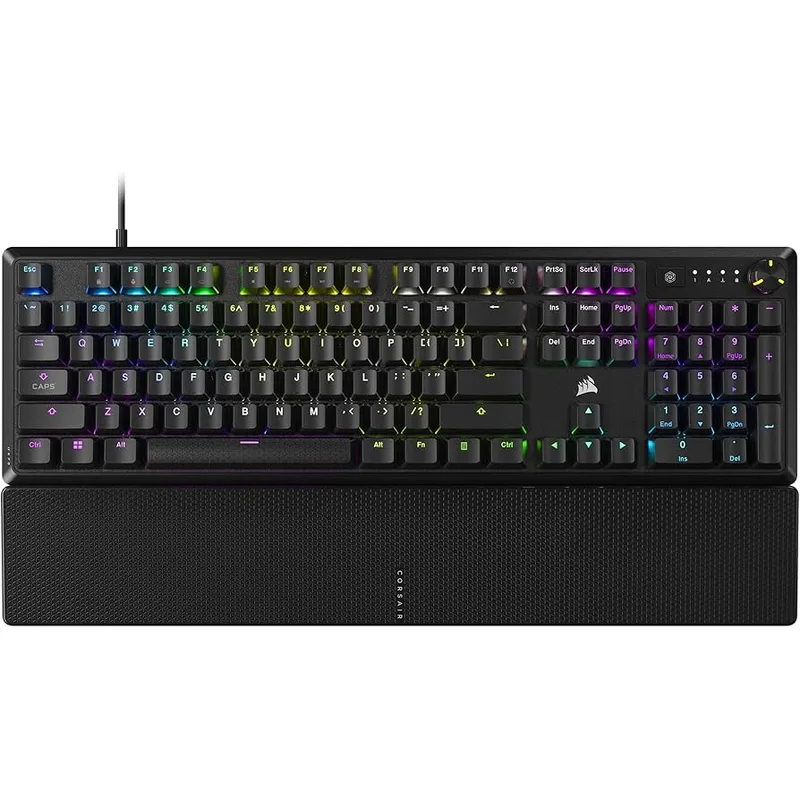
The Corsair K70 Core RGB is the most feature-complete gaming keyboard under $100. Corsair’s MLX Red switches come pre-lubed from the factory — not perfectly lubed like a $200 custom board, but noticeably smoother than dry stock linears on cheaper boards. The switches actuate at 45g with a 2mm actuation point and 4mm total travel.
SOCD (Simultaneous Opposite Cardinal Directions) support is notable at this price. In games like Valorant and Counter-Strike 2, pressing opposing directions simultaneously now has defined behavior through software rather than canceling out, which matters for movement tech in shooters.
The media control dial on the right side handles volume with single-knob precision — no Fn-key gymnastics for audio. Combined with dedicated media keys and a USB passthrough port on the back, the K70 Core punches above its price class. The only genuine limitation is ABS keycaps, which will develop a greasy shine on high-contact keys within 6–12 months.
Keychron C3 Pro — Best Value
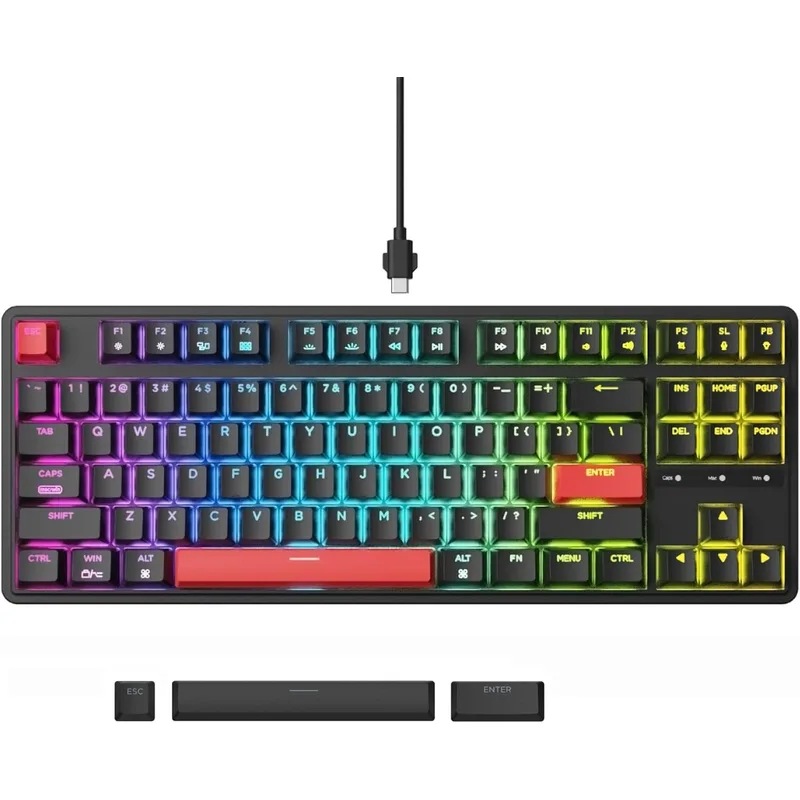
The Keychron C3 Pro is the keyboard that makes spending $100+ on a gaming board hard to justify. At $37, you get hotswappable 5-pin sockets, QMK/VIA firmware, a gasket mount, and double-shot PBT keycaps — a combination that costs $120+ from most gaming brands.
Hotswap is the headline feature. Drop in Gateron Yellows for a smooth 35g linear, or Boba U4s for a silent tactile — no soldering. The gasket mount adds noticeable flex versus a plate-mounted board, producing a “thock” sound profile that enthusiasts chase in keyboards three times the price. QMK/VIA makes every key fully remappable via browser — no software install required.
The tradeoff is software depth. Keychron doesn’t offer profile switching, per-key RGB fine-tuning, or game-mode detection. If RGB animations and G-Hub-style macros matter to you, look at the K70 Core instead.
HyperX Alloy Origins Core — Most Durable
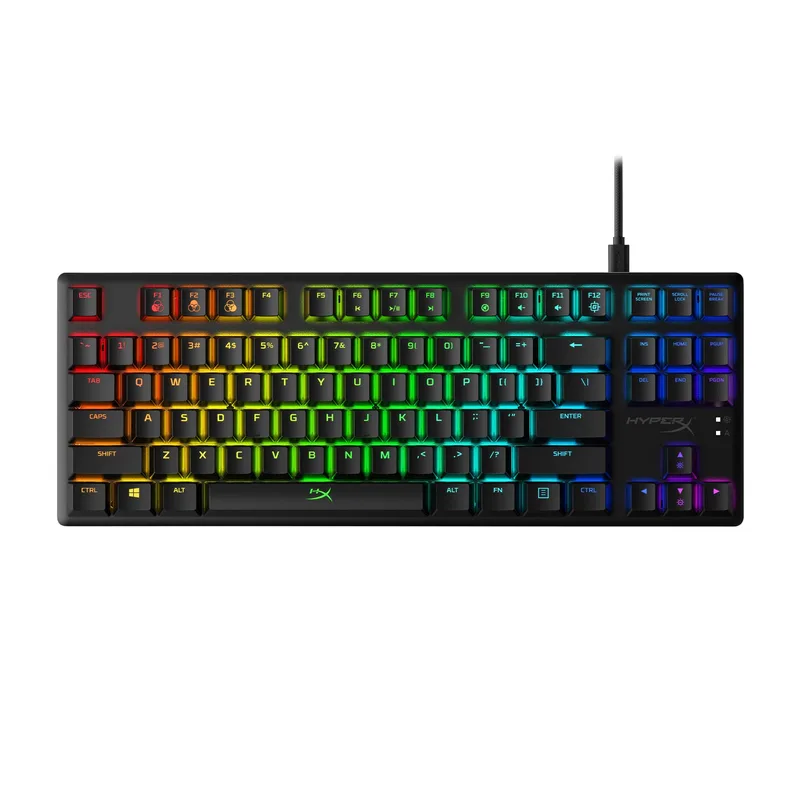
The HyperX Alloy Origins Core is built to last. The aircraft-grade aluminum top frame doesn’t creak or flex under aggressive typing, and double-shot PBT keycaps mean the legends won’t fade — both are durability advantages over the ABS-keycapped K70 Core.
HyperX Red linear switches actuate at 45g with a 1.8mm actuation point, slightly shorter than the MLX Red’s 2mm, which translates to marginally faster input registration. The full per-key RGB implementation through NGENUITY software covers standard lighting effects and game-reactive lighting, though the software itself is less polished than iCUE.
Three tilt angles (0°, 7°, 11°) and the detachable USB-C cable add practical flexibility. At $79.99, the Origins Core sits between the Keychron C3 Pro and K70 Core, and it’s the best choice if build quality and keycap longevity matter more to you than hotswap or media controls.
Logitech G413 TKL SE — Best for Esports
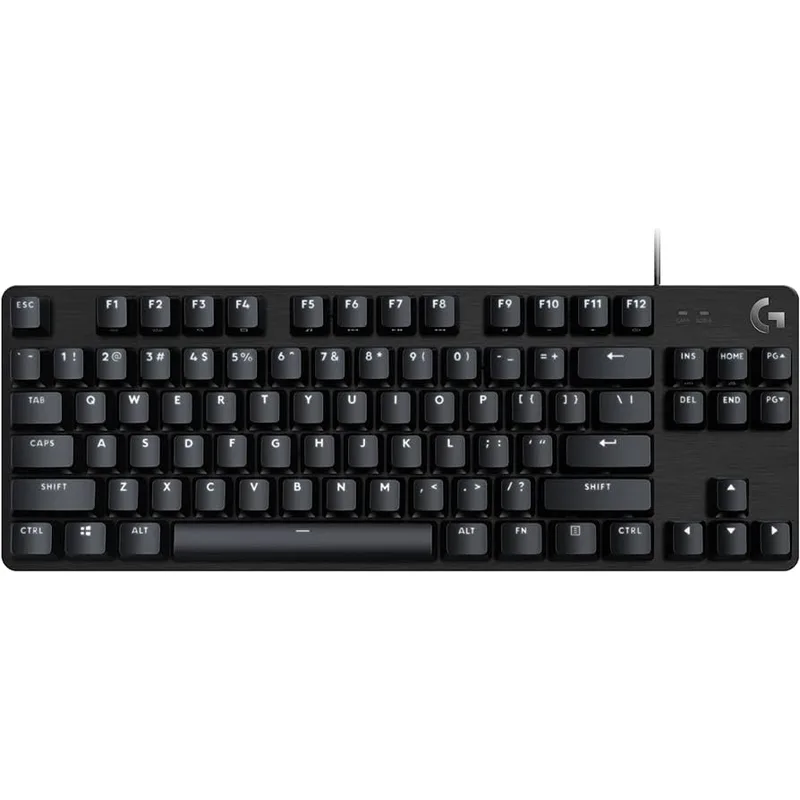
The Logitech G413 TKL SE is Logitech’s stripped-down competitive option at $50. Brushed aluminum top plate, PBT keycaps, GX Brown tactile switches — the bones are solid. White LED backlight (no RGB) keeps cost down.
GX Brown switches actuate at 45g with a light tactile bump at 2mm. They’re notably lighter than Cherry MX Brown at the same actuation point (Cherry requires 55g), which some players find too mushy for typing but snappy enough for gaming inputs. If you prefer a stiffer switch, Logitech’s GX Red version ($39.99 as well) offers 40g linear actuation.
The 6KRO anti-ghosting handles six simultaneous keypresses — enough for all practical gaming scenarios including modifier keys. Serious typists who need N-key rollover should look at the K70 Core or Origins Core.
SteelSeries Apex 3 TKL — Quietest Pick
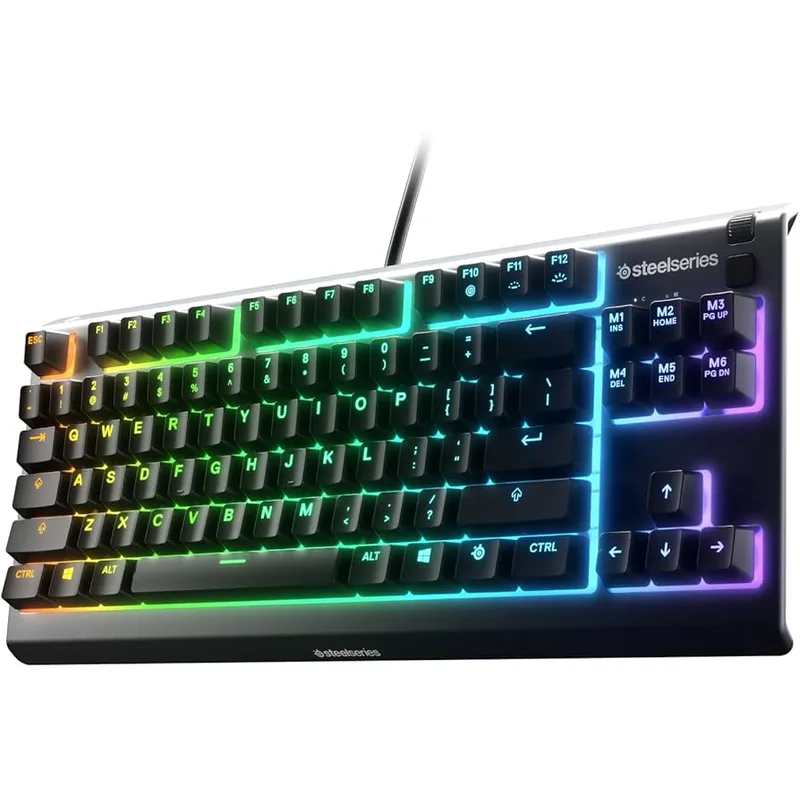
The SteelSeries Apex 3 TKL exists for one specific buyer: someone who needs near-silent input, spill protection, and spends as little as possible. At $34.99 it’s the cheapest board here, and the IP32 rating makes it the only keyboard in this roundup you’d trust near a desk drink.
QX2 Whisper Quiet switches are membrane, actuating with no audible click and minimal tactile feedback. Typing speed tests typically show 5–10% lower accuracy for first-time membrane users coming from mechanical, but most adapt within a week. The 8-zone RGB produces decent underglow effects, not the per-key customization you’d get from the other boards.
If you’re buying a keyboard for a dorm, shared apartment, or office and quiet is the top priority, the Apex 3 TKL delivers at a price where getting it wrong isn’t painful.
FAQ
Do you need a mechanical keyboard for gaming? No. Membrane keyboards like the Apex 3 TKL work fine for gaming. Mechanical switches offer more consistent actuation feel and typically longer rated lifespans (50–100 million keypresses vs. 5–20 million for membrane), but the performance difference in most games is not measurable in outcomes.
What switch is best for FPS gaming? Linear switches — specifically low-actuation-force linears like Gateron Yellow (35g), HyperX Red (45g), or MLX Red (45g) — are the standard for competitive FPS players. The smooth travel and no-bump actuation allows rapid re-actuation for WASD movement without switch resistance slowing key release.
Is hotswap worth paying for on a budget keyboard? Yes, if you think you’ll ever want to try different switches. The Keychron C3 Pro’s hotswap sockets let you experiment with any MX-compatible switch for $10–15 per switch set rather than buying a whole new board. For a $37 keyboard that can grow with you as preferences change, it’s a strong differentiator.
What’s the difference between TKL and 65% keyboards? TKL (tenkeyless) removes the numpad and keeps all standard keys including the arrow cluster and navigation row (Insert, Delete, Home, End, PgUp, PgDn). A 65% removes the function row as well. All five boards in this roundup are either TKL or full-size — none are 60/65% layouts. If you specifically want a 60% board for maximum desk space and portability, see our best 60% keyboards guide.
Can you use these keyboards for both gaming and typing? All five boards here handle typing competently. The Keychron C3 Pro’s gasket mount and PBT keycaps make it the most pleasant for extended typing sessions. The G413 TKL SE’s tactile GX Brown switches are also well-suited for mixed use.
The Bottom Line
For most gamers, the Keychron C3 Pro at $37 is the clearest choice — hotswap sockets, QMK/VIA, gasket mount, and PBT keycaps at a price that leaves room in your budget for a better mouse. If you want a polished full-size board with media controls and SOCD, the Corsair K70 Core RGB at $70 delivers features you’d normally pay $130 for. The HyperX Alloy Origins Core is the pick if build durability and lasting keycap quality matter most.