ASUS and GIGABYTE both showed new premium AM5 boards at CES 2026 in January — the ROG Crosshair X870E Glacial with AIO Q-Connector technology and GIGABYTE’s X870E AERO X3D WOOD pushing DDR5 overclocking to 9000 MT/s. At the mainstream level, B650 boards have quietly dropped to $120–$160 while X870/X870E boards settled into the $230–$350 range. This guide covers every factor that actually matters — chipset tiers, VRM quality, form factor, and connectivity — then picks the five boards worth buying in March 2026.
| Spec | MSI MAG B650 Tomahawk WiFi 8.8/10 | ASUS ROG Strix B650-A Gaming WiFi 8.5/10 | MSI MAG X870 Tomahawk WiFi 9/10 | MSI MPG X870E Carbon WiFi 9.3/10 | ASUS TUF Gaming Z890-Plus WiFi 8.7/10 |
|---|---|---|---|---|---|
| socket | AM5 | AM5 | AM5 | AM5 | LGA 1851 |
| chipset | AMD B650 | AMD B650 | AMD X870 | AMD X870E | Intel Z890 |
| form_factor | ATX | ATX | ATX | ATX | ATX |
| memory | DDR5 up to 6400+ MT/s (OC) | DDR5 up to 6400+ MT/s (OC) | DDR5 up to 8400+ MT/s (OC) | DDR5 up to 8400+ MT/s (OC) | DDR5 |
| m2_slots | 3x M.2 (PCIe 4.0) | 3x M.2 with heatsinks | 3x M.2 Gen5 | 4x M.2 Gen5 | 4x M.2 |
| networking | Wi-Fi 6E, 2.5G LAN | Wi-Fi 6E, 2.5G LAN | Wi-Fi 7, 5G LAN | Wi-Fi 7, 5G LAN, USB4 40Gbps | Wi-Fi 7, Thunderbolt 4, 2.5G LAN |
| Rating | 8.8/10 | 8.5/10 | 9/10 | 9.3/10 | 8.7/10 |
Prices change daily — tap Check Price for the current Amazon price.
Prices change daily — tap Check Price for the current Amazon price.
Motherboards at a Glance
| Board | Price | Chipset | Socket | Best For |
|---|---|---|---|---|
| MSI MAG B650 Tomahawk WiFi | Check price | B650 | AM5 | Budget Ryzen builds |
| ASUS ROG Strix B650-A Gaming WiFi | Check price | B650 | AM5 | Mid-range with aesthetics |
| MSI MAG X870 Tomahawk WiFi | Check price | X870 | AM5 | PCIe 5.0 + Wi-Fi 7 value |
| MSI MPG X870E Carbon WiFi | Check price | X870E | AM5 | High-end AMD / content creation |
| ASUS TUF Gaming Z890-Plus WiFi | Check price | Z890 | LGA 1851 | Intel Core Ultra 200S builds |
What Actually Matters When Choosing a Motherboard
Chipset Tiers: B650 vs. X870 vs. X870E
The chipset controls which features are unlocked at the platform level. For AMD AM5 in 2026:
B650 boards start at $120 and support PCIe 4.0 on the GPU slot, DDR5 up to roughly 7200 MT/s in practice, and PCIe 4.0 M.2 slots (some boards include one PCIe 5.0 M.2 via CPU lanes). B650 handles every Ryzen 9000 CPU including the 9800X3D. Networking varies by board — Wi-Fi 6E is the norm at $140+, but some budget B650 boards skip Wi-Fi entirely.
X870 is the 2025/2026 mainstream platform step-up. PCIe 5.0 on the GPU slot and Gen5 M.2 are guaranteed. Wi-Fi 7 is mandatory on every X870 board — AMD requires it for certification — along with at least 5G LAN. DDR5 ceiling rises to 8400+ MT/s overclocked. Boards start around $230.
X870E adds a second full-speed PCIe 5.0 x4 connection from the chipset (versus one on X870), enabling additional Gen5 M.2 slots to all run at full bandwidth simultaneously. USB4 support is standard, and VRM requirements are stricter. Boards start around $280. The X870E platform makes sense when you need four Gen5 M.2 slots or heavy USB4/Thunderbolt bandwidth.
For Intel Z890: this is the only chipset for LGA 1851 K/KF series overclocking. Thunderbolt 4 is common on Z890 boards, and DDR5 support reaches 8800+ MT/s with CUDIMMs on the 270K Plus. Budget chipset options don’t exist for Core Ultra 200K series — B860 and H870 don’t support overclocking.
VRM Quality: The Spec That Kills Budget Boards
The voltage regulator module (VRM) feeds power to the CPU. A weak VRM throttles performance under sustained load. Practical minimums by CPU:
- Ryzen 5 9600X (65W): Any B650 board with 8+ phases handles it comfortably.
- Ryzen 7 9800X3D (120W under PBO): Needs 10+ high-amp phases. The B650 Tomahawk’s 14+2+1 Duet Rail 80A is sufficient with headroom.
- Ryzen 9 9950X3D (170W): Look for 14+ phases at 80A or higher. X870E boards are the safer choice.
- Intel Core Ultra 265K (125W all-core): Needs at least 12 stages. The TUF Z890-Plus’s 16+1+2+1 configuration handles this without derating.
Form Factor: ATX, mATX, or ITX
ATX (305×244mm) is the right choice for most builds. It offers the most M.2 slots, PCIe expansion, and USB headers. Mid-tower and full-tower cases universally support ATX.
Micro-ATX cuts one PCIe slot and often one M.2 slot, with prices $20–$40 lower. Choose mATX only if your case doesn’t fit ATX or you genuinely won’t use the extra slots.
Mini-ITX (170×170mm) uses only 2 RAM slots instead of 4 and limits M.2 to one or two. Prices are paradoxically higher than ATX due to component density. Choose ITX only if the build specifically requires a small footprint.
Connectivity: M.2 Slots, USB, and Networking
M.2 slots: Three is the minimum for a practical gaming or workstation build — OS drive, game drive, and scratch/backup. Four is comfortable for prosumers.
USB rear I/O: USB 3.2 Gen 2 (10Gbps) covers all peripherals. USB 3.2 Gen 2x2 (20Gbps) or USB4/Thunderbolt 4 (40Gbps) matter only for high-speed external storage and docks. If you own a Thunderbolt 4 dock, verify the board has a TB4 port before buying.
Networking: Wi-Fi 6E at $150 covers gaming adequately. Wi-Fi 7 (mandatory on X870 boards and common on Z890) cuts latency in congested environments and supports multi-link operation — meaningful if your router supports Wi-Fi 7. 5G LAN on X870 boards outpaces the 2.5G LAN found on most Z890 boards at the same price.
Motherboard Deep Dives
1. MSI MAG B650 Tomahawk WiFi — Best Budget AMD
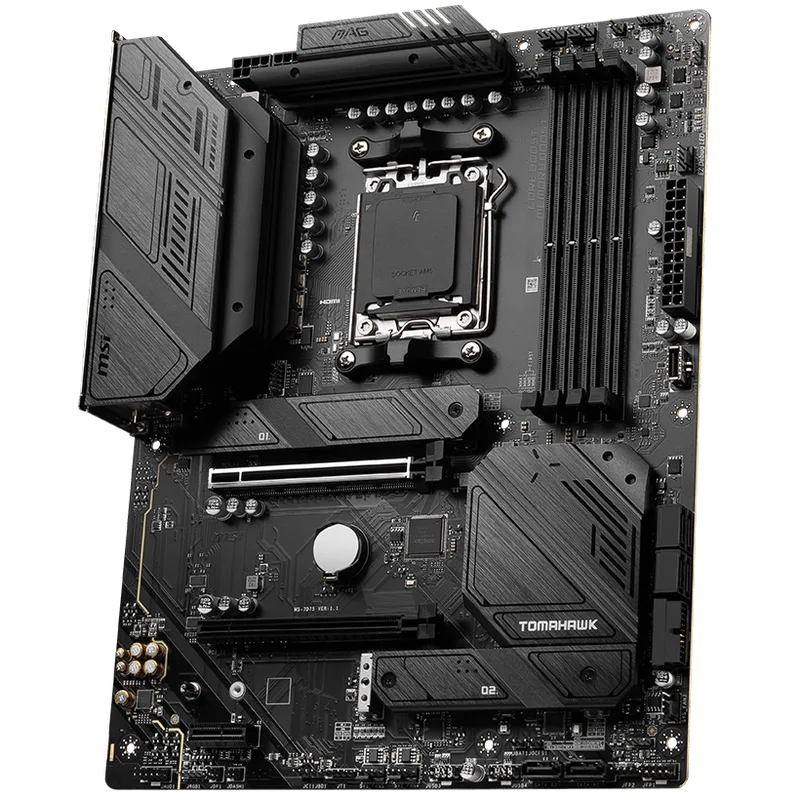
The B650 Tomahawk is the correct anchor board for any AM5 build that doesn’t need PCIe 5.0 GPU bandwidth — which is every gaming build in 2026. The 14+2+1 Duet Rail 80A VRM is substantially stronger than most $120–$140 boards, handling the 9800X3D under PBO without any measurable throttling in extended gaming or workload sessions.
Three M.2 slots cover the typical gaming setup without adapters. Wi-Fi 6E and 2.5G LAN are both included, which separates it from budget competition that often ships with Wi-Fi 5 or no wireless at all. Front-panel USB 3.2 Gen 2 header is present; the rear I/O tops out at Gen 2 (10Gbps), which is a B650 platform constraint, not a board-specific omission.
For Ryzen 5 9600X through Ryzen 9 9900X builds on a $700–$950 total budget, the B650 Tomahawk at $197 is the correct choice. The Ryzen 7 9800X3D also runs cleanly here — you won’t access PCIe 5.0 GPU bandwidth, but that’s not a real-world gaming bottleneck with any current GPU.
Socket: AM5 | DDR5 ceiling: 6400+ MT/s (EXPO) | PCIe GPU slot: 4.0 x16
2. ASUS ROG Strix B650-A Gaming WiFi — Best Mid-Range AMD
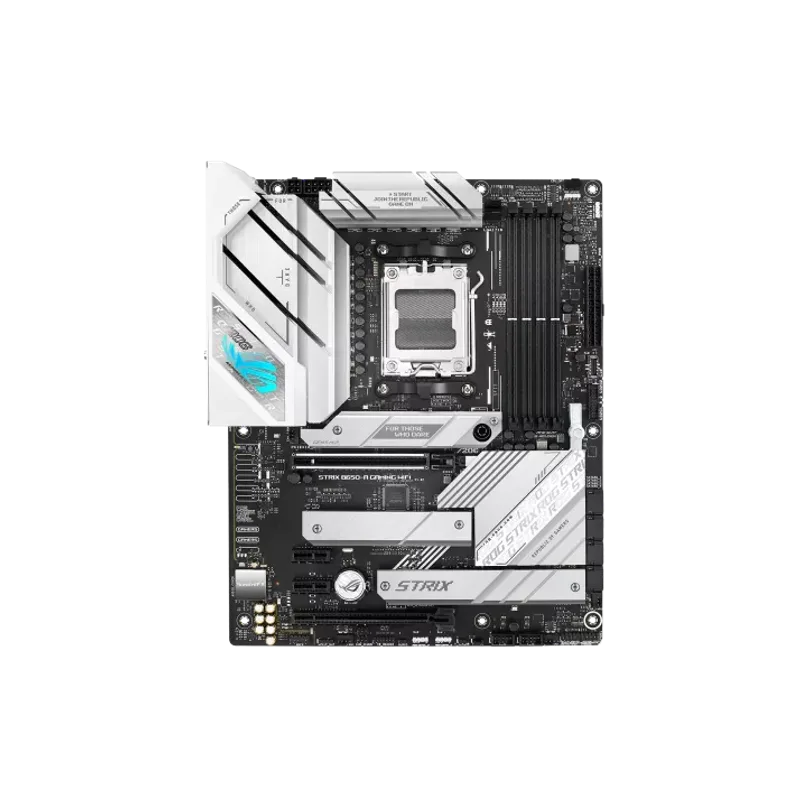
The ROG Strix B650-A is the choice when aesthetics matter. The white PCB, white heatsink shroud, and Aura Sync RGB headers integrate cleanly with white-themed windowed builds. On the functional side, you get USB 3.2 Gen 2x2 Type-C (20Gbps) on the rear panel — a meaningful upgrade for fast external SSD enclosures or Thunderbolt accessories that don’t need full 40Gbps.
The honest trade-off versus the Tomahawk: the VRM is lighter (12+2 stages vs. 14+2+1 at higher amperage), and you get the same three M.2 slots with no PCIe 5.0 anywhere. The $50 premium goes almost entirely toward build quality, appearance, and the USB 20Gbps port. If you care about visual presentation and use 20Gbps external devices, the B650-A earns its price. If you run a closed case and care only about CPU headroom, the Tomahawk at $197 is the stronger board.
Socket: AM5 | DDR5 ceiling: 6400+ MT/s (EXPO) | PCIe GPU slot: 4.0 x16
3. MSI MAG X870 Tomahawk WiFi — Best Value X870
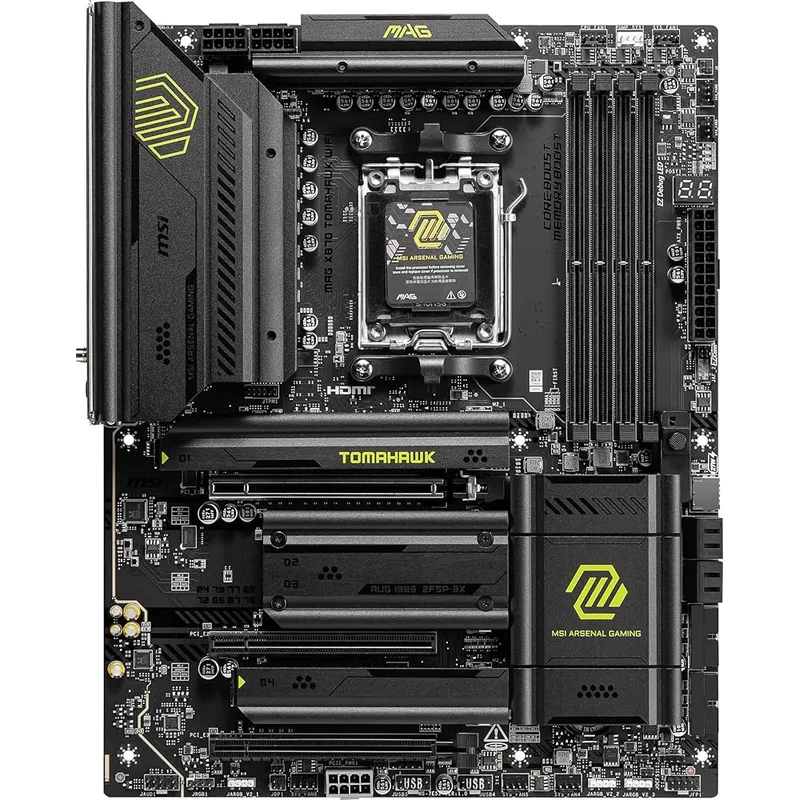
The X870 Tomahawk is the board Tom’s Hardware identified as the best value AMD AM5 gaming motherboard for early 2026, and the designation holds. Stepping from B650 to X870 buys you: PCIe 5.0 on the GPU slot, Gen5 M.2, Wi-Fi 7, 5G LAN, and DDR5 headroom to 8400+ MT/s. All five of those features are standard on every X870 board — there’s no trimmed-down X870 variant without Wi-Fi 7 or 5G LAN the way B650 boards vary widely.
In practical terms: PCIe 5.0 GPU bandwidth doesn’t bottleneck current GPUs (the RX 9070 XT and RTX 5080 don’t saturate PCIe 4.0 x16 today). What does matter is the Gen5 M.2 slot for next-generation NVMe drives, Wi-Fi 7 for wireless-first builds, and single USB4 40Gbps port for external storage. At $250, the X870 Tomahawk is the board to pair with a Ryzen 7 9800X3D if you want the platform to still be relevant in 2028.
Socket: AM5 | DDR5 ceiling: 8400+ MT/s (OC) | PCIe GPU slot: 5.0 x16
4. MSI MPG X870E Carbon WiFi — Best High-End AMD
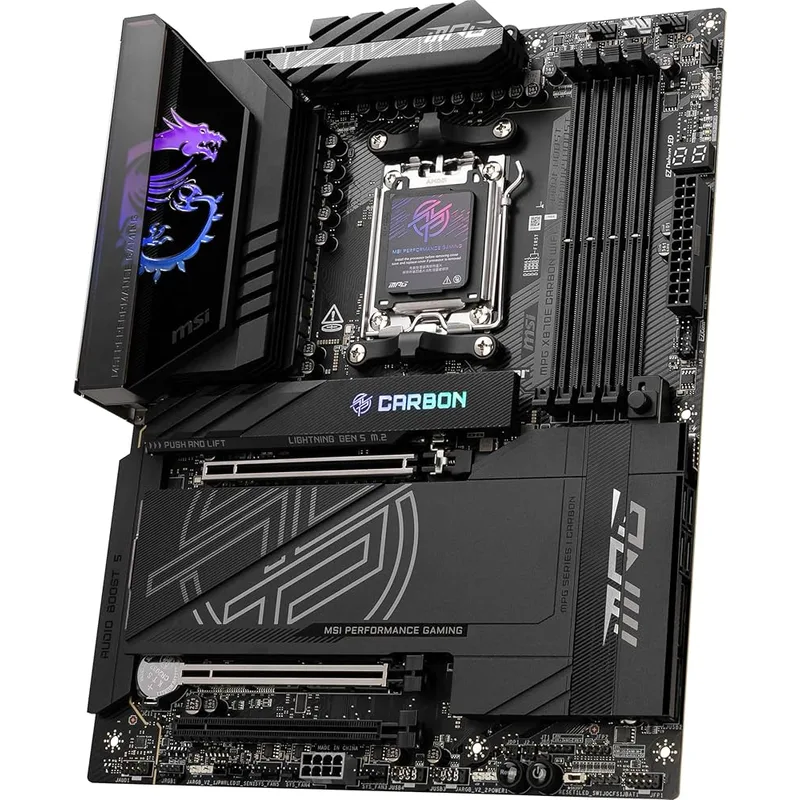
The X870E Carbon WiFi is built for builds where sustained power delivery and storage bandwidth matter. Its 18+2+1 x 110A VRM — the strongest current X870E configuration — handles the Ryzen 9 9950X3D at 170W without thermal throttling across extended workloads. Four Gen5 M.2 slots cover the prosumer storage setup: OS drive at PCIe 5.0, game storage at PCIe 5.0, video project scratch disk, and a backup NVMe — all running at simultaneous full bandwidth.
USB4 (40Gbps) rear I/O supports Thunderbolt 4 docks and external SSDs at spec, and Wi-Fi 7 with 5G LAN completes the connectivity picture. For a gaming-only build, the $90 premium over the X870 Tomahawk is genuinely hard to justify — you’ll never need four Gen5 slots or the extra VRM headroom. For a workstation-gaming hybrid running Blender, DaVinci Resolve, or video encoding alongside gaming, this is the right board.
Socket: AM5 | DDR5 ceiling: 8400+ MT/s (OC) | PCIe slots: PCIe 5.0 x16 + PCIe 5.0 x4
5. ASUS TUF Gaming Z890-Plus WiFi — Best Intel Z890
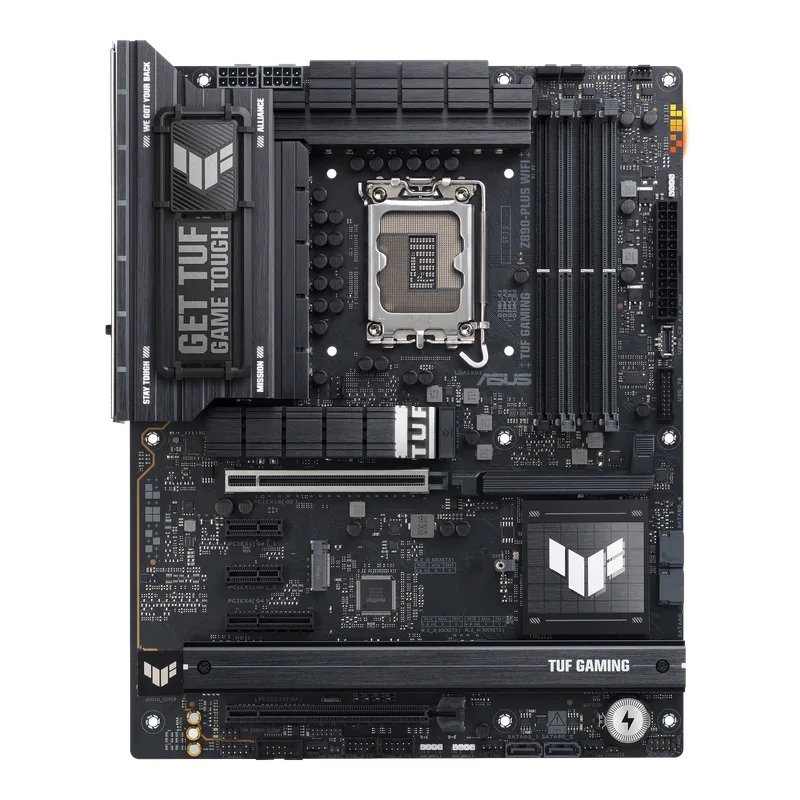
For builds centered on the Core Ultra 7 265K or the incoming Core Ultra 7 270K Plus (launching March 26), the TUF Z890-Plus is the right Z890 entry point. The 16+1+2+1 VRM handles 125W all-core draws without throttling, Thunderbolt 4 Type-C on the rear panel is a Z890 platform advantage that AM5 boards at this price don’t match, and four M.2 slots beat most B650 boards at a similar price.
Wi-Fi 7 is included. The notable concession against AMD X870 boards at $250 is LAN speed: 2.5G versus X870’s mandatory 5G. Intel’s LGA 1851 also has no budget chipset for K-series CPUs — Z890 is the floor, making the total platform cost meaningfully higher than AMD AM5. If you’re set on Intel, this board handles everything the platform offers without the premium of ROG or Maximus branding. For more LGA 1851 board options, see our best LGA 1851 motherboards guide.
Socket: LGA 1851 | Supported CPUs: Core Ultra 200S (245K, 265K, 270K Plus) | Thunderbolt: TB4 Type-C
Key Compatibility Checks Before You Buy
Socket matching is absolute. AM5 boards fit AMD Ryzen 7000, 8000, and 9000 series. LGA 1851 fits Intel Core Ultra 200S. There is no cross-compatibility.
DDR5 is the only option. All five boards here require DDR5. Budget for a 32GB DDR5-6000 kit ($70–$90) for AMD builds using EXPO profiles; 64GB for workstation configurations.
BIOS flashing for Ryzen 9000 on older B650 stock. B650 boards manufactured before 2025 may need a BIOS update before they recognize Ryzen 9000 CPUs. Both the MSI B650 Tomahawk and ASUS ROG Strix B650-A support USB BIOS Flashback without a compatible CPU. Check the retail box for a Ryzen 9000-ready sticker — most current stock is pre-flashed.
Verify M.2 lane sharing. If you’re populating all M.2 slots while using a GPU in the primary x16 slot, confirm that no M.2 slot shares PCIe lanes with the GPU. MSI and ASUS both document this clearly in their manuals; typically the bottom M.2 slot is the one that shares with a secondary PCIe slot.
Form factor fit. All five boards are ATX (305×244mm). Confirm your case supports ATX before ordering — mid-towers universally do, but compact SFF cases do not.
Chipset Tier Comparison
| Feature | B650 | X870 | X870E | Z890 (Intel) |
|---|---|---|---|---|
| PCIe GPU slot | 4.0 x16 | 5.0 x16 | 5.0 x16 | 5.0 x16 |
| M.2 Gen5 | Limited | Yes | Yes (multiple) | Yes |
| Wi-Fi 7 mandatory | No | Yes | Yes | No (varies) |
| USB4 / Thunderbolt 4 | No | Optional | Standard | Yes (Z890) |
| DDR5 ceiling (OC) | ~7200 MT/s | ~8400 MT/s | ~8400 MT/s | ~8800 MT/s |
| Starting board price | $120 | $230 | $280 | $200 |
Upgrade Path
B650 board (now): AMD has committed AM5 support through at least Zen 6. Your B650 board accepts every future Ryzen CPU with a BIOS update. PCIe 5.0 GPU bandwidth becomes a constraint only when next-generation GPUs saturate PCIe 4.0 x16 — likely a 2027 issue, not 2026. The B650 Tomahawk specifically has the VRM headroom to handle a Zen 6 chip if AMD maintains similar TDPs.
X870 Tomahawk (now): This is the AM5 board to hold for 4–5 years. PCIe 5.0 GPU, Gen5 M.2, Wi-Fi 7, and 5G LAN give headroom for every plausible upgrade — new GPU, faster NVMe, future Zen 6 CPU — without a board swap. The only reason to upgrade is if you need a fourth M.2 slot or a fuller USB4 implementation.
X870E Carbon (now): You’re at the top of the current AM5 tier. Upgrade only if AM5+ or a new socket generation offers meaningful IPC gains that require new platform features.
Z890 (Intel): Intel’s LGA 1851 will support Core Ultra 300S series (Panther Lake desktop, expected late 2026 or 2027). Two generations of CPU support is typical for Intel sockets historically. AMD’s explicit multi-year AM5 commitment provides more planning certainty.
FAQ
Q: Do I need an X870 board for the Ryzen 7 9800X3D? No. The 9800X3D runs on any AM5 board including B650 boards from $120. The B650 Tomahawk’s VRM handles it under PBO without throttling. You lose PCIe 5.0 GPU bandwidth and Gen5 M.2, but neither affects gaming performance with current hardware.
Q: What’s the real difference between X870 and X870E? X870E adds a second PCIe 5.0 x4 connection through the chipset, allowing multiple Gen5 M.2 slots to all operate at full bandwidth simultaneously. X870 boards typically have one or two Gen5 M.2 slots with one running at reduced speed when multiple slots are populated. For gaming builds, X870 is sufficient. X870E earns its premium with 4+ high-speed NVMe drives running concurrently.
Q: Can I use my existing DDR4 RAM? No. AM5 (B650, X870, X870E) and LGA 1851 (Z890) are both DDR5-only. DDR4 RAM is incompatible and cannot be adapted. Budget for a new DDR5 kit.
Q: Is Wi-Fi 7 worth paying for in a motherboard? Yes, if your router supports it. Wi-Fi 7 reduces latency by 4x versus Wi-Fi 6E in congested environments and supports multi-link operation — combining 2.4GHz, 5GHz, and 6GHz bands simultaneously. For a gaming PC connected wirelessly, Wi-Fi 7 (found on all X870 boards and most Z890 boards) is a meaningful step up from Wi-Fi 6E on B650 boards.
Q: Do B650 boards support Ryzen 9000 out of the box? Most current retail stock does. B650 boards manufactured before 2025 may require a BIOS update first. Both the MSI B650 Tomahawk and ASUS ROG Strix B650-A support USB BIOS Flashback for updating without a compatible CPU installed. Check the retail box for a Ryzen 9000 compatibility sticker before assuming you can skip the update.
The Bottom Line
For most AMD builds in 2026, the MSI MAG B650 Tomahawk WiFi at $150 is the correct answer — it handles every Ryzen 9000 CPU including the 9800X3D, includes Wi-Fi 6E and 2.5G LAN, and doesn’t pay for PCIe 5.0 features that don’t affect current gaming. If you want the full X870 feature set — PCIe 5.0 GPU slot, Gen5 M.2, Wi-Fi 7, 5G LAN — without paying flagship prices, the MSI MAG X870 Tomahawk WiFi at $250 is the strongest value in that tier. The MSI MPG X870E Carbon WiFi earns its $320 ask for prosumer-gaming hybrids where four Gen5 M.2 slots and a bulletproof VRM actually get used. Intel builders pairing a Core Ultra 265K or 270K Plus should start with the ASUS TUF Gaming Z890-Plus WiFi — Thunderbolt 4, solid VRM, and four M.2 slots at $240 make it the most complete Z890 option without ROG-tier pricing. For a broader comparison of gaming-focused boards across all platforms, see our best gaming motherboards roundup.