The sub-$600 GPU market in 2026 is more competitive than it’s been in years — AMD’s RDNA 4 lineup has forced NVIDIA to price its Blackwell cards aggressively, and Intel’s Arc B580 remains a genuine budget alternative with an unusually wide memory bus. Supply crunches have pushed some cards above their MSRP periodically, but the core picks below represent the best value when prices are at or near street-normal levels.
| Spec | Sapphire Pulse AMD Radeon RX 9070 16GB 9.1/10 | ASUS TUF Gaming GeForce RTX 5060 Ti 16GB OC Unavailable 8.8/10 | ASUS Dual GeForce RTX 5060 Ti 16GB OC 8.4/10 | PowerColor Hellhound Radeon RX 9060 XT 16GB 8.5/10 | ASRock Intel Arc B580 Challenger 12GB OC 8/10 |
|---|---|---|---|---|---|
| Architecture | RDNA 4 (Navi 44) | Blackwell (GB206) | Blackwell (GB206) | RDNA 4 (Navi 44) | Xe2-HPG (Battlemage) |
| VRAM | 16GB GDDR6 | 16GB GDDR7 | 16GB GDDR7 | 16GB GDDR6 | 12GB GDDR6 |
| Memory Bus | 256-bit | 128-bit | 128-bit | 128-bit | 192-bit |
| Boost Clock | 2540 MHz | 2692 MHz | 2572 MHz | 2700 MHz | 2740 MHz |
| TDP | 220W | 180W | 180W | 150W | 190W |
| Outputs | 2× HDMI 2.1, 2× DisplayPort 2.1 | HDMI 2.1b, 3× DisplayPort 2.1b | — | — | — |
| Rating | 9.1/10 | 8.8/10 | 8.4/10 | 8.5/10 | 8/10 |
Prices change daily — tap Check Price for the current Amazon price.
Prices change daily — tap Check Price for the current Amazon price.
Quick Picks
- Best overall AMD: Sapphire Pulse RX 9070 16GB — matches the RTX 5070 in rasterized workloads for $549 MSRP, with a 256-bit memory bus none of the RTX 5060 Ti cards can match
- Best NVIDIA: ASUS TUF RTX 5060 Ti 16GB OC — DLSS 4 and superior ray tracing make this the pick if you play RT-heavy titles like Cyberpunk 2077
- Budget pick: ASRock Intel Arc B580 Challenger 12GB — $299 with a 192-bit memory bus and 12GB GDDR6, better than any AMD or NVIDIA option at this price
Buying Guide: What to Look For Under $600
Memory Bus Width Matters More Than Clock Speed
The biggest spec divide in this price range isn’t architecture — it’s bus width. The Sapphire Pulse RX 9070 uses a 256-bit bus; every RTX 5060 Ti and RX 9060 XT uses a 128-bit bus. In GPU-memory-bandwidth-limited scenarios (4K, heavy texture mods, content creation), the 256-bit bus wins clearly. At 1440p in typical gaming, the gap narrows but still favors the RX 9070.
The Arc B580 uses a 192-bit bus at $299 — wider than anything NVIDIA or AMD offers below $450 — which is why it punches above its raw shader count in some workloads.
DLSS 4 vs FSR 4 vs XeSS 2
All three upscalers have narrowed the quality gap, but DLSS 4 on Blackwell still leads in supported titles. If your game library includes major NVIDIA-partnered titles (Cyberpunk 2077, Alan Wake 2, Star Wars Outlaws), DLSS 4 Multi Frame Generation can add 30-60% effective framerate on top of native rendering. FSR 4 works across AMD and NVIDIA hardware and has improved significantly over FSR 2, but peer reviews consistently rank DLSS 4 Quality mode ahead at equivalent settings.
XeSS 2 on the Arc B580 sits between FSR and DLSS in most comparisons — solid, but niche.
Target Resolution
- 1080p gaming: The RX 9060 XT 16GB at $449 is the sweet spot. Spending more for 1080p on a 1080p monitor nets diminishing returns.
- 1440p gaming: The RTX 5060 Ti 16GB and RX 9070 are both legitimate picks. The RX 9070 wins in rasterization; the RTX 5060 Ti wins with DLSS 4 and ray tracing.
- 4K: Neither the RTX 5060 Ti (128-bit bus) nor the RX 9060 XT (128-bit bus) is well-suited for native 4K. The RX 9070’s 256-bit bus handles DLSS/FSR-assisted 4K at 60+ fps in most titles, making it the only card in this roundup with legitimate 4K capability.
Power Supply Requirements
None of these cards are power-hungry compared to the tier above:
- RX 9070: 220W — a 650W PSU is sufficient
- RTX 5060 Ti: 180W — 600W PSU is sufficient
- RX 9060 XT: 150W — 550W PSU is sufficient
- Arc B580: 190W — 600W PSU is sufficient
If you’re shopping for a PSU to pair with one of these, a 750W 80+ Gold unit gives you headroom for a future GPU upgrade.
Detailed Reviews
1. Sapphire Pulse AMD Radeon RX 9070 16GB
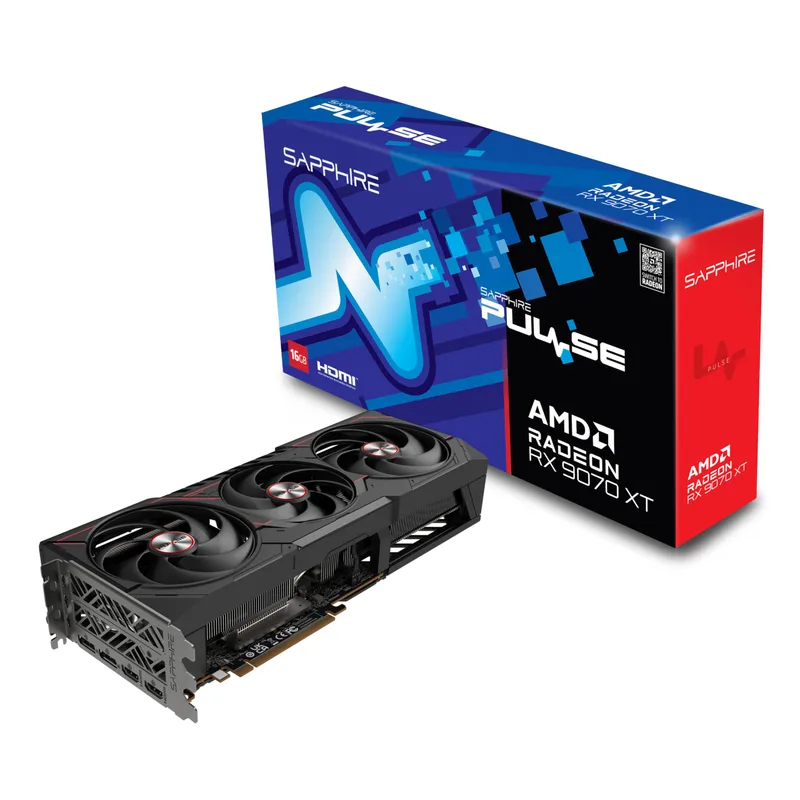
The Sapphire Pulse RX 9070 is the top pick in the sub-$600 segment when you can get it at or near MSRP. Its RDNA 4 architecture with 56 compute units delivers rasterized performance that benchmark comparisons from GamersNexus and Guru3D place between the RTX 5070 and RTX 5060 Ti — often closer to the 5070 in DX12 titles. The 256-bit memory bus is the key differentiator here: none of the RTX 5060 Ti models can match that bandwidth.
At $549 MSRP, the RX 9070 represents a genuine bargain. The catch is availability — demand has pushed prices above $600 on Amazon at times. Check the listing before assuming it’s under budget. The Sapphire Pulse cooler (dual fan, moderate profile) keeps temps in check at 220W TDP, with owners reporting junction temps in the 80-85°C range under sustained load — normal for RDNA 4.
Ray tracing is where the RX 9070 loses ground. In path-traced titles, the RTX 5060 Ti’s dedicated RT hardware and DLSS 4 give NVIDIA a clear edge. If most of your library uses FSR-compatible titles with rasterized rendering, the RX 9070 wins. If you’re running Cyberpunk 2077 in full Overdrive mode regularly, the RTX 5060 Ti is a better fit.
The RX 9070 is the better card for most 1440p gaming — if you can get it at MSRP.
2. ASUS TUF Gaming GeForce RTX 5060 Ti 16GB OC
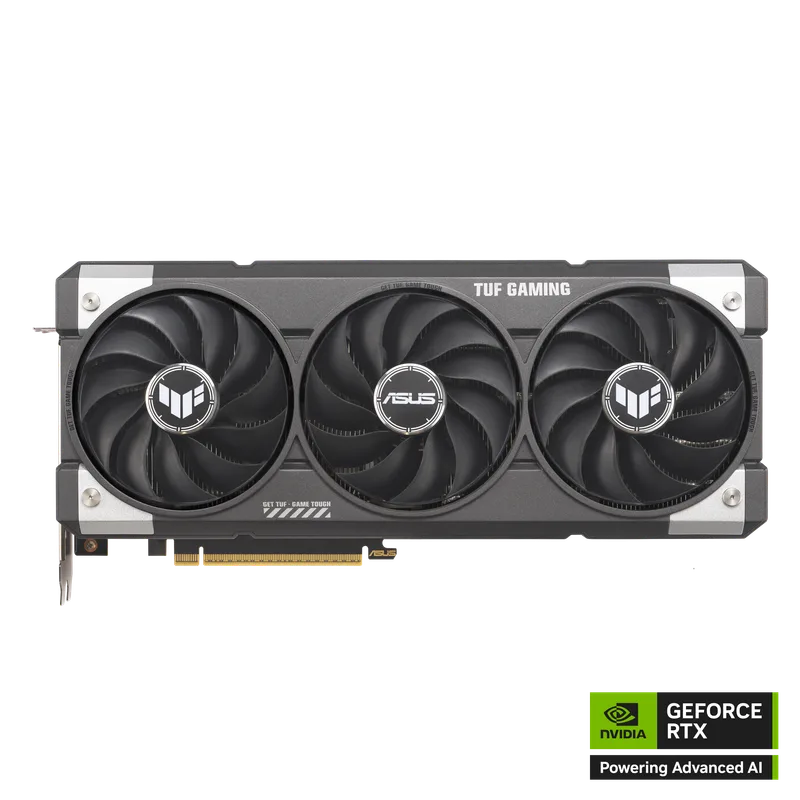
ASUS TUF Gaming GeForce RTX 5060 Ti 16GB OC
The ASUS TUF RTX 5060 Ti 16GB OC is the strongest NVIDIA card under $600 and the only pick in this roundup with DLSS 4 Multi Frame Generation. At 1440p, benchmarks show the RTX 5060 Ti averaging 142 FPS vs the RX 9060 XT’s 134 FPS in rasterized titles — a 5% lead — with a much wider margin in ray tracing workloads.
The 128-bit memory bus is the honest limitation. At 16GB GDDR7 with 448 GB/s bandwidth, it’s not a problem at 1440p, but GPU-memory-bandwidth-bound scenarios (4K rendering, heavy mods) expose the narrowness compared to the RX 9070’s 256-bit bus. For 1440p gaming, this rarely matters in practice.
ASUS’s TUF cooler runs cool and quiet. The 3.1-slot heatsink keeps GPU temps below 70°C even in extended gaming at 2692 MHz boost. Military-grade components and a 3-year warranty make it a reliable long-term purchase.
The main argument against the TUF at $599 is the RX 9070 at $549 — the AMD card wins in rasterization on average and costs $50 less. The RTX 5060 Ti counters with DLSS 4 and superior RT performance. If DLSS 4 and ray tracing are priorities, this is your card. If raw rasterization efficiency at 1440p matters more, the RX 9070 edges it out for $50 less.
3. ASUS Dual GeForce RTX 5060 Ti 16GB OC
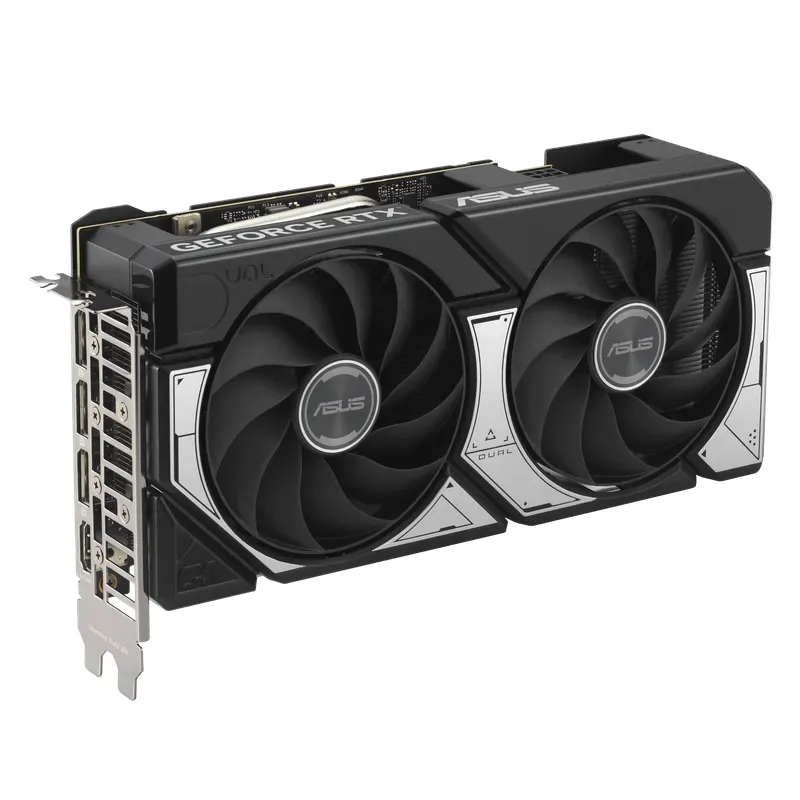
The ASUS Dual RTX 5060 Ti 16GB OC runs the same GB206 die as the TUF model with a lower boost clock (2572 MHz vs 2692 MHz) and a 2.5-slot cooler instead of the TUF’s 3.1-slot heatsink. In most gaming workloads, this makes no perceptible difference — the real-world FPS delta between these two cards is under 3% in typical titles.
At $479 compared to $599 for the TUF, the Dual is the smart buy for most buyers who want NVIDIA’s Blackwell stack without paying a premium for ASUS’s top-tier cooling. The smaller cooler runs approximately 5°C warmer under sustained load (typically 73-76°C vs the TUF’s 68-70°C), but neither card throttles.
The 2.5-slot design is a genuine advantage in compact builds. Cases like the Fractal Design North or NZXT H5 Flow can fit a 2.5-slot card more comfortably than a 3.1-slot behemoth. The 0dB fan mode under 50°C also makes the Dual noticeably quieter during desktop use.
Slickdeals listings have shown the Dual discounted to $429.99 for Prime members — at that price it becomes the best-value 16GB GDDR7 card in the segment. Watch for deals.
4. PowerColor Hellhound Radeon RX 9060 XT 16GB
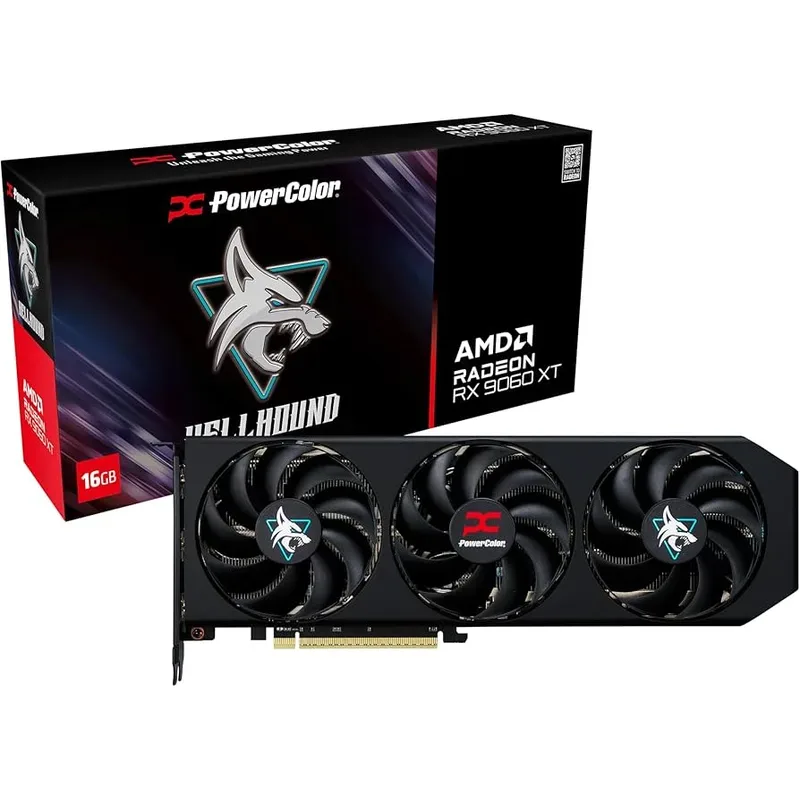
The PowerColor Hellhound RX 9060 XT 16GB is the most efficient card in this roundup by watts per frame at 1080p. At 150W TDP, it delivers 134 FPS average in rasterized 1080p gaming — within 5% of the RTX 5060 Ti — while consuming 30W less. Benchmark comparisons across titles like Spider-Man 2, Hogwarts Legacy, and Starfield show the gap narrowing further in AMD-optimized titles.
The 128-bit memory bus is identical to the RTX 5060 Ti, but GDDR6 instead of GDDR7 means lower bandwidth (roughly 360 GB/s vs 448 GB/s on the RTX 5060 Ti). At 1080p ultra and 1440p high, this doesn’t matter for average frame rate — but 1440p ultra textures can create occasional VRAM pressure that the 16GB pool absorbs better than 8GB alternatives.
GamersNexus’ review of the RX 9060 XT called out strong rasterization efficiency while noting ray tracing as its clear weak point — Cyberpunk 2077 path tracing at 1440p shows the RX 9060 XT at roughly 44 fps vs the RTX 5060 Ti’s 56 fps. If your game list is rasterization-heavy and you don’t use ray tracing, the $100 saved over the RTX 5060 Ti is significant.
PowerColor’s triple-fan Hellhound cooler keeps temps consistently under 70°C at 150W — it’s overkill for this card’s thermal requirements, which means it runs quietly with fans rarely spinning above 40% in typical gaming.
For 1080p 144Hz gaming or budget-conscious 1440p builds, the RX 9060 XT 16GB is the best dollar-per-frame card in this roundup.
5. ASRock Intel Arc B580 Challenger 12GB OC
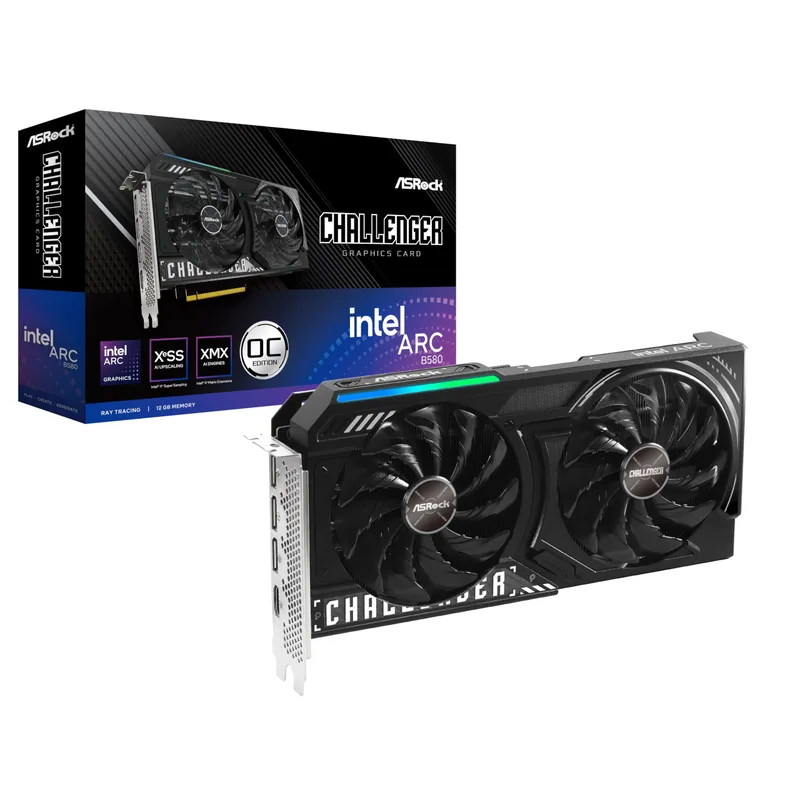
The ASRock Intel Arc B580 Challenger 12GB OC is the outlier in this roundup — it’s an Intel GPU in a market NVIDIA and AMD dominate, and it still earns its spot at $299 through a combination of 12GB GDDR6 and an unusually wide 192-bit memory bus.
The B580’s 20 Xe2 cores deliver 1080p ultra performance comparable to the last-gen RTX 4060 — not as fast as RDNA 4 or Blackwell, but fast enough for 60-100+ FPS in most modern titles at 1080p. At $299, this is the card for builders who need a capable GPU without blowing the budget on a $450+ discrete card.
The 192-bit bus is the story. Every AMD RX 9060 XT and every NVIDIA RTX 5060 Ti uses 128-bit at launch prices. The B580’s wider bus means better performance scaling with VRAM-heavy workloads like modded games (Skyrim/Fallout 4 with heavy texture packs, Star Citizen), and better texture streaming in general. 12GB of GDDR6 pairs well with that wider pipe.
XeSS 2 upscaling has matured considerably since Arc’s rocky B-series launch — in XeSS-supported titles, quality mode rivals FSR 4 balanced for image quality. Ray tracing remains the B580’s weakness, as Xe2’s RT implementation trails both RDNA 4 and Blackwell by 20-30% in RT-intensive scenarios.
Driver stability has improved substantially through 2025 and into 2026, but Intel’s ecosystem remains behind AMD and NVIDIA. DX9/DX11 legacy titles occasionally show compatibility issues. For a modern Steam library of DX12/Vulkan titles, this is much less of a concern.
If your budget tops out at $300, the ASRock B580 Challenger is the best-performing card available, and its 192-bit bus gives it longevity that narrow-bus cards at similar prices lack.
FAQ
Q: Is the RTX 5070 under $600?
No. The RTX 5070 starts at $609.99 on Newegg as of August 2026 — just over the budget. If you can stretch the budget slightly, the RTX 5070 is a meaningful step up from the RTX 5060 Ti, particularly for 4K gaming with DLSS 4. But within a strict $600 cap, the picks in this roundup are your options.
Q: Should I get the 8GB or 16GB version of the RTX 5060 Ti?
The 16GB version at $479-599. The 8GB RTX 5060 Ti (around $359-399) runs into VRAM limitations at 1440p high textures in modern titles — user reports on forums like r/hardware consistently show 8GB cards stuttering in texture-heavy scenes where 16GB models don’t. The $80-100 premium for 16GB is worth it for longevity.
Q: Can the RX 9070 actually do 4K?
With FSR 4 Quality mode enabled, the RX 9070 handles 4K gaming at 60+ FPS in most titles released through 2026. Its 256-bit memory bus and 16GB GDDR6 give it genuine 4K capability that the 128-bit RTX 5060 Ti lacks without heavy reliance on upscaling. For native 4K without upscaling, you need to step up to the RX 9070 XT ($699+) or RTX 5070.
Q: Is the Intel Arc B580 reliable now?
For modern DX12 and Vulkan titles: yes, substantially better than at launch. Intel’s driver team has addressed most of the instability issues from the Arc A-series era. Legacy DX9/DX11 titles remain more hit-or-miss — if your library includes older games, check the Intel Arc subreddit for compatibility reports on specific titles before buying.
Q: Does any card in this roundup support PCIe 5.0?
The AMD RX 9070 and RX 9060 XT both use PCIe 5.0 x16. The NVIDIA RTX 5060 Ti cards also use PCIe 5.0. The ASRock Arc B580 uses PCIe 4.0 — this is not a real-world bottleneck for gaming at the B580’s performance tier, but it is worth noting if you’re building a PCIe 5.0 platform.
The Bottom Line
For a strict $600 budget, the Sapphire Pulse RX 9070 is the top pick when available at MSRP — it trades blows with the RTX 5070 in rasterization and has the only 256-bit memory bus in this roundup. If DLSS 4 and ray tracing matter more than average rasterization performance, the ASUS TUF RTX 5060 Ti 16GB OC is the NVIDIA answer at $599 — $50 more than the RX 9070, with better ray tracing and DLSS 4 Multi Frame Generation to justify the premium. Builders on a tighter budget should look at the PowerColor Hellhound RX 9060 XT 16GB at $449 — it closes to within 5% of the RTX 5060 Ti in everyday 1440p gaming for $150 less.