The ASUS ROG Crosshair X870E Hero launched in September 2024 at $699 — a price that put it in the exclusive company of enthusiast boards few gamers would actually buy. By July 2026, the street price has dropped to $569.99, landing it $220 above B850’s best options rather than $450 above them. That narrowed gap changes who should seriously consider it.
The Crosshair X870E Hero targets extreme overclockers and builders who want the most storage bandwidth and connectivity on a single AM5 board. It is not for value-seekers. This review examines whether the $569 asking price is justifiable against the MSI MPG X870E Carbon WiFi at $349 and the Gigabyte X870E AORUS Master at $379 — both of which share the X870E chipset and much of the same feature set.
| Spec | ASUS ROG Crosshair X870E Hero 9.2/10 | MSI MPG X870E Carbon WiFi 9/10 | Gigabyte X870E AORUS Master 9.1/10 |
|---|---|---|---|
| Socket | AM5 (LGA1718) | AM5 (LGA1718) | AM5 (LGA1718) |
| Chipset | AMD X870E | AMD X870E | AMD X870E |
| Form Factor | ATX | ATX | ATX |
| VRM | 18(110A)+2(110A)+2(80A) Vishay SPS | 18+2+1 phases, 110A SPS | 16+2+2 phases, 110A SPS |
| Memory | 4x DDR5 DIMM, up to 256GB, DDR5-8600+ OC | DDR5 up to 8400+ MT/s OC, 256GB max | DDR5 up to 8200+ MT/s OC, 256GB max |
| Storage | 5x M.2 (3x PCIe 5.0 x4, 2x PCIe 4.0 x4) + SlimSAS | 5x M.2 (PCIe 5.0 primary + secondary) | 4x M.2 (PCIe 5.0 + PCIe 4.0 mix) |
| Connectivity | 2x USB4 40Gbps, 8x USB 10Gbps, Wi-Fi 7, 2.5G + 5G LAN | 1x USB 40Gbps, Wi-Fi 7, 5GbE LAN | 2x USB4 40Gbps, Wi-Fi 7, 5GbE LAN |
| Rating | 9.2/10 | 9/10 | 9.1/10 |
Prices change daily — tap Check Price for the current Amazon price.
Prices change daily — tap Check Price for the current Amazon price.
Full Specifications
| Spec | ASUS ROG Crosshair X870E Hero |
|---|---|
| Socket | AM5 (LGA1718) |
| Chipset | AMD X870E |
| Form Factor | ATX |
| VRM | 18(110A)+2(110A)+2(80A) Vishay SPS |
| Memory Slots | 4x DDR5 DIMM, up to 256GB |
| Max Memory Speed | DDR5-8600 (OC) |
| M.2 Slots | 5x total — 3x PCIe 5.0 x4, 2x PCIe 4.0 x4 |
| SlimSAS | 1x PCIe 4.0 x4 |
| PCIe Slots | 2x PCIe 5.0 x16 (SafeSlot) |
| Rear USB | 2x USB4 40Gbps Type-C, 2x USB 10Gbps Type-C, 6x USB 10Gbps Type-A |
| LAN | Intel 2.5GbE + Realtek 5GbE (dual) |
| Wireless | Wi-Fi 7 (802.11be), Bluetooth 5.4 |
| Audio | ROG SupremeFX, ESS ES9219 Quad DAC, 120dB SNR |
| Fan Headers | 6x |
| ARGB Headers | 3x |
| BIOS FlashBack | Yes |
| Q-Code Diagnostics | Yes |
| Price (July 2026) | ~$569.99 |
The Main Event
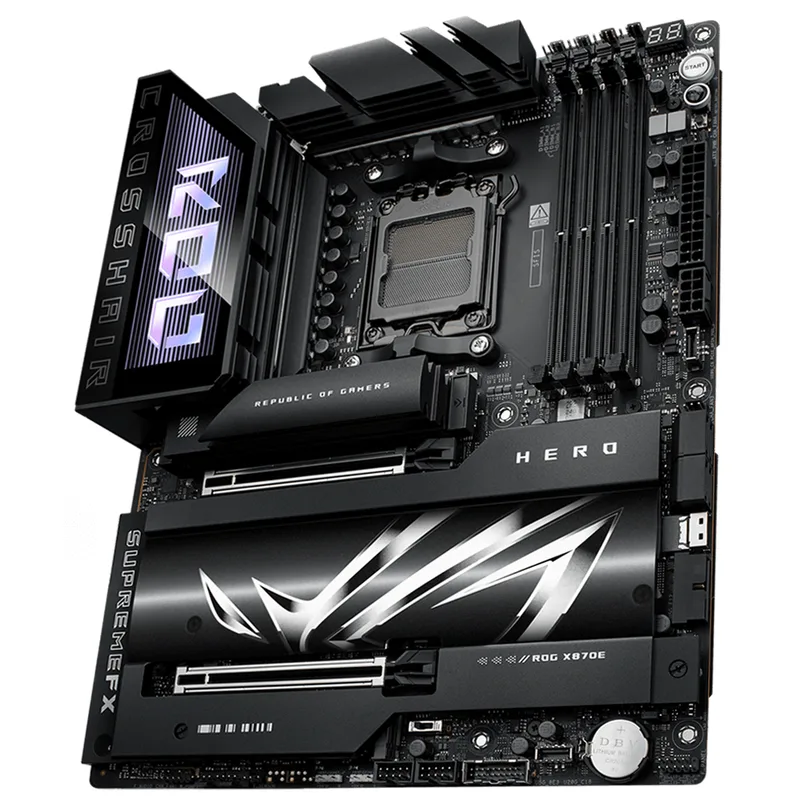
VRM: 22 Power Stages, No Thermal Ceiling
The X870E Hero’s VRM configuration is its most significant differentiator. The 18 primary Vcore stages are Vishay SIC654 Smart Power Stages rated at 110A each, joined by two 110A SoC stages and two 80A auxiliary stages. ASUS connects these to heatpipe-linked aluminum heatsinks that span the top of the board.
In practice, this translates to headroom that no Ryzen 9000 consumer chip can exhaust. The Ryzen 9 9950X running at its 170W stock power limit stresses the VRM to roughly 30–35% capacity. ASUS’s own overclocking team used this board to clock a 9950X to 7.54 GHz with liquid nitrogen, setting five world records in the process. That’s context, not a buying argument — but it illustrates why the VRM will never be a bottleneck.
For the typical Ryzen 7 9800X3D or 9950X build, VRM quality differences between the X870E Hero and its competitors are academic. The MSI MPG X870E Carbon WiFi’s 18+2+1 110A Renesas stages perform identically in practice at stock and PBO settings. The Hero’s advantage is theoretical ceiling, not measured performance difference.
Five M.2 Slots with Three PCIe 5.0 x4
Five M.2 slots is the X870E Hero’s headline storage specification, and the breakout matters:
- M.2_1 (key M): PCIe 5.0 x4 — up to 14,900 MB/s (WD Black SN8100 territory)
- M.2_2 (key M): PCIe 5.0 x4 — same bandwidth, dedicated to secondary Gen5 SSD
- M.2_3 (key M): PCIe 5.0 x4 — third full-bandwidth Gen5 slot
- M.2_4 (key M): PCIe 4.0 x4 — 7,400 MB/s (Samsung 990 Pro territory)
- M.2_5 (key E): PCIe 4.0 x4 — for additional storage
An additional SlimSAS connector supports another PCIe 4.0 x4 connection, useful for workstation-class storage arrays.
Three Gen5 M.2 slots is the relevant competitive number. The Gigabyte X870E AORUS Master at $379 offers four M.2 slots with a Gen5-capable primary; the MSI MPG Carbon matches five total slots with Gen5 on the primary and secondary positions. The X870E Hero’s advantage is having three PCIe 5.0 x4 slots — useful primarily for content creators or professionals running multiple Gen5 SSDs for video editing scratch disks.
For gaming builds pairing one Gen5 boot drive with one Gen4 game storage drive, the difference is zero.
Dual USB4 40Gbps: The Real Differentiator
This is what the X870E Hero’s premium actually purchases. Two USB4 40Gbps Type-C ports on the rear I/O is uncommon — at $569, the X870E Hero and the Gigabyte X870E AORUS Master ($379) are the boards in this price range that offer it. The MSI MPG Carbon WiFi at $349 includes only one USB4 port.
USB4 at 40Gbps supports:
- Thunderbolt 4 docks at full 40Gbps bandwidth (both ports simultaneously on the Hero)
- External GPU enclosures
- NVMe enclosures running at full PCIe 3.0 x4 speeds
- Future USB4 Gen3 peripherals at 80Gbps (with compatible devices)
For a workstation-adjacent build — one that connects a Thunderbolt 4 dock for display output and a high-speed external SSD enclosure simultaneously — dual USB4 is genuinely useful. For a dedicated gaming rig that never uses Thunderbolt peripherals, it’s irrelevant.
The remaining USB complement adds two USB 10Gbps Type-C and six USB 10Gbps Type-A ports. Six USB-A is comparatively sparse for a $569 flagship; the MSI MAG B850 Tomahawk MAX at $229 provides eight USB-A ports, though at a lower chipset tier.
Dual LAN and Wi-Fi 7
Intel 2.5GbE and Realtek 5GbE run simultaneously from separate controllers. The 5Gbps Realtek port is ASUS’s practical acknowledgment that most premium builders run fiber connections exceeding 2.5Gbps, without committing to the cost and heat of a 10GbE implementation (which appears on the ROG Crosshair X870E Extreme at $999+).
Wi-Fi 7 (802.11be) with the included Q-Antenna reaches theoretical 4.8x the throughput of Wi-Fi 6E according to ASUS’s documentation, with real-world benefits primarily manifesting in congested wireless environments with a compatible Wi-Fi 7 router.
ROG SupremeFX Audio with ESS Quad DAC
The X870E Hero’s audio section uses an ESS ES9219 Quad DAC rather than the Realtek ALC4080 found on most competing AM5 boards, including the MSI MPG Carbon and Gigabyte AORUS Master. The ESS implementation measures 120dB SNR on the front headphone jack output per ASUS’s published specifications.
For users running high-impedance studio headphones (300Ω Sennheiser HD 800, Beyerdynamic DT 1990) directly from the motherboard, the X870E Hero’s output is audibly cleaner than Realtek ALC solutions. For standard gaming headsets, USB headsets, or anyone using an external DAC/AMP, this distinction is irrelevant.
BIOS, AI Overclocking, and Core Flex
ASUS AI Overclocking analyzes the installed CPU and memory, then sets an optimal profile automatically. Combined with Core Flex technology — which independently manages per-core boost ceilings — it extracts additional single-core performance from the 9800X3D without manual voltage adjustments.
BIOS FlashBack permits BIOS updates without an installed CPU. Q-Code displays two-digit POST codes for rapid diagnosis of boot failures. PCIe Slot Q-Release Slim allows one-handed GPU removal — practical when reinstalling a 3.4-slot GPU like the ASUS ROG Astral RTX 5090 that blocks the PCIe latch.
The BIOS interface itself reflects years of ASUS refinement. Memory training for high-frequency DDR5 above 7200 MT/s is more reliable on ASUS AM5 boards than on most competitors — relevant for builders pairing the Hero with DDR5-7200 or DDR5-8000 kits targeting extreme memory overclocks.
The Alternatives
When to Choose the MSI MPG X870E Carbon WiFi
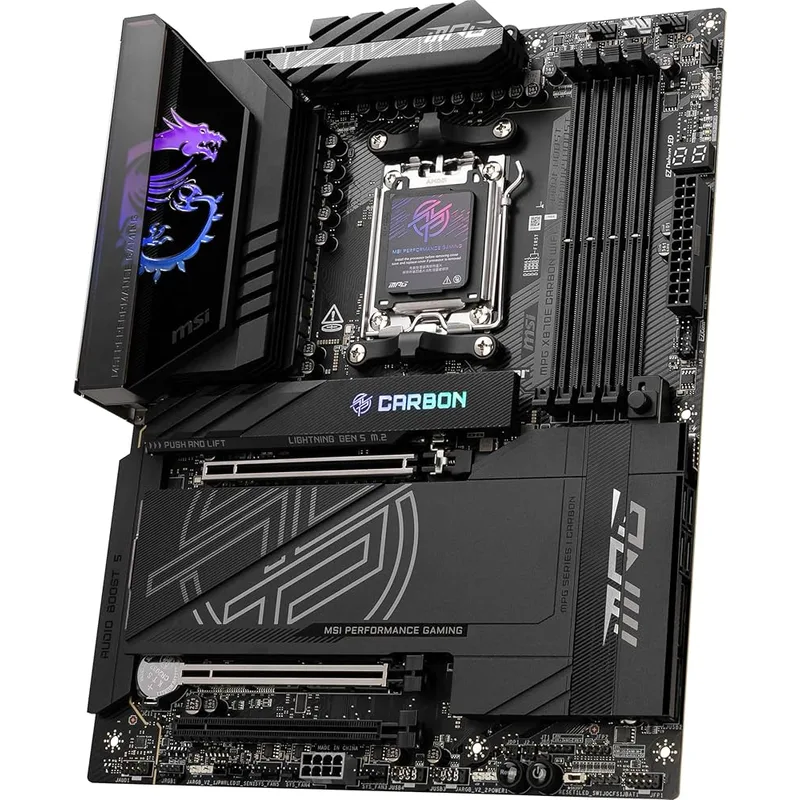
At $349 — $220 less than the X870E Hero — the MSI MPG X870E Carbon WiFi matches the Hero’s VRM quality (18+2+1 110A Renesas SPS) and five M.2 slots. For a builder running a Ryzen 9 9950X with PBO at its 200W power limit, the MPG Carbon’s VRM handles the load without thermal concerns, per owner reports and reviewer data.
The single USB4 port is the primary connectivity downgrade from the Hero. If you’re not simultaneously connecting two Thunderbolt 4 peripherals, the MPG Carbon’s single USB4 is functionally identical.
The $220 saved redirected to a GPU tier upgrade — say, from an RX 9070 to an RTX 5070 Ti — produces more measurable system-level improvement than the Hero’s dual USB4 and ESS audio. For most builds, the MPG Carbon is the more rational choice.
When to Choose the Gigabyte X870E AORUS Master
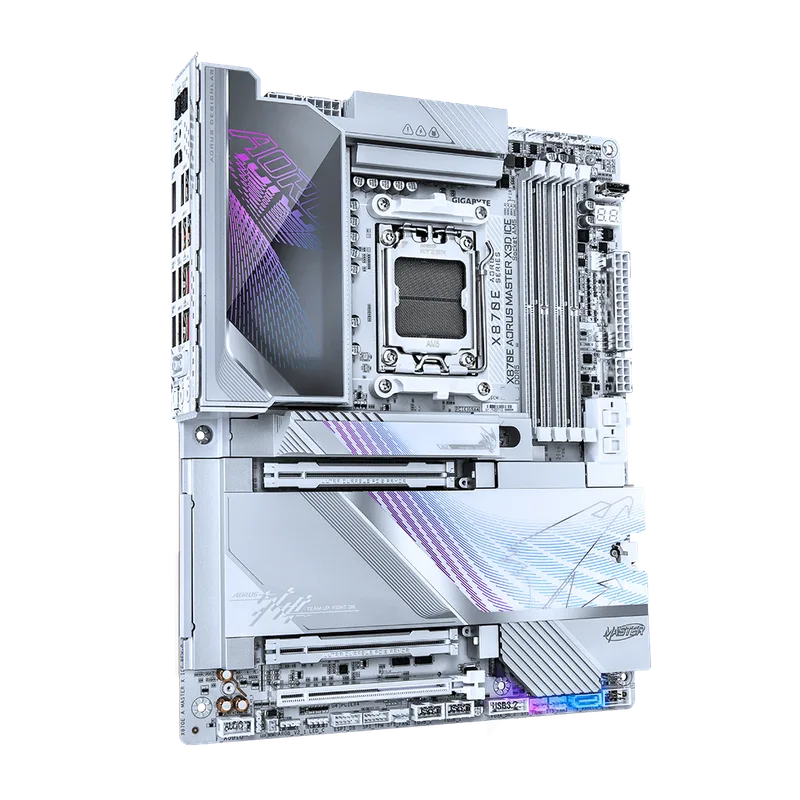
The Gigabyte X870E AORUS Master at $379 hits an interesting middle position: it matches the X870E Hero’s dual USB4 40Gbps and 5GbE LAN while costing $190 less. The trade-offs are one fewer M.2 slot (four vs five) and a 16-phase rather than 18-phase Vcore VRM.
The 16+2+2 VRM still uses 110A SPS stages and stays below 65°C under Cinebench workloads per reviewer findings — adequate for every consumer Ryzen 9000 CPU including the 9950X at 170W. Four M.2 slots covers the majority of high-end gaming and workstation configurations. Tool-free M.2 and PCIe installation via EZ-Latch is a practical quality-of-life feature missing on the Hero.
The AORUS Master also ships with a 5-year warranty vs ASUS’s 3-year — meaningful for a board at this price tier.
For builders who specifically want dual USB4 but won’t fill five M.2 slots, the AORUS Master at $379 undercuts the X870E Hero by $190 while matching its most distinctive connectivity feature.
Is the X870E Hero Worth $569?
The honest answer depends on your workflow:
Yes, if you:
- Need two simultaneous USB4/Thunderbolt 4 connections (external GPU + Thunderbolt dock, or two high-speed enclosures)
- Run three or more PCIe 5.0 NVMe drives (video production, data science)
- Use high-impedance headphones directly from the motherboard
- Want maximum BIOS refinement and AI OC for extreme DDR5 frequency chasing
No, if you:
- Run one Gen5 SSD and standard game library storage
- Don’t use Thunderbolt peripherals
- Are building primarily for gaming — frame rates are identical on any X870E board with the same CPU
- Can spend the $190–$220 savings elsewhere in the build
The Gigabyte X870E AORUS Master at $379 delivers the two features most buyers would actually use from the X870E Hero — dual USB4 and 5GbE LAN — at $190 less. The MSI MPG Carbon at $349 covers the remaining gap for builders who don’t need dual USB4 at all.
FAQ
Does the X870E Hero support Ryzen 9850X3D when it releases? AMD has committed to AM5 platform continuity through 2027. The X870E chipset is the highest tier available on AM5, and the Hero will support future Ryzen 9000 series CPUs including any 3D V-Cache variants via BIOS update. No new motherboard purchase needed.
Can the X870E Hero run DDR5-8000 memory? Officially, ASUS supports DDR5-8600 OC on the Crosshair X870E Hero with compatible kits. Reaching those speeds requires suitable memory ICs (Hynix A-die or Samsung B-die), good cooling, and manual BIOS tuning. DDR5-6000 CL30 is the practical sweet spot for gaming performance without stability tradeoffs.
Is X870E required for Ryzen 9 9950X overclocking? No — B850 boards with quality VRMs (MSI MAG B850 Tomahawk MAX, ASUS TUF B850-Plus) handle the 9950X at PBO without issues. X870E adds PCIe 5.0 across both M.2 and GPU lanes plus more USB lanes from the chipset, not fundamentally better CPU overclocking support.
What PSU is recommended with this board? A 1000W ATX 3.1 unit is appropriate for high-end builds using the X870E Hero (Ryzen 9 9950X + RTX 5090 or similar). The Corsair RM1000x at $160 or Seasonic Focus GX-1000 at ~$190 are strong matches for extreme configurations.
Does the X870E Hero have BIOS FlashBack without a CPU? Yes. BIOS FlashBack is located on the rear I/O panel. It allows flashing a BIOS update with USB power only — no installed CPU, RAM, or GPU required. This matters when buying a new board ahead of a Ryzen 9000 CPU with the latest AGESA firmware already loaded.
The Bottom Line
The ASUS ROG Crosshair X870E Hero is the most connectivity-complete X870E ATX motherboard available under $600 in July 2026. Its three PCIe 5.0 x4 M.2 slots, dual USB4 40Gbps ports, ESS Quad DAC audio, and 22-stage VRM represent the top of what AMD’s AM5 ecosystem currently offers outside the $999+ Extreme and MEG ACE MAX tier.
The challenge is that its closest competitors close most of those gaps at significantly lower prices. The Gigabyte X870E AORUS Master matches dual USB4 and 5GbE LAN at $379; the MSI MPG X870E Carbon WiFi matches VRM quality and M.2 count at $349. Builders who specifically need dual USB4 and premium onboard audio should pick the X870E Hero. Builders who simply want an excellent high-end AM5 motherboard should save $190–$220 and buy the AORUS Master instead.