X870E is AMD’s flagship chipset for Socket AM5 in 2026, supporting every Ryzen 7000, 8000, and 9000 series processor while mandating USB4 and PCIe 5.0 on both the CPU and chipset lanes. Prices have dropped substantially since launch — the MSI MPG X870E Carbon WiFi now starts around $349, putting dual USB4 and five M.2 Gen5 slots within reach of mainstream builders who were priced out a year ago.
| Spec | MSI MPG X870E Carbon WiFi Motherboard 9/10 | ASUS ROG Crosshair X870E Hero 9.5/10 | Gigabyte X870E AORUS Master 9.1/10 | ASRock X870E Taichi Unavailable 9.3/10 | MSI MEG X870E ACE MAX 9.4/10 |
|---|---|---|---|---|---|
| Socket | AM5 (LGA1718) | AM5 (LGA1718) | AM5 (LGA1718) | AM5 (LGA1718) | AM5 (LGA1718) |
| Form Factor | ATX | ATX | ATX | E-ATX | ATX |
| VRM | 18+2+1 phases, 110A SPS | 18+2+2 phases, 110A SPS | 16+2+2 phases, 110A SPS | 24+2+1 phases, 110A SPS | 18+2+1 phases, 110A SPS |
| Memory | DDR5 up to 8400+ MT/s OC, 256GB max | DDR5 up to DDR5-8600, 256GB max | DDR5 up to 8200+ MT/s OC, 256GB max | DDR5 up to 8200+ MT/s OC, 256GB max | DDR5 up to 8400+ MT/s OC, 256GB max |
| PCIe | PCIe 5.0 x16 + 5x M.2 (Gen5) | PCIe 5.0 x16 + 5x M.2 (three PCIe 5.0 x4) | PCIe 5.0 x16 + 4x M.2 (PCIe 5.0 + Gen4) | 2x PCIe 5.0 x16 + 1x M.2 Gen5 + 3x M.2 Gen4 | PCIe 5.0 x16 + 5x M.2 (all FROZR-cooled) |
| Connectivity | USB 40Gbps, Wi-Fi 7, 5Gbps LAN | 2x USB4 40Gbps, Wi-Fi 7, 5Gbps LAN | 2x USB4 40Gbps, Wi-Fi 7, 5GbE LAN | 2x USB4 40Gbps, Wi-Fi 7, 5GbE LAN | USB4 40Gbps, Wi-Fi 7, 10GbE LAN |
| Rating | 9/10 | 9.5/10 | 9.1/10 | 9.3/10 | 9.4/10 |
Prices change daily — tap Check Price for the current Amazon price.
Prices change daily — tap Check Price for the current Amazon price.
Quick Picks
- Best Value: MSI MPG X870E Carbon WiFi — 18+2+1 VRM, five M.2 Gen5 slots, USB 40Gbps, and Wi-Fi 7 at $349. Hard to beat at the price.
- Best Overall: ASUS ROG Crosshair X870E Hero — Dual USB4, three PCIe 5.0 M.2 slots, and AI OC at $579 for builds with multiple high-speed storage drives.
- Best Power Delivery: ASRock X870E Taichi — 24+2+1 phases at $480 if you plan to push a Ryzen 9 9950X hard.
Buying Guide: What Matters in an X870E Board
X870E vs X870 vs B850 — Which Chipset Do You Need?
X870E mandates PCIe 5.0 on both the primary GPU slot and at least one M.2 slot, plus dual USB4 at 40Gbps. X870 drops the mandatory dual USB4 and only requires PCIe 5.0 on the GPU slot. B850 skips USB4 entirely and uses PCIe 5.0 only on the GPU lane.
For a Ryzen 7 9800X3D gaming build under $2,000, B850 covers everything you need. X870E makes sense when you require dual USB4 for docks or enclosures, plan to run multiple Gen5 NVMe drives simultaneously, or intend serious overclocking of a Ryzen 9 9950X.
VRM Phase Count and What It Actually Means
Every board in this roundup uses 110A smart power stages. The difference is phase count: the ASRock Taichi’s 24+2+1 spreads load across more phases, reducing per-phase heat and voltage ripple. For a stock or lightly-tuned Ryzen 9 9700X, 16 phases is overkill. For sustained all-core AVX-512 loads on a 9950X or extreme memory overclocking, 20+ phases give meaningful stability headroom.
M.2 Slot Generations
PCIe 5.0 NVMe drives (Samsung 9100 Pro, WD Black SN8100) reach 14,000+ MB/s sequential read. PCIe 4.0 NVMe tops around 7,400 MB/s. The practical gap in gaming load times and desktop file operations is small — 5–8 seconds on a large game install copy — but matters for video editing workflows moving large ProRes or RAW files.
Boards with three or more PCIe 5.0 M.2 slots (ASUS Hero, MSI MEG ACE MAX) are better equipped as Gen5 drive prices normalize through 2026.
Memory Support and EXPO/XMP
All X870E boards support AMD EXPO and Intel XMP 3.0 profiles. DDR5-6000 CL30 remains the sweet spot for Ryzen 9000 — it maximizes Infinity Fabric frequency without manual tuning. DDR5-8000+ profiles on these boards require fine-tuned subtimings and are primarily relevant for memory benchmarking rather than gaming or productivity improvements.
Form Factor Considerations
Four of the five boards here are ATX (244×305mm), fitting standard mid-towers and up. The ASRock X870E Taichi is E-ATX (272×305mm), requiring cases like the Fractal Torrent, Lian Li O11 Dynamic EVO, or Phanteks P500A. Verify your case’s maximum motherboard width before purchasing.
Detailed Reviews
1. MSI MPG X870E Carbon WiFi — Best Value X870E
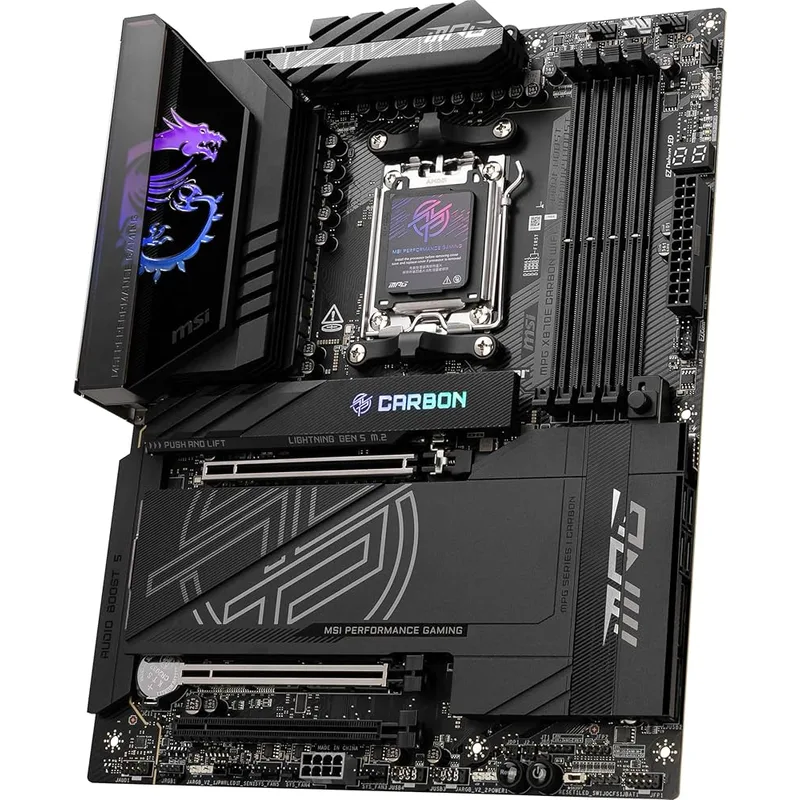
The MSI MPG X870E Carbon WiFi is the strongest argument for choosing X870E over B850 at a near-B850 price. At $349, it brings five M.2 slots — four with Gen5 capability — a genuine 18+2+1 VRM with 110A Renesas power stages, and USB 40Gbps Type-C rear I/O, all features absent from any B850 board at the same price.
Owner reports on the Slickdeals and HardForum threads that tracked this board’s $327–$349 deals consistently mention stable XMP/EXPO at DDR5-6000 CL30 without BIOS intervention. The 18-phase VRM holds peak temperatures around 59°C under sustained Cinebench R23 multicore loads on the 9950X, per real-hardware reports — adequate thermal headroom for all-day workstation use without active VRM cooling.
The primary trade-off is the audio subsystem. MSI uses a capable codec here, but it’s not the dedicated DAC you get on the MEG ACE MAX. Separate USB audio solutions or the onboard 3.5mm output handle most gaming and streaming use cases without complaint.
At $349, the MPG Carbon WiFi undercuts the Gigabyte AORUS Master ($379) while matching it on phase count and adding a fifth M.2 slot. For first-time X870E buyers who don’t need 10GbE or the absolute ceiling of VRM phases, this is where to start.
2. ASUS ROG Crosshair X870E Hero — Best Overall
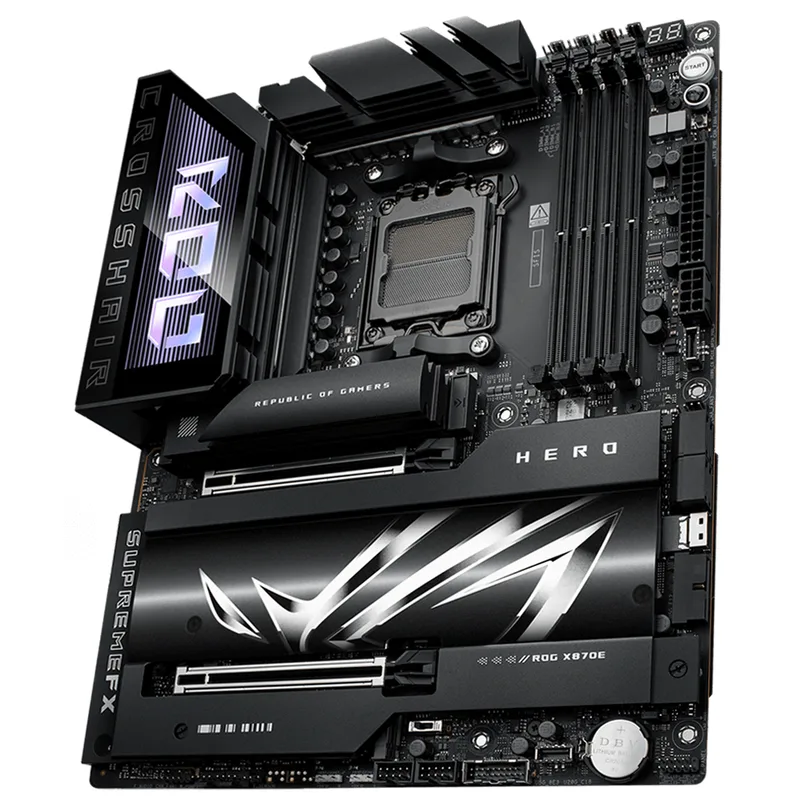
The ASUS ROG Crosshair X870E Hero holds Best Overall because it solves two real problems that cheaper X870E boards don’t: simultaneous dual USB4 connectivity and three PCIe 5.0 M.2 slots without lane-sharing. Read our full ASUS ROG Crosshair X870E Hero review for detailed benchmark and overclocking results.
Most $300–$400 X870E boards offer one USB4 port with a second sharing bandwidth to other USB 3.2 Gen2 ports under full load. The Hero places two independent USB4 controllers on separate lanes, so connecting both a Thunderbolt 4 dock and a 40Gbps NVMe enclosure simultaneously produces no throughput degradation.
ASUS’s AI Overclocking with Core Flex is the feature that separates this board for 9800X3D and 9950X users. Core Flex extends per-core boost allocation beyond AMD’s default limits on the high-efficiency cores — owner reports on Reddit’s r/Amd indicate consistent additional 50–100 MHz effective boost on the compute cores without requiring manual PBO adjustments.
The Q-Release Slim single-button GPU latch is a practical quality-of-life win that sounds minor until you’re swapping GPUs monthly. On heavy cards like the RTX 5080, it eliminates the flex-and-pry routine that risks PCB damage on standard latches.
The $579 price is $200 more than the MSI Carbon. Justify it when you need dual USB4 simultaneously occupied, three PCIe 5.0 M.2 drives running in parallel, or you’re extracting maximum performance from a 9950X under sustained multicore loads.
3. Gigabyte X870E AORUS Master — Best Mid-Range
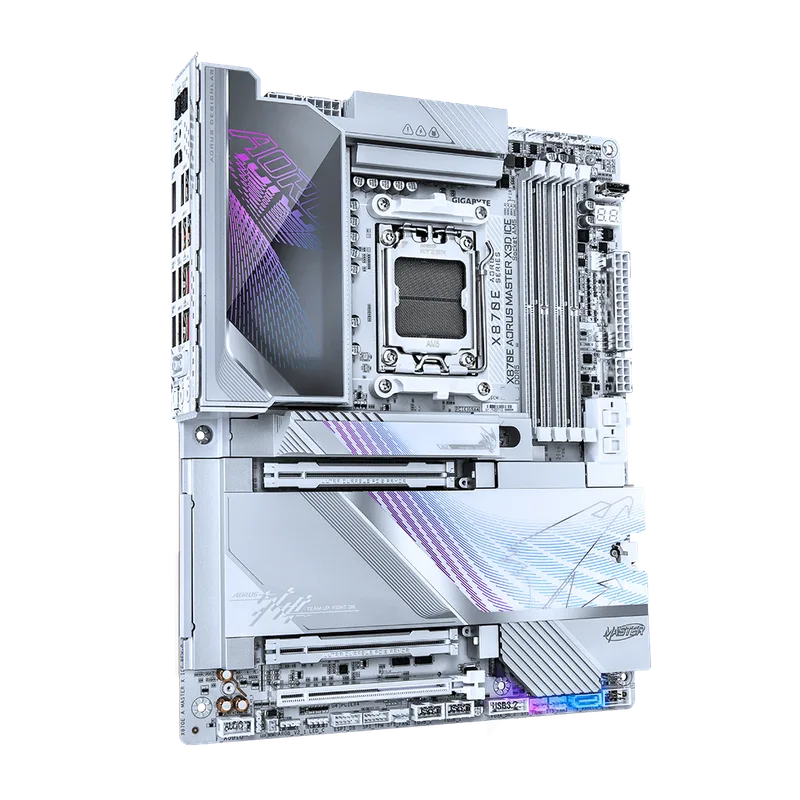
The Gigabyte X870E AORUS Master hits a specific gap: 5GbE wired networking at $379, which neither the MSI Carbon (5Gbps) nor the ASRock Taichi ($480) offers at a lower price. For homes with a multi-gigabit router and NAS, the jump from 2.5GbE to 5GbE doubles real-world network transfer speeds for large game library migrations and Time Machine backups.
The 16+2+2 VRM design with 110A stages and Gigabyte’s Thermal Armor heatsink keeps the power delivery below 65°C during sustained Cinebench loads according to TechPowerUp’s review — within the comfortable operating range for long workstation sessions. The 16 primary phases are enough for Ryzen 9 9950X operation at stock and moderate PBO offsets.
EZ-Latch is Gigabyte’s standout build feature: M.2 drives and the primary GPU slot release with a single lever press, no screwdriver needed. For builders who swap storage regularly or test multiple GPUs, the time savings accumulate quickly.
The 5-year warranty is the spec that separates the AORUS Master from MSI and ASUS offerings at this tier. Both competitors offer 3 years. For a board that may outlive three GPU generations, the extended coverage is a genuine differentiator.
The trade-off vs the MSI Carbon is one fewer M.2 slot (four vs five) at a $30 price premium. Choose the AORUS Master for 5GbE, 5-year coverage, and the EZ-Latch build experience. Choose the Carbon for a fifth M.2 slot at slightly lower cost.
4. ASRock X870E Taichi — Best Power Delivery
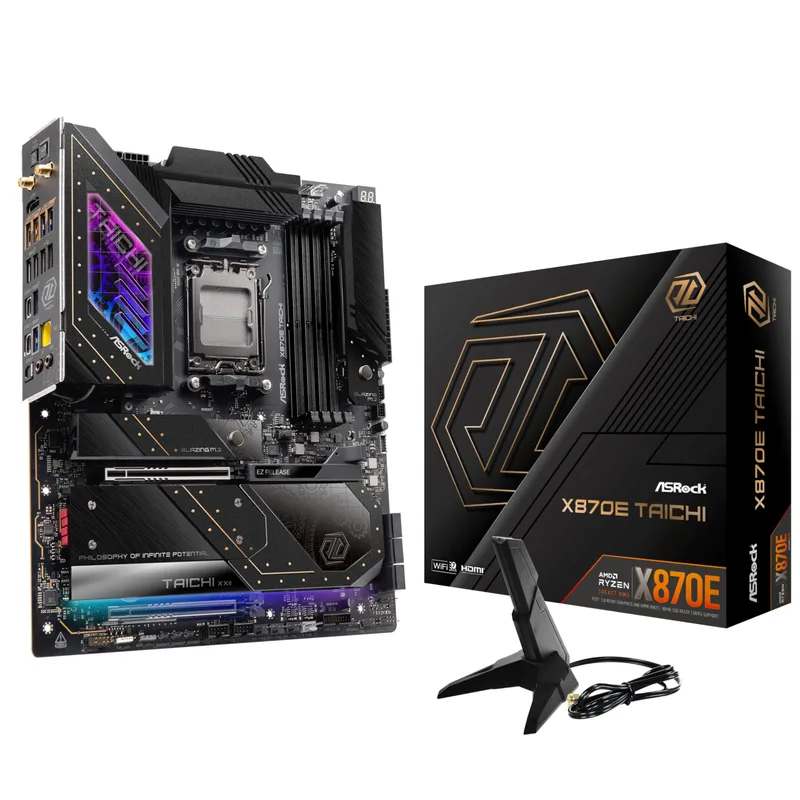
ASRock X870E Taichi
The ASRock X870E Taichi holds the highest VRM phase count among all X870E motherboards: 24+2+1 phases with 110A SPS stages. That’s not a paper spec — it means more thermal headroom, lower per-phase ripple, and better voltage stability during sustained AVX-512 loads on a Ryzen 9 9950X than any other board in this comparison.
The E-ATX form factor enables what the ATX design can’t: a second full-length PCIe 5.0 x16 slot without compromising bandwidth. That second slot supports AMD CrossFire, a dual-GPU compute setup for ML inference, or simply a future-proofed second GPU path without lane sharing with M.2 slots.
The rear I/O with 12 ports — 4x USB 2.0, 4x USB 3.2 Gen1, 2x USB 3.2 Gen2 Type-A, and 2x USB4 Type-C — handles professional workstations with audio interfaces, capture cards, external storage, and multiple USB-powered devices simultaneously without a hub.
The 21 USB ports (12 rear, 9 internal) are the highest count in this roundup. For streamers and content creators who use a capture card, external SSD, audio interface, stream deck, and multiple peripherals, the Taichi handles all of them natively.
The key constraint: verify your case before ordering. E-ATX requires at minimum 272mm of motherboard mounting width. Most mid-towers marketed as “ATX compatible” stop at 244mm. The Fractal Design North, NZXT H7 Flow, and standard Lian Li Lancool III all support E-ATX — the Lian Li Lancool 207 and Fractal Meshify 2 Compact do not.
5. MSI MEG X870E ACE MAX — Premium Pick
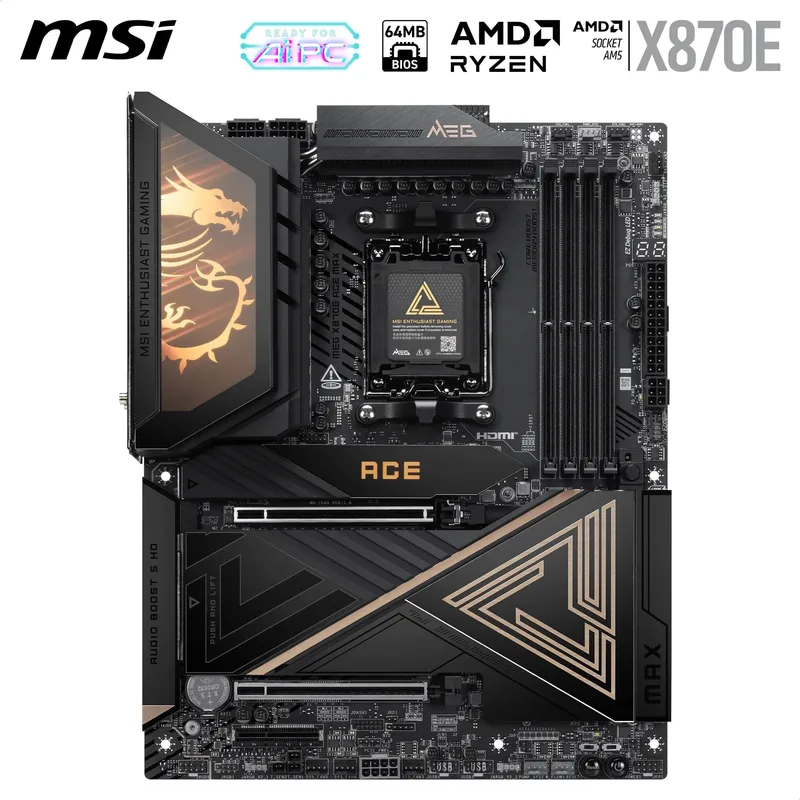
The MSI MEG X870E ACE MAX commands $649 for one feature the other four boards can’t match: 10GbE wired LAN. For professionals with a 10-gigabit NAS, editing suite server, or internal network switch, the real-world difference between 2.5GbE and 10GbE is 270 MB/s vs 1,100 MB/s in file transfers — a 4x improvement that changes whether editing directly from network storage is practical.
The five M.2 slots with individual FROZR heatsinks address a genuine problem with Gen5 NVMe drives. Drives like the WD Black SN8100 generate substantial heat under sustained sequential writes. Per MSI’s thermal data, covered M.2 slots maintain drive temperatures 15–20°C lower than uncovered slots under 10-minute sustained write workloads — preventing Gen5 drives from hitting their thermal throttle threshold.
The 60W USB Power Delivery Type-C port is a productivity quality-of-life feature. A MacBook Pro charges at full 60W speed from the rear I/O — one fewer cable between your desk and power strip when the board is your workstation backbone.
MSI’s dedicated audio DAC produces 32-bit/384kHz output. The measurable signal-to-noise ratio is higher than standard Realtek codecs, relevant for audiophile headphone use with high-impedance headphones like the Sennheiser HD 800 S or Beyerdynamic DT 1990 Pro.
The lane-sharing limitation between the PCIe x4 expansion slot and M.2_1 socket is the main design trade-off. Using both simultaneously is not supported — a practical issue for builds combining an NVMe drive in slot 1 with an add-in PCIe card. Plan your build layout before committing to the ACE MAX.
FAQ
Does X870E work with Ryzen 7000 and 8000 series CPUs?
Yes. X870E uses Socket AM5 (LGA1718), which is compatible with all Ryzen 7000, 8000, and 9000 series processors. The platform will require a BIOS update on older boards before a Ryzen 9000 CPU can POST — install the CPU, update via BIOS Flashback or a compatible CPU, then swap in the 9000 series chip.
Is X870E worth it over B850 in 2026?
It depends on what you need. B850 covers PCIe 5.0 on the GPU slot and basic M.2 support. X870E adds mandatory dual USB4 40Gbps, PCIe 5.0 on the chipset M.2 lanes, and typically a higher-phase VRM for overclocking headroom. For a gaming-only Ryzen 7 9800X3D build, B850 saves $100–$150 and loses nothing in practice. X870E pays for itself when you need USB4 docks, multi-Gen5 NVMe storage, or serious Ryzen 9 overclocking.
Which X870E board is best for the Ryzen 9 9800X3D?
Any board in this roundup handles the 9800X3D without issue — it draws 120W TDP, well within the capacity of even a 16-phase VRM. The ASUS ROG Crosshair X870E Hero is the preferred pairing due to ASUS’s AI OC Core Flex feature, which extends the 9800X3D’s per-core boost beyond AMD’s defaults automatically.
What memory speed should I run on X870E?
DDR5-6000 CL30 is the optimal setting for Ryzen 9000 — it synchronizes the memory and Infinity Fabric at 3000 MHz, the highest 1:1 ratio the CPU supports. Pushing beyond 6000 MHz requires either a 3:2 divider (which reduces latency gains) or manual subtiming work for marginal real-world improvement. The TechPowerUp review of these boards shows 0–2% gaming performance difference between DDR5-6000 CL30 and DDR5-8000 CL36.
Does lane sharing between M.2 and PCIe slots affect gaming?
In practice, no. Gaming GPUs operate on the primary PCIe 5.0 x16 slot directly from the CPU, which has no lane sharing. Lane sharing only occurs between chipset-connected PCIe x4 expansion slots and chipset M.2 sockets — relevant for add-in cards like capture cards or 10GbE NICs, not for GPU performance.
The Bottom Line
The MSI MPG X870E Carbon WiFi is the buy at $349 — 18+2+1 VRM, five M.2 slots, USB 40Gbps, and Wi-Fi 7 at a price that makes X870E accessible for mid-range AM5 builds. Step up to the ASUS ROG Crosshair X870E Hero at $579 if you need dual USB4 simultaneously active or three PCIe 5.0 M.2 drives running in parallel. The ASRock X870E Taichi is the right call for extreme overclocking builds in a large chassis — the 24-phase VRM has no peer on this platform. The MSI MEG X870E ACE MAX at $649 is justified only if 10GbE wired networking is a hard requirement.