Intel’s Z890 platform had a rough debut in late 2024, but the story looks very different in August 2026. Cumulative BIOS updates, Intel’s microcode patches for Arrow Lake, and the arrival of the Core Ultra 200K Plus refresh have turned LGA1851 into a genuinely competitive platform for both gaming and productivity — and Z890 motherboard prices have come down enough that you can build a capable Arrow Lake system for under $1,000. These five boards cover every use case from budget gaming builds at $199 to serious overclocking rigs at $479.
| Spec | ASUS ROG Strix Z890-E Gaming WiFi 9.2/10 | MSI MAG Z890 Tomahawk WiFi 9/10 | GIGABYTE Z890 Eagle WiFi7 Unavailable 8.5/10 | ASUS ROG Maximus Z890 Hero 9.4/10 | MSI MEG Z890 ACE 9.3/10 |
|---|---|---|---|---|---|
| Socket | LGA1851 (Intel Z890) | LGA1851 (Intel Z890) | LGA1851 (Intel Z890) | LGA1851 (Intel Z890) | LGA1851 (Intel Z890) |
| VRM | 18+2+1+2 power stages | 16+1+1+1 phases | 14+1+2 phases | 22+2+1+2 power stages | 24+1+2+1 DRPS (110A SPS) |
| Memory | DDR5 up to 8800MHz (OC) | DDR5 (OC supported) | DDR5 up to 8800MHz (OC) | DDR5 up to 9200MHz (OC) | DDR5 up to 9200+ MT/s (OC) |
| M.2 Slots | 7x M.2 (3x PCIe 5.0) | 4x M.2 (1x PCIe 5.0) | 4x M.2 (1x PCIe 5.0) | 6x M.2 (3x PCIe 5.0) | 5x M.2 (2x PCIe 5.0) |
| Connectivity | WiFi 7, 5Gbps LAN, 2x TB4 | Intel Killer WiFi 7, 5Gbps Killer LAN, 2x TB4 | WiFi 7, 2.5GbE LAN, USB4 (40 Gbps) | WiFi 7, 5Gbps + 2.5Gbps dual LAN, TB4 | WiFi 7, 10Gbps LAN, TB4 |
| Form Factor | ATX | ATX | ATX | ATX | ATX |
| Rating | 9.2/10 | 9/10 | 8.5/10 | 9.4/10 | 9.3/10 |
Prices change daily — tap Check Price for the current Amazon price.
Prices change daily — tap Check Price for the current Amazon price.
Quick Picks
- Best overall under $400: ASUS ROG Strix Z890-E Gaming WiFi — 7x M.2 slots with three PCIe 5.0 is unmatched at $329. The VRM handles the 285K at sustained all-core loads, and AI Overclocking learns your chip’s tolerances automatically.
- Best value: MSI MAG Z890 Tomahawk WiFi — $249 with Thunderbolt 4 on both Type-C rear ports and Intel Killer networking. If you don’t need more than four M.2 drives or a 10G NAS port, this is where most gamers should stop.
- Best budget Z890: GIGABYTE Z890 Eagle WiFi7 — $199 gets you a full Z890 chipset with PCIe 5.0, DDR5-8800 OC support, and WiFi 7. The right board for Core Ultra 205 or 265K stock builds that don’t need extreme VRM headroom.
Buying Guide: What to Know Before Picking a Z890 Board
Z890 vs B860 — do you need the flagship chipset?
Z890 is Intel’s unlocked chipset for LGA1851. You need it if you’re buying a K-series processor (285K, 265K, 245K, or the new 270K Plus and 285K Plus) and want to overclock above XMP, or if you need more than three M.2 slots, more chipset PCIe lanes for add-in cards, or Thunderbolt 4 built in. B860 is the budget alternative — it supports XMP memory profiles but locks CPU multiplier overclocking. If you’re buying the Core Ultra 245KF and running at stock, B860 saves money without real performance loss. If you’re buying a Plus-suffix Arrow Lake Refresh chip and want to push the limit, Z890 is the right foundation.
VRM tiers and what they mean for your chip
The Core Ultra 285K draws around 125W PBP (Processor Base Power) but can spike to 250W+ under sustained all-core AVX-512 loads with no power limits. Here’s how the boards in this roundup stack up:
| Board | VRM Stages | Sustained OC Headroom |
|---|---|---|
| MEG Z890 ACE | 24+1+2+1 (110A SPS) | Unrestricted 285K OC |
| ROG Maximus Z890 Hero | 22+2+1+2 | Full 285K OC, extended loads |
| ROG Strix Z890-E | 18+2+1+2 | Full 285K OC, typical OC workloads |
| MAG Z890 Tomahawk | 16+1+1+1 | 285K OC, heavier heatsink recommended |
| Z890 Eagle WiFi7 | 14+1+2 | 265K/245K stock, light OC |
The Tomahawk’s 16-phase VRM is adequate for the 285K at stock and moderate MCE overclocking, but owner reports on community forums consistently flag warmer VRM temps during extended renders compared to the Strix Z890-E’s 18-stage design.
M.2 slot reality check
All five boards support at least one PCIe 5.0 M.2 slot capable of 14 GB/s sequential reads. The Eagle WiFi7 and Tomahawk each have one PCIe 5.0 slot and three PCIe 4.0 slots. The Strix Z890-E and Hero each have three PCIe 5.0 slots. The MEG ACE has two. If you’re using a Gen5 SSD like the WD_BLACK SN8100 or Samsung 9100 PRO, you’ll want to confirm it lands in a PCIe 5.0 slot on whichever board you choose.
One critical caveat on the ROG Strix Z890-E: M.2 slots 3 and 4 share bandwidth with the primary PCIe x16 slot. When both are populated, the GPU drops to x8 electrically. In practice, the performance difference between x16 and x8 at PCIe 5.0 speeds is below measurement noise for current GPUs — but it’s a detail worth knowing if you’re planning a PCIe-sensitive workload.
Thunderbolt 4 vs USB4
Three boards in this roundup include Thunderbolt 4 (the Strix Z890-E, Tomahawk, Hero, and MEG ACE). The Eagle WiFi7 offers USB4 instead. USB4 and Thunderbolt 4 share the same 40 Gbps ceiling and both support DisplayPort Alt mode, so external SSDs and monitors work fine on either. The difference matters only for eGPU enclosures that require Thunderbolt certification — most consumer gaming docks do not.
Arrow Lake Refresh compatibility
Intel’s Core Ultra 200K Plus series (270K Plus, 285K Plus) launched in early 2026 and is fully compatible with all Z890 boards via BIOS update. GIGABYTE pushed Z890 Eagle WiFi7 firmware for the refresh series in mid-2026. If you’re buying a new board today, it will ship with the correct microcode already installed.
Detailed Reviews
ASUS ROG Strix Z890-E Gaming WiFi — Best Overall
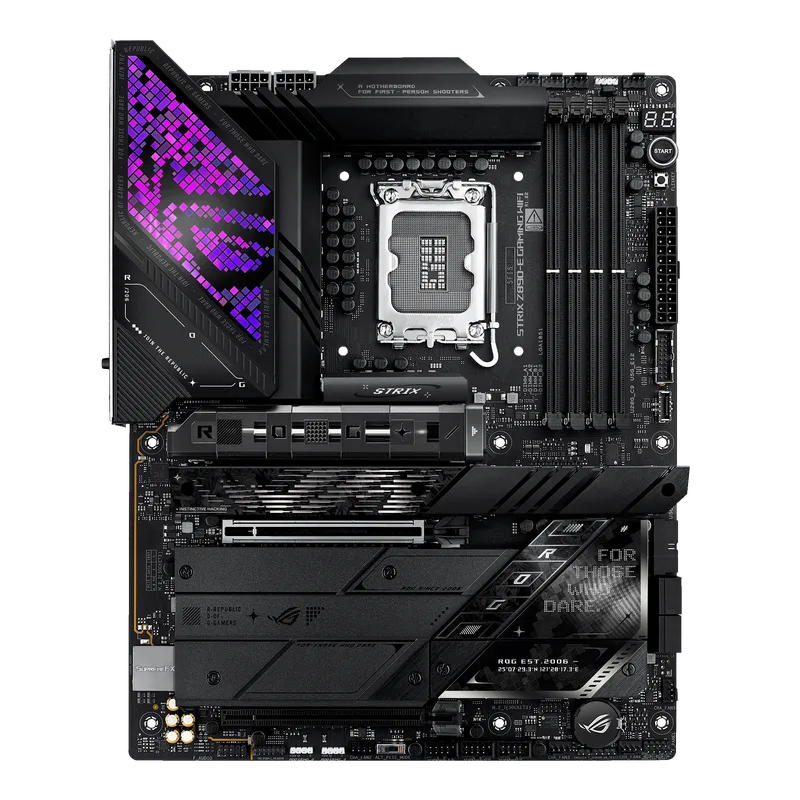
The ASUS ROG Strix Z890-E Gaming WiFi earns its position at the top of this roundup because it addresses the main complaint reviewers had about the Strix Z790-E: storage expansion. Seven M.2 slots — three of which are PCIe 5.0 — is a configuration previously reserved for $500+ boards. At $329, that density is genuinely unusual.
The 18+2+1+2-stage VRM is built around ASUS’s ROG-grade doublers and premium power chokes. According to the Newegg product spec sheet and peer review data from multiple outlets, it maintains stable VRM temperatures at full Core Ultra 285K all-core loads. The AI Overclocking feature runs locally on the board’s NPU, analyzing each boot’s stability data and tightening voltage offsets over time — no internet connection or ASUS account required.
Connectivity is strong for the price: WiFi 7 with tri-band 6GHz support, Bluetooth 5.4, 5Gbps LAN, and two Thunderbolt 4 ports on the rear panel. The main networking limitation is the absence of 10Gbps LAN. For most gamers transferring files over a home NAS, 5Gbps is enough — but content creators moving 4K RAW footage regularly will notice the ceiling.
The bandwidth-sharing behavior on M.2_3 and M.2_4 is the board’s only structural weakness. PCIe 5.0 x8 is still faster than PCIe 4.0 x16, so the GPU slot drop is not a performance regression for current hardware — but it is a constraint to plan around if you’re building a storage-heavy workstation.
For $329, the ROG Strix Z890-E is the most well-rounded Z890 board available.
MSI MAG Z890 Tomahawk WiFi — Best Value
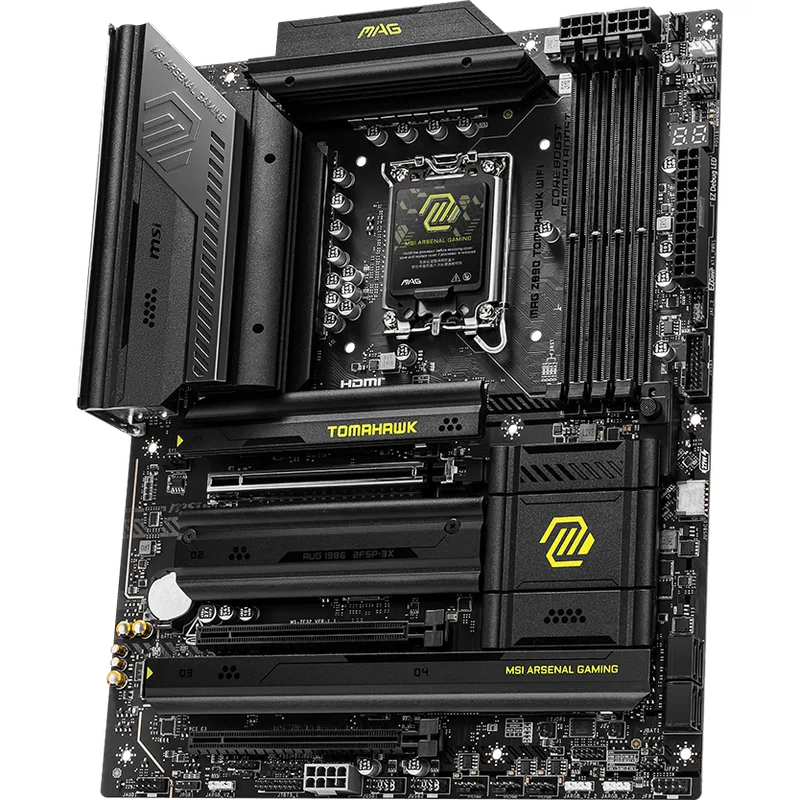
The MSI MAG Z890 Tomahawk WiFi has been the default recommendation for mid-range Intel builds since its Z490 ancestor established the formula. The Z890 version continues that tradition at $249 — $80 less than the Strix Z890-E with no meaningful difference in gaming frame rates.
The 16+1+1+1-phase DUET VRM design uses per-phase doublers to reach 16 effective CPU voltage phases. Per community forum discussion on the Tom’s Hardware boards and PCPartPicker owner reports, it handles the Core Ultra 285K at stock settings and moderate MCE profiles without issue. Only at sustained 250W+ AVX-512 loads does VRM temperature become a consideration — and at that point, the question is whether you should be running a 285K that hard on any board without active VRM cooling.
MSI’s Intel Killer networking combination is a genuine differentiator at this price. The Killer 5G LAN and Killer WiFi 7 modules share a dedicated Killer Intelligence Engine coprocessor that classifies network packets by application and prioritizes real-time game traffic. In practice, this reduces latency spikes during background downloads without requiring manual QoS configuration in your router.
Two Thunderbolt 4 ports on the rear panel is unusual at $249. Most Z890 boards at this price include one TB4 port or skip it entirely. The Tomahawk’s implementation supports DisplayPort 2.1 Alt mode, 40 Gbps data, and 100W Power Delivery.
The one storage trade-off: only one PCIe 5.0 M.2 slot. If you’re pairing this board with a Gen5 SSD like the WD_BLACK SN8100, it needs to go in slot 1. The remaining three M.2 slots are PCIe 4.0, which is plenty for most secondary and game-drive applications.
GIGABYTE Z890 Eagle WiFi7 — Best Budget
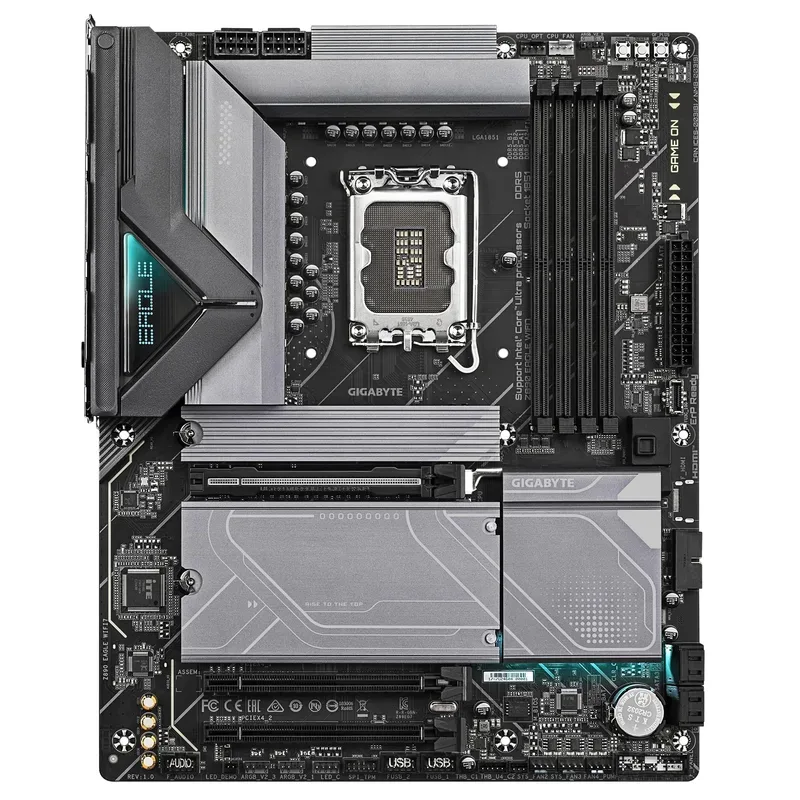
GIGABYTE Z890 Eagle WiFi7
The GIGABYTE Z890 Eagle WiFi7 makes a compelling case for Z890 over B860 at the entry level. At $199, it’s only $10 more than some B860 boards while delivering the full Z890 feature set: unlocked overclocking, PCIe 5.0 x16 for the GPU, and DDR5-8800 OC support.
The 14+1+2-phase VRM is the limiting factor for aggressive overclocking. Based on GIGABYTE’s own VRM spec sheets and ThinkComputers.org’s review of the Z890 Eagle WiFi7, the power delivery is rated for Intel’s recommended 253W sustained TDP — which covers stock Core Ultra 285K behavior. Take manual voltage overclocking seriously on this board with a 285K and you’ll want an active cooling solution over the VRM area. For stock Core Ultra 265K or Core Ultra 245K builds — or the Arrow Lake Refresh 270K Plus at default power limits — the Eagle WiFi7’s power delivery is appropriate.
GIGABYTE’s EZ-Latch M.2 mechanism is the best tool-free M.2 release design currently shipping. A single push-pin clip releases the drive; the screwdriver never leaves the drawer. All four M.2 slots are covered.
The USB4 implementation is notably full-featured. The rear panel USB4 Type-C port delivers 40 Gbps data transfer (equivalent to Thunderbolt 4’s bandwidth) and supports DisplayPort Alt mode for 8K@30Hz or 4K@120Hz displays. The limitation is Thunderbolt certification: eGPU enclosures that specifically require TBT3/TBT4 enumeration will not work. External NVME enclosures, USB4 hubs, and monitors are fine.
For builders who want a Z890 platform for a Core Ultra 265K gaming build at stock settings, the Eagle WiFi7 is the correct choice.
ASUS ROG Maximus Z890 Hero — Premium Pick
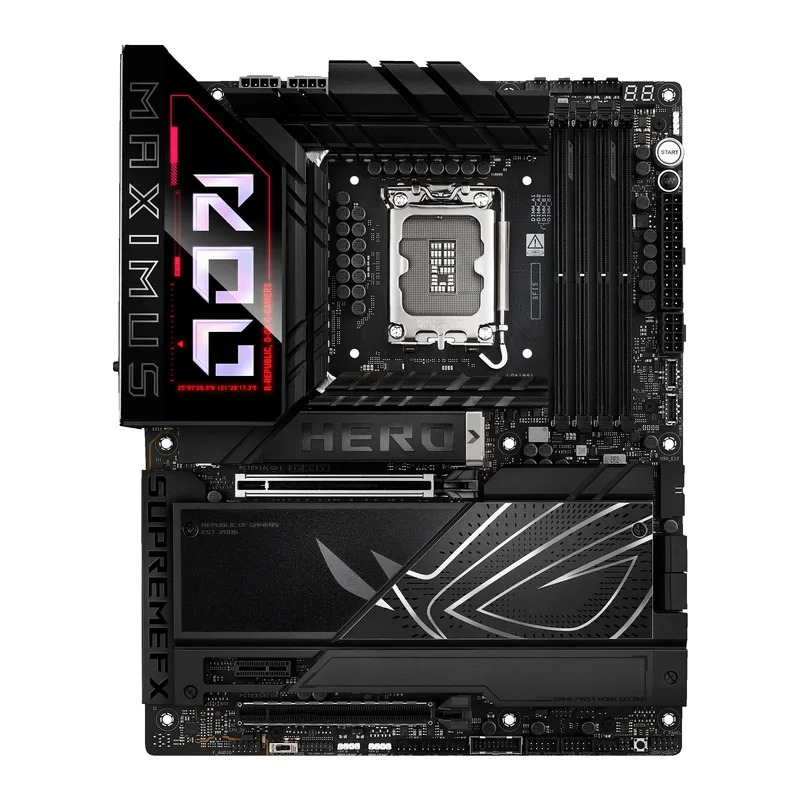
The ASUS ROG Maximus Z890 Hero occupies the tier where enthusiast features start to pull ahead of mid-range boards in measurable ways. At $449, it costs $120 more than the Strix Z890-E — but it brings a 22+2+1+2-stage VRM, six M.2 slots with three PCIe 5.0, and ASUS’s NitroPath DRAM topology that allows DDR5-9200 profiles with improved signal integrity versus standard daisy-chain memory routing.
The VRM is the headline spec. Twenty-two plus stages with ASUS’s premium doublers and chokes have sustained the Core Ultra 285K at 260W under extended all-core workloads in user reports from the ASUS Republic of Gamers forums. The AI Overclocking system on the Hero runs an extra layer of voltage learning compared to the Strix Z890-E: per-session adaptation logs combine with AI Cooling II to adjust fan curves simultaneously based on CPU temperature data.
Six M.2 slots — three PCIe 5.0, three PCIe 4.0 — is the key differentiator over the Strix. Critically, the Hero’s PCIe 5.0 M.2 slots do not share bandwidth with the PCIe x16 slot. You can run three Gen5 NVMe drives simultaneously at full 14 GB/s without reducing GPU throughput. For video editors or anyone building a fast scratch disk setup alongside a boot drive and game storage, this matters.
Dual LAN (5Gbps + 2.5Gbps simultaneously active) is a genuine workstation feature. Route your PC gaming through the 5Gbps port and NAS traffic through the 2.5Gbps — separate traffic streams on the same physical host.
The case against the Hero is simple: if you’re building primarily for gaming and don’t need more than four M.2 drives, the $120 premium over the Strix Z890-E will not show up in any benchmark.
MSI MEG Z890 ACE — Best for Overclocking
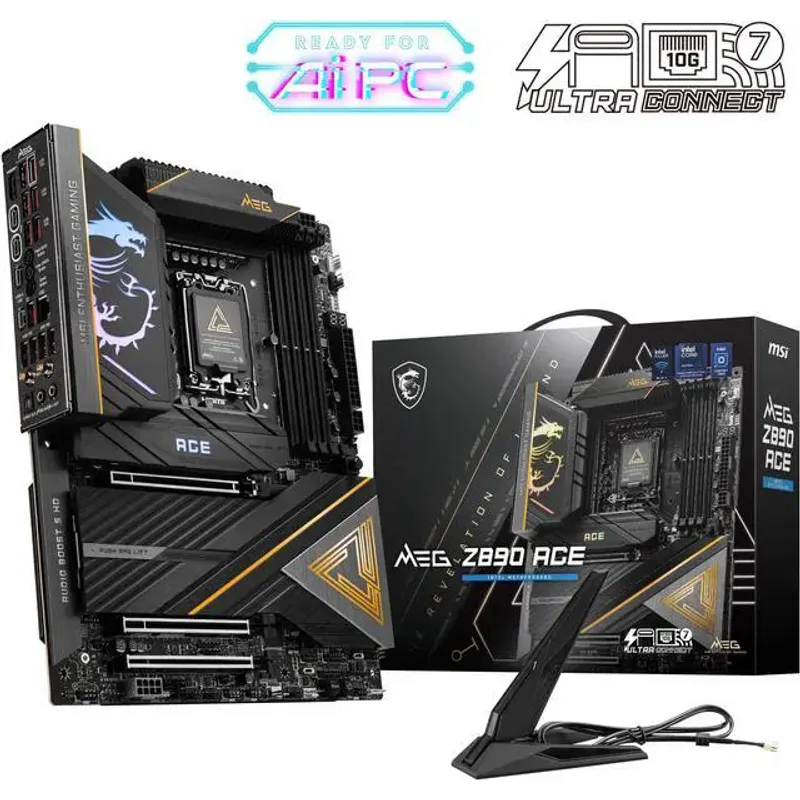
The MSI MEG Z890 ACE is the board you buy when the VRM specification is the deciding criterion. At $479, it’s the most expensive board in this roundup, and its 24+1+2+1 DRPS power design with 110A-rated SPS stages is the highest sustained-current VRM spec among Z890 ATX boards at this price tier.
TweakTown’s MEG Z890 ACE review noted that the board delivered “rock-solid stability even during extended overclocking sessions” with the Core Ultra 285K — a result that aligns with MSI’s design intent. The 110A SPS (Smart Power Stage) modules are the same components MSI uses on its $600+ MEG GODLIKE, scaled to a slightly smaller phase configuration.
The 10Gbps LAN is the other headline feature. None of the other four boards in this roundup include 10GbE. For users with a Synology or QNAP NAS on 10GbE, or a multi-gig fiber ISP providing above-2.5G tier service, the MEG ACE is the only board in this comparison that delivers full line-rate transfers.
DDR5-9200+ MT/s support is validated on MSI’s memory compatibility list. XMP and EXPO profiles are both auto-detected on boot. MSI’s AI OC feature is present but per community consensus on OverclockersUK and PCPartPicker, it is less consistent at finding stable settings compared to ASUS’s longer-matured implementation — manual OC on the MEG ACE is well-documented and rewarding; the AI route is less so.
The MEG ACE’s limitation against the Maximus Hero is M.2 count: two PCIe 5.0 slots vs the Hero’s three, at $30 more. For pure storage density, the Hero wins. For maximum sustained overclocking current and 10GbE networking, the MEG ACE wins.
FAQ
Q: Do Z890 motherboards support Intel 13th and 14th Gen (Raptor Lake) processors?
No. Z890 uses LGA1851, which is physically incompatible with LGA1700 processors. Raptor Lake and Raptor Lake Refresh chips require Z790, B760, or H770 motherboards. Z890 is exclusively for Intel Core Ultra 200K series (Arrow Lake) and the newer Core Ultra 200K Plus (Arrow Lake Refresh).
Q: Which Z890 board should I pick for the Core Ultra 285K Plus?
The Core Ultra 285K Plus (Arrow Lake Refresh) shares the same 253W sustained TDP envelope as the 285K. The Tomahawk handles it at stock; the Strix Z890-E handles it at mild OC; the Hero and MEG ACE handle sustained aggressive overclocking. All five boards in this roundup have BIOS support for Plus-series processors as of mid-2026.
Q: Is there any gaming performance difference between these boards at stock CPU settings?
In practice, no. Peer-reviewed motherboard comparisons consistently show less than 1% frame rate variance between motherboards running the same CPU at identical settings. Board choice affects overclocking headroom, feature set, and long-term reliability — not out-of-the-box gaming FPS.
Q: Does the GIGABYTE Z890 Eagle WiFi7 support ECC memory?
No consumer LGA1851 board supports ECC memory. ECC support on Intel platforms requires Xeon processors and W-series workstation chipsets.
Q: Can I use DDR4 RAM on a Z890 motherboard?
No. Z890 is DDR5-only. Arrow Lake dropped DDR4 support entirely — unlike Alder Lake and Raptor Lake, which offered both DDR4 and DDR5 variants. You’ll need DDR5 memory for any LGA1851 build.
The Bottom Line
The ASUS ROG Strix Z890-E Gaming WiFi at $329 is the right board for most Arrow Lake builders — seven M.2 slots including three PCIe 5.0, a VRM that handles the 285K at full load, and WiFi 7 without overspending. If $249 is the target, the MSI MAG Z890 Tomahawk WiFi delivers Thunderbolt 4, Intel Killer networking, and the same Z890 chipset with a meaningful price reduction. For dedicated overclockers, the MSI MEG Z890 ACE at $479 offers the highest sustained VRM current rating on this platform and the only 10Gbps LAN in the roundup.