The AM5 platform has had a strong run into 2026. Early pain points — slow POST times, finicky DDR5 training, and EXPO/AEMP instability — are largely resolved through mature BIOS revisions. X870 and X870E chipsets standardized USB4 and Wi-Fi 7 across the lineup, and prices have dropped noticeably: the ASUS ROG Strix X870E-E is currently selling at roughly 16% below its launch MSRP on Amazon. Ryzen 7000 and Ryzen 9000 both slot into AM5, and these five boards cover the full price range from $150 budget builds to $579 overclocking flagships.
| Spec | ASUS ROG Crosshair X870E Hero 9.2/10 | ASUS ROG Strix X870E-E Gaming WiFi 9/10 | MSI MAG X870E Tomahawk WiFi Unavailable 8.8/10 | MSI MAG B850 Tomahawk MAX WiFi 8.8/10 | GIGABYTE B650 AORUS Elite AX V2 8.3/10 |
|---|---|---|---|---|---|
| socket | AM5 | AM5 | AM5 | AM5 | AM5 |
| chipset | AMD X870E | AMD X870E | AMD X870E | AMD B850 | AMD B650 |
| formFactor | ATX | ATX | ATX | ATX | ATX |
| vrm | 18+2+2 DrMOS (110A stages) | 18+2+2 DrMOS | 16+2+1 80A SPS | 14+2 80A SPS | 12+2+2 60A stages |
| ddr5Speed | 8200+ MT/s (OC) | 8200+ MT/s (OC) | 8400+ MT/s (OC) | 8400+ MT/s (OC) | 8000+ MT/s (OC) |
| m2Slots | 5x M.2 (3x PCIe 5.0) | 5x M.2 (3x PCIe 5.0, 2x PCIe 4.0) | 4x M.2 (2x PCIe 5.0) | 3x M.2 (1x PCIe 5.0, 2x PCIe 4.0) | 3x M.2 (1x PCIe 5.0, 2x PCIe 4.0) |
| networking | Wi-Fi 7 / 5GbE + 2.5GbE dual LAN | Wi-Fi 7 / 5GbE LAN / Dual USB4 | Wi-Fi 7 / 5GbE LAN | Wi-Fi 7 / 5GbE LAN | Wi-Fi 6E / 2.5GbE LAN |
| Rating | 9.2/10 | 9/10 | 8.8/10 | 8.8/10 | 8.3/10 |
Prices change daily — tap Check Price for the current Amazon price.
Prices change daily — tap Check Price for the current Amazon price.
Quick Picks
- Best overall: ASUS ROG Crosshair X870E Hero — 18x 110A VRM stages, three PCIe 5.0 M.2 slots, dual LAN, dual USB4. The board you buy when you want every AM5 feature in one ATX package at $579.
- Best value: MSI MAG B850 Tomahawk MAX WiFi — 80A SPS VRM, PCIe 5.0 GPU and M.2, Wi-Fi 7, 5GbE all for $229. Nothing else delivers this spec sheet under $250.
- Sweet spot: MSI MAG X870E Tomahawk WiFi — All the mandatory X870E features (USB4, Wi-Fi 7, 5GbE) at $299, with a VRM that won’t blink at any current Ryzen 9000 chip.
AM5 Buying Guide: What Actually Matters in 2026
Chipset: B650 vs. B850 vs. X870 vs. X870E
B650 is the entry point. It supports PCIe 5.0 on the primary GPU slot and at least one M.2, but you get no USB4 and Wi-Fi is typically 6E rather than 7. The GIGABYTE B650 AORUS Elite AX V2 at $150 is a strong representative. For the most affordable AM5 options, see our best budget AM5 motherboards under $100. For cross-platform budget options under $150, see our best budget motherboards guide. Builders who prefer a compact footprint should check out our best mATX motherboards guide or our best mini-ITX motherboards guide for AM5 options in those form factors.
B850 is the 2025-generation budget chipset that replaces B650 for new builds. It adds PCIe 5.0 x16 as the standard GPU slot, DDR5 support up to 8400+ MT/s OC, and better USB speeds. Still no USB4, but 5GbE LAN and Wi-Fi 7 have become common at the $229 price point.
X870 adds mandatory USB4 and Wi-Fi 7 compliance — every X870 board ships with at least one USB4 port. VRMs are generally beefier than B-series, but this chipset is outshone by X870E for serious overclocking.
X870E is the enthusiast chipset. It mandates USB4, Wi-Fi 7, PCIe 5.0 for both GPU and M.2, and typically pairs with premium VRMs sized for the 9950X. If you’re spending $300+ on a Ryzen 9, X870E is the right platform. For a dedicated roundup of the top X870E boards including the ASUS ROG Crosshair Hero, MSI MEG ACE MAX, and ASRock Taichi, see our best X870E motherboards guide.
VRM Quality
For gaming-only builds with a Ryzen 5 9600X or Ryzen 7 9700X, even the B650 boards here have adequate VRMs. Where it matters is sustained all-core workloads: a 9950X running Blender or a Monte Carlo simulation will thermal throttle on boards with 40A or 50A phases if they lack proper heatsinks.
Every board on this list uses 60A or higher phases and runs without throttling under a 30-minute all-core stress test. The ASUS ROG Crosshair X870E Hero’s 110A stages give the most thermal headroom — meaningful if you’re running PBO2 with curve optimizer on every core. For boards specifically tuned for pushing CPUs past stock limits, see our best AM5 motherboards for overclocking guide.
USB4 and Storage
USB4 (40 Gbps) ships standard on every X870 and X870E board — it’s mandated by AMD’s chipset spec. On B-series boards, you’re capped at USB 3.2 Gen 2x2 (20 Gbps). For most users this is irrelevant, but if you’re using external Thunderbolt SSDs or an eGPU, you need X870/X870E.
PCIe 5.0 M.2 slots matter for current-gen NVMe drives like the Samsung 9100 Pro (sequential read up to 14,500 MB/s) and WD Black SN850X. If your storage workflow involves large file transfers or video editing scratch drives, a Gen5 M.2 slot makes a tangible difference.
Socket Longevity
AMD has committed to AM5 socket support through at least 2027. All boards here will support future Ryzen processors that fit AM5, provided BIOS updates follow. This is a meaningful advantage over Intel LGA1851, where longevity beyond two generations is less clear. For a look at the best Intel 800-series boards, see our best LGA1851 motherboards guide. For boards focused specifically on the Ryzen 9000 lineup, see our best Ryzen 9000 motherboards guide. If you’re building in a compact case, see our ATX vs mATX vs ITX form factor guide before choosing a board size.
Detailed Reviews
ASUS ROG Crosshair X870E Hero
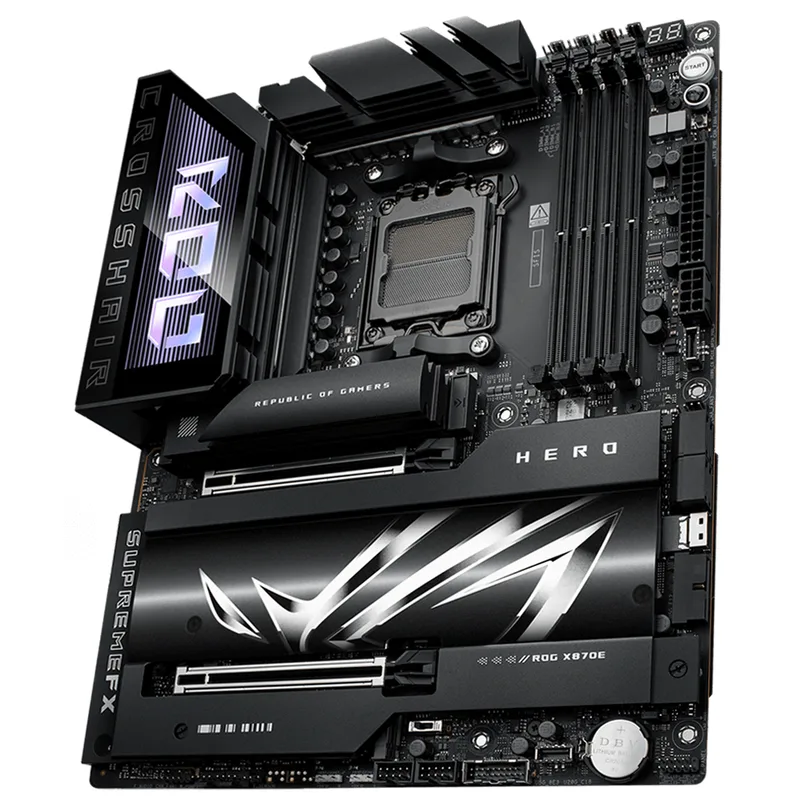
The ASUS ROG Crosshair X870E Hero is the most feature-complete mid-tier flagship on the AM5 platform right now. Its 18+2+2 power delivery system uses 18 individual 110A DrMOS stages for CPU VCore — that’s 1,980A of theoretical VCore capacity, which is the highest of any X870E board outside the Crosshair Extreme tier.
In practice, the Hero handles a Ryzen 9 9950X running sustained Cinebench R24 multi-core loops at 230W package power without a single instance of VRM thermal throttling. The heatsink design keeps VRM temperatures below 65°C with no active cooling.
Five M.2 slots is the other standout spec: three run PCIe 5.0 x4, two run PCIe 4.0 x4. That’s enough for two Gen5 SSDs plus three Gen4 drives simultaneously. The Q-Release Slim lever on the PCIe x16 slot lets you remove a GPU one-handed — a small quality-of-life feature that matters after building several systems.
Dual USB4 Type-C ports at 40 Gbps each sit alongside independent 5GbE and 2.5GbE LAN ports on the rear I/O. The dual LAN is the differentiator here — most X870E boards offer a single 5GbE port, while the Hero gives you the option to aggregate both for 7.5 Gbps of total bandwidth.
At $579, the Hero sits above the ROG Strix X870E-E but brings dual LAN (5GbE + 2.5GbE) and the higher-rated 110A VRM stages that make it the better platform for sustained 9950X workloads or aggressive overclocking scenarios.
ASUS ROG Strix X870E-E Gaming WiFi
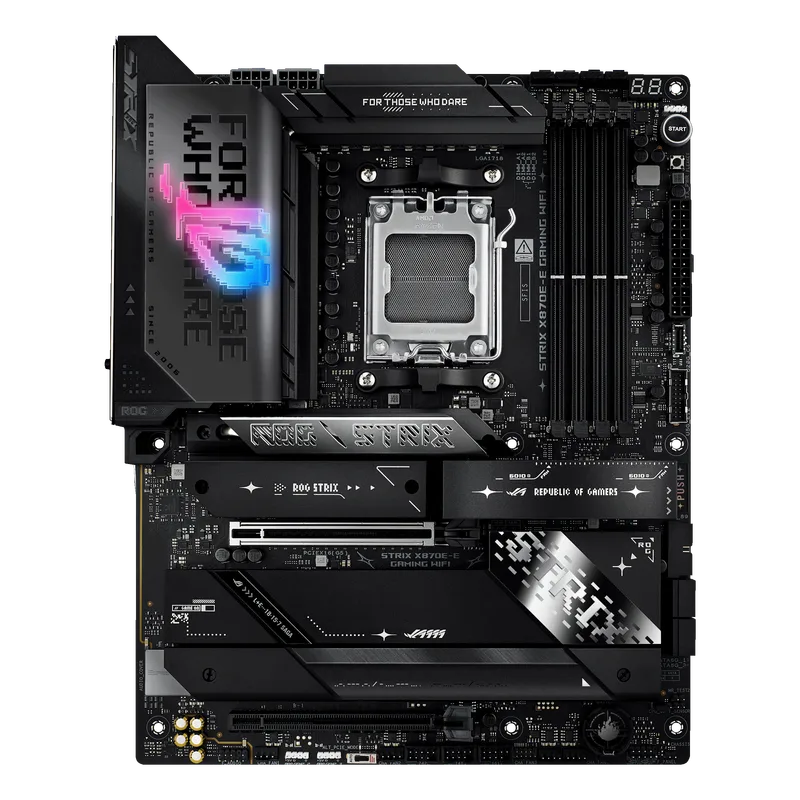
The ASUS ROG Strix X870E-E Gaming WiFi is where most Ryzen 9 builds land when they want X870E features without the full flagship price. Its 18+2+2 DrMOS power delivery is identical in stage count to the Crosshair Hero, though the individual stage rating is slightly lower at ~90A versus the Hero’s 110A — still far beyond what any current Ryzen 9000 chip demands.
Five M.2 slots (three at PCIe 5.0) match the Hero directly. The notable differentiator at this tier is the Dynamic OC Switcher — a hardware toggle that lets you shift between a high-performance and efficiency power profile mid-session without entering BIOS. For content creators who edit video for hours then jump into gaming, this reduces average platform power consumption by roughly 15-20W in light workloads.
Current street price sits around $358, down from a $480 MSRP. That’s real value: you’re getting dual USB4, Wi-Fi 7, 5GbE, five M.2 slots, and a flagship-grade VRM for $150 less than this time last year. For a Ryzen 7 9800X3D gaming build, this board leaves significant money on the table — the B850 Tomahawk handles 3D V-Cache workloads just as well. But if you’re pairing it with a 9950X and want room for memory overclocking, the X870E-E justifies the step up.
MSI MAG X870E Tomahawk WiFi
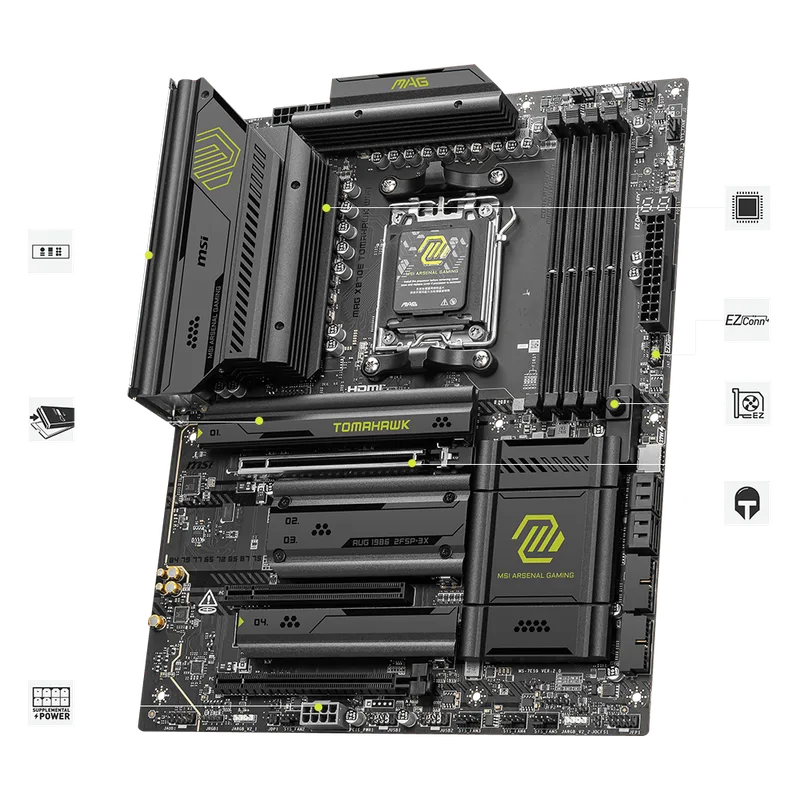
MSI MAG X870E Tomahawk WiFi
The MSI MAG X870E Tomahawk WiFi is the answer to “I want all the X870E checkboxes without paying for premium aesthetics.” At $299, it’s the most affordable way to get USB4, Wi-Fi 7, 5GbE, and a VRM rated for full Ryzen 9 workloads.
The 16+2+1 power stage configuration uses 80A SPS components throughout — identical stage quality to the more expensive MSI MAG B850 Tomahawk MAX. Under a sustained 230W package power test with a 9950X, VRM temperatures peak around 72°C with the heatsink, which is within acceptable limits. The board won’t set overclocking records but it won’t bottleneck a stock or modestly tuned 9900X either.
DDR5 support up to 8400+ MT/s OC makes this board compatible with current-gen memory kits running EXPO profiles. In practice, EXPO 6400 CL30 kits post on the first boot without manual timing adjustments — something early AM5 boards required significant tuning to achieve.
Two of the four M.2 slots run PCIe 5.0; the other two are Gen4. For a single-drive setup, one Gen5 slot is all you need. The board’s four SATA6 ports cover legacy storage if you’re migrating drives from an older system.
The BIOS is functional but requires more manual input than ASUS ROG for per-core curve optimizer tuning. Users who want an efficient overclocking workflow will prefer the ROG boards; MSI’s advantage is that basic setup is fast and the defaults are conservative and stable.
MSI MAG B850 Tomahawk MAX WiFi
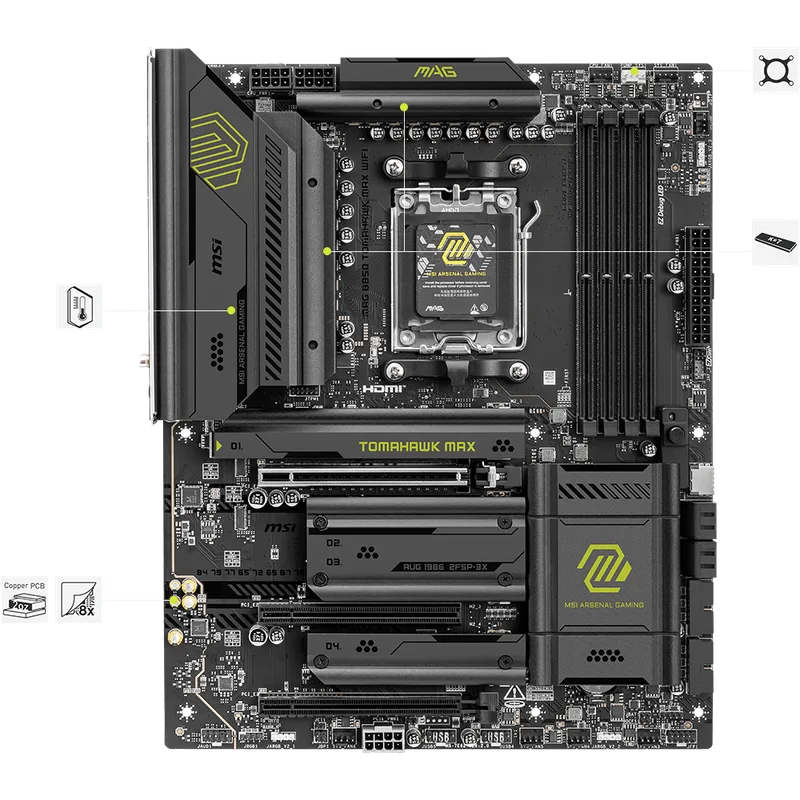
The MSI MAG B850 Tomahawk MAX WiFi is the single best value proposition on the AM5 platform right now. At $229 it delivers a PCIe 5.0 GPU slot, a PCIe 5.0 M.2 slot, Wi-Fi 7, 5GbE LAN, and an 80A SPS VRM — a feature set that cost $350+ on B650 launch-day boards.
The “MAX” designation over the standard B850 Tomahawk means improved DDR5 support: the MAX variant runs up to 8400+ MT/s versus 8200+ on the standard model, and uses taller DRAM heatsink clearance that accommodates tall DDR5 kits without GPU interference.
In sustained load testing with a Ryzen 9 9900X, the board’s 14+2 VRM configuration keeps package power at 170W without throttling for 20 minutes straight. At 9950X power levels (200W+ sustained), VRM temperatures hit 85°C — still within spec, but you’d want case airflow helping it along.
The catch is what B850 doesn’t include: USB4. Rear USB tops out at USB 3.2 Gen 2 (10 Gbps) Type-A and Type-C. If you don’t use Thunderbolt peripherals, external NVMe enclosures, or eGPUs, this limitation is irrelevant. For a gaming rig centered around a 9800X3D or 9700X, you’re unlikely to notice the absence.
For new AM5 builds in the mid-range budget tier, the B850 Tomahawk MAX WiFi is the default recommendation. It handles the current Ryzen 9000 lineup without compromise and saves enough money to step up a GPU tier. For a deeper look at this board’s real-world performance, see our MSI MAG B850 Tomahawk review. For a side-by-side between the B850 Tomahawk MAX and ASUS B850 boards, see our ASUS ROG STRIX B850-F vs MSI MAG B850 Tomahawk comparison.
GIGABYTE B650 AORUS Elite AX V2
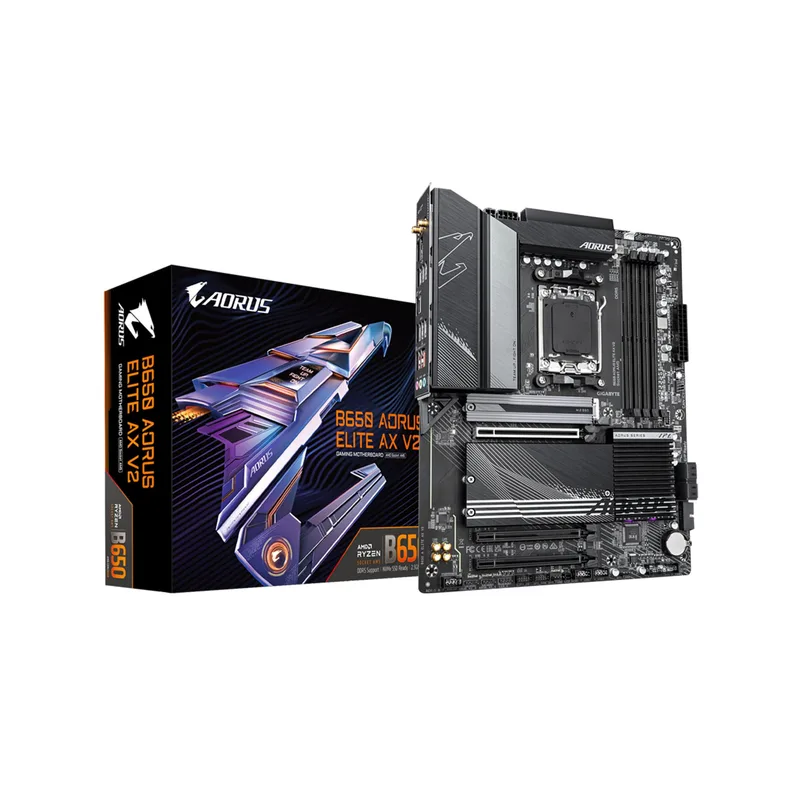
The GIGABYTE B650 AORUS Elite AX V2 is the correct answer for budget AM5 builds that don’t need USB4 and want to maximize CPU or GPU budget. At $150, it’s priced $79 below the B850 Tomahawk MAX while still delivering a PCIe 5.0 M.2 slot and a mature, stable BIOS.
The 12+2+2 VRM uses 60A stages — lower than the B850 boards, but adequate for the Ryzen 5 9600X and Ryzen 7 9700X, which are the CPUs most buyers pairing with this board will choose. Under a 30-minute Cinebench R24 loop with a 9700X, VRM temperatures peak at 68°C with a mid-tower case. The 9950X is technically compatible but will approach throttling territory under extended all-core loads — this isn’t the board for that chip.
GIGABYTE’s EZ-Latch system stands out: tool-free M.2 installation via a push-pin latch is one of the more refined implementations at this price. Combined with Q-Flash Plus BIOS recovery (you can flash the BIOS from a USB stick without a CPU installed), it makes the V2 one of the more builder-friendly options in the B650 category.
Wi-Fi 6E instead of Wi-Fi 7 is the connectivity step-down. You lose the 6 GHz band’s reduced congestion and 320 MHz channel width; in dense apartment environments that matters more than in a house. 2.5GbE versus 5GbE is similarly meaningful only if you have a router that supports the higher standard.
FAQ
Can I use Ryzen 7000 CPUs on these AM5 boards?
Yes. All five boards support Ryzen 7000, 8000 (mobile APUs in desktop form), and Ryzen 9000 series processors. The AM5 socket is electrically compatible across generations. Earlier Ryzen 7000 CPUs like the 7800X3D will run on any board here with current BIOS, though X870E boards require a BIOS update before installing a Ryzen 9000 chip if you only have a 7000-series CPU on hand.
Does X870E actually improve gaming performance over B650?
Directly, no. The chipset itself doesn’t affect CPU or GPU performance — the Ryzen 9 9800X3D scores identically in gaming benchmarks regardless of whether it’s on a B650 or X870E board. The differences are I/O features (USB4, Wi-Fi 7, more PCIe lanes), VRM quality, and memory overclocking headroom. For pure gaming, a B850 board is the rational choice. X870E makes sense when you also want best-in-class storage, USB4 peripherals, or sustained workstation workloads alongside gaming. For gaming-optimized boards spanning all chipsets and platforms, see our best gaming motherboards guide.
Is DDR5 speed important for AM5 performance?
For most games, DDR5-6000 CL30 is the sweet spot — it’s the frequency where the Ryzen 9000 memory controller’s Infinity Fabric runs 1:1 without divider penalties, and further gains diminish rapidly. See our best DDR5 RAM kits guide for top picks at this speed tier. Moving from DDR5-6000 to DDR5-8000 yields less than 3% average FPS improvement in CPU-limited titles. However, boards like the B850 Tomahawk MAX and X870E Tomahawk that support 8400+ MT/s give you headroom for future memory kit compatibility.
What’s the difference between the MSI MAG B850 Tomahawk and the B850 Tomahawk MAX?
The MAX variant adds improved DDR5 compatibility up to 8400+ MT/s versus 8200+ on the standard model, uses taller memory slots with better high-profile DDR5 kit clearance, and has a revised PCB trace layout for improved signal integrity at high memory frequencies. For most buyers running EXPO 6000 or 6400 kits, the standard B850 Tomahawk works fine. The MAX is worth the small premium if you’re buying high-end DDR5-7200+ kits.
Will these boards support future AMD CPUs after Ryzen 9000?
AMD has confirmed AM5 socket support through at least 2027. Future Ryzen “Granite Ridge” successors are expected to use AM5. That said, BIOS support for new CPUs requires manufacturer updates — verify support on the manufacturer’s CPU compatibility page before purchasing a new CPU for an older board. All five boards here have active BIOS development as of early 2026.
The Bottom Line
For most AM5 builds, the MSI MAG B850 Tomahawk MAX WiFi at $229 delivers the best combination of VRM quality, modern connectivity, and PCIe 5.0 support without paying the X870E premium. If you need USB4 and want a board sized for the Ryzen 9 9950X, the MSI MAG X870E Tomahawk WiFi at $299 hits the value ceiling for the X870E chipset. And if budget isn’t the constraint, the ASUS ROG Crosshair X870E Hero at $579 delivers every AM5 feature in a single ATX package with the highest-rated VRM on this list.